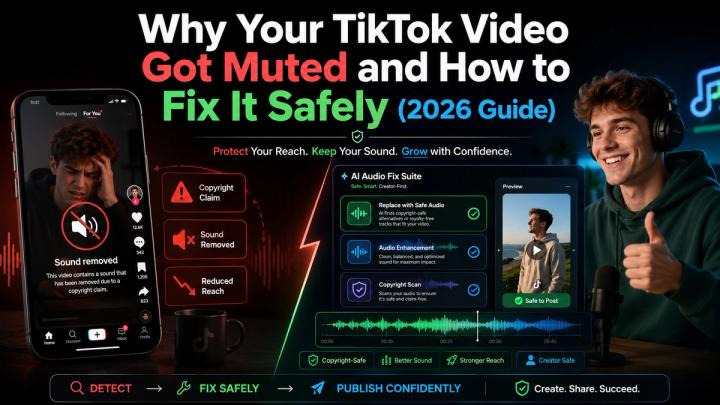
⚡ Quick Answer
Your TikTok video may get muted because the sound was removed due to a copyright claim, a Community Guidelines violation, or Commercial Music Library (CML) restrictions on business accounts. TikTok’s Help Center states that users can check a muted video to see the specific removal reason.
For creators, brands, and small businesses, the safest fix is not to keep re-uploading the same video with altered audio. The ultimate solution is to identify the risk, separate background music from speech, and apply licensed soundtracks before publishing.
📌 Key Takeaways for Creators & Brands:The Root Cause: TikTok mutes videos primarily due to copyrighted background audio or commercial music misuse on Business Accounts.The Unsafe Fix: Re-uploading, pitching audio up/down, or muting the entire video damages engagement, context, and organic reach.The Safe Fix: Separate risky background music from human speech/product sounds, then overlay platform-compliant, royalty-cleared audio.The Automated Solution: Vividspark.ai AI Soundtrack offers an integrated workflow featuring Copyright Risk Detection, AI Voice/Music Separation, and Licensed Soundtrack Replacement.
🎯 Why TikTok Videos Get Muted
A muted TikTok video can be frustrating because the video may have looked perfect before upload. The edit was finished, the timing worked, the caption was ready, and the music supported the mood. Then the sound disappears.
TikTok videos can lose sound for several reasons:
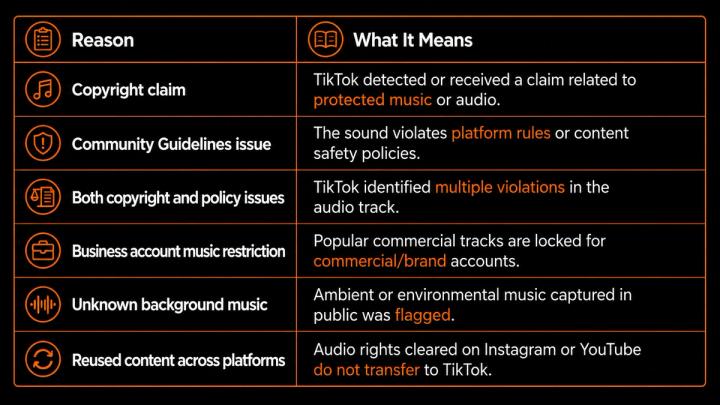
TikTok’s official support documentation confirms that if an original sound is removed due to copyright violations, account holders may be eligible to appeal—provided they possess explicit commercial licensing proof.
📌 Why Music Risk Is Common on TikTok
TikTok culture is deeply connected to music. Trends, dances, memes, edits, and product videos often rely on sound. But that also means music rights can become complicated.
A song may be available for personal accounts but strictly forbidden for business entities or paid ad campaigns. TikTok’s Business Help Center explicitly notes that Business Accounts are restricted to the Commercial Music Library (CML)—a pre-cleared global library designed for commercial use.
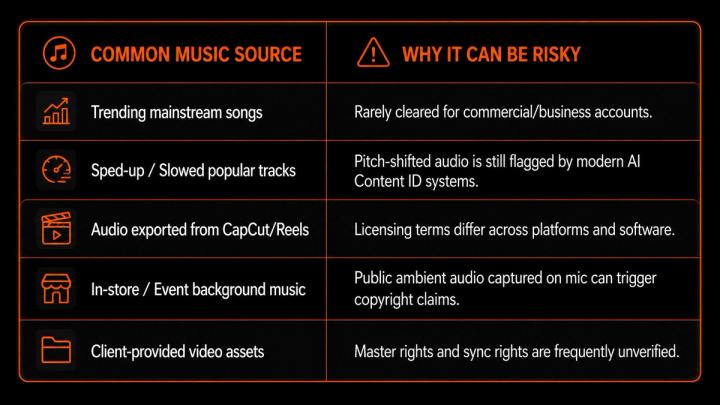
Reuters Legal Industry data highlights that social media music litigation continues to grow because digital tracks carry dual copyright layers: composition rights and sound recording master rights.
🚨 What Happens When a TikTok Video Is Muted?
A muted video does far more damage than just removing sound—it destroys viewer retention and brand trust.
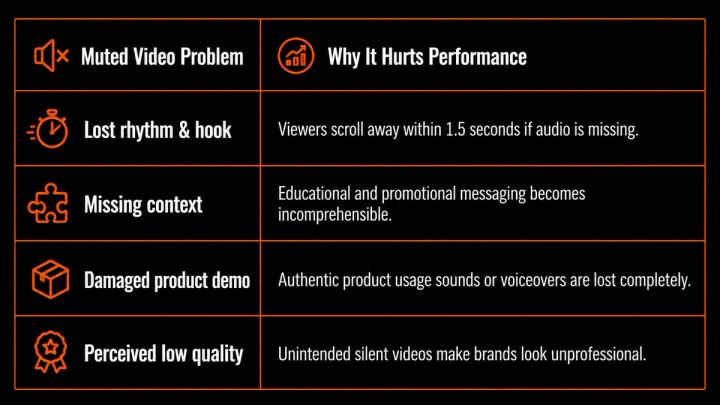
According to Wyzowl’s 2026 Video Marketing Report, over 88% of marketers rely on video soundscapes to drive conversions, clicks, and brand recall. When sound gets pulled, ROI drops to zero immediately.
📊 Unsafe Fixes vs. Safer Fixes
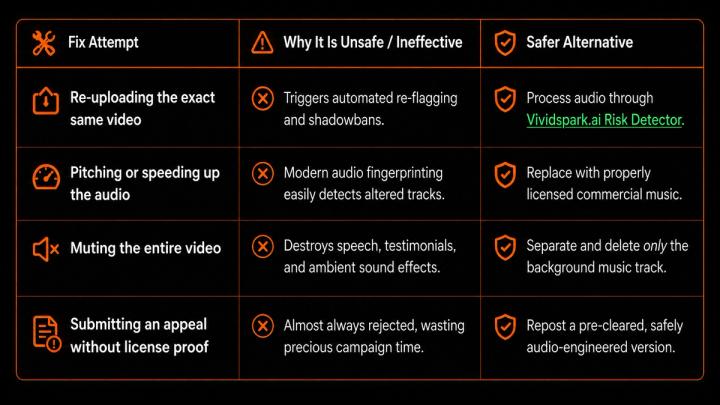
🔍 Step-by-Step: How to Fix a Muted TikTok Video Safely
Step 1: Check the Removal Reason
Open the muted TikTok video, tap the notification at the bottom, and read the platform’s official removal notice to determine if the issue is Copyright, Commercial Policy, or Community Guidelines.
Step 2: Isolate and Remove Risky Background Music
Do not delete your speech or product audio. Use advanced AI vocal and music separation tools like Vividspark.ai Audio Cleaner to strip away background music while preserving:
- Crystal-clear human voiceovers & speeches
- Natural ambient sounds & lifestyle acoustics
- Essential product demonstration audio cues
Step 3: Replace with AI-Matched, Fully Licensed Soundtracks
Once the risky music is extracted, overlay a compliant track. Using Vividspark.ai AI Soundtrack Engine, creators can automatically match licensed music based on video pacing, emotional arcs, and scene transitions:
[Video Hook: High Energy] -> [Talking Head: Subtle Ambient Music] -> [CTA: Clean Punchy Outro]
Step 4: Validate Multi-Platform Rights
Before re-publishing, run your new asset through multi-platform validation. Data from DataReportal shows the average user accesses over 6.5 social networks monthly. Ensuring your music is cleared across TikTok, Instagram Reels, YouTube Shorts, and Meta Ads prevents multi-channel takedowns.
🛠️ The Ultimate Safe Publishing Workflow
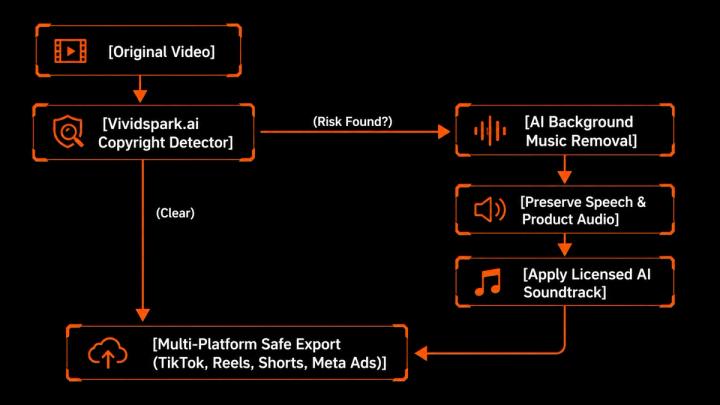
🤖 How Vividspark.ai Solves TikTok Mute Issues
Vividspark.ai provides an end-to-end AI video infrastructure designed for creators, digital agencies, and e-commerce brands:
- Copyright Risk Detector: Scans audio tracks against global content ID databases prior to publishing.
- AI Music Stem Separation: Removes copyrighted background music while leaving speech, voiceovers, and native sounds 100% intact.
- Smart AI Soundtrack Matching: Recommends and syncs commercially pre-cleared tracks that fit the exact mood and pacing of your edit.
- Omnichannel Export: Prepares platform-ready audio renders for TikTok, Meta Ads, YouTube, and LinkedIn in one click.
❓ FAQ
Q1. Why did my TikTok video get muted automatically?
A: TikTok uses automated audio fingerprinting to detect copyrighted music, unlicensed commercial tracks on Business Accounts, or audio violating Community Guidelines.
Q2. Can I use trending songs if I edit or pitch-shift them?
A: No. Modern AI copyright detection algorithms identify melodic structures and master recordings even when pitched, slowed, or mixed with sound effects.
Q3. What is the difference between personal and business music rights on TikTok?
A: Personal accounts have access to TikTok's general sound library for non-commercial use. Business Accounts are legally restricted to the Commercial Music Library (CML) or custom royalty-cleared audio.
Q4. How does Vividspark.ai fix a muted video without ruining the voiceover?
A: Vividspark.ai uses AI audio stem separation to split the audio track into isolated channels (speech, music, ambient noise). It deletes the copyrighted background music while leaving the voiceover pristine.
Q5. Will re-uploading a fixed video affect my TikTok algorithm reach?
A: If you re-upload a video with completely clean, licensed audio and a new file hash, TikTok evaluates it as a fresh submission without penalty.
✨ Conclusion
A muted TikTok video is more than an audio inconvenience. It can damage the video’s rhythm, emotional impact, clarity, and publishing value.
The safest fix starts with understanding why the video was muted. If the issue is copyright-related, creators should avoid reusing the same risky soundtrack. Instead, they should check the audio, remove or separate risky background music, preserve the original sounds that matter, and replace the soundtrack with licensed music that fits the video’s story.
For creators, brands, and small businesses, this process matters even more when videos are published across TikTok, Instagram, YouTube, Facebook, websites, and paid campaigns.
With Vividspark.ai AI Soundtrack, creators can move from a muted-video problem to a safer publishing workflow: detect copyright risk, remove risky background music, preserve important audio, match licensed music by scene, adjust the result manually, and prepare the final video for multi-platform publishing.
In 2026, safer video publishing is not only about avoiding muted audio. It is about making sure the final video sounds right, stays usable, supports the story, and is ready for the platforms where audiences actually watch.