⚡ Quick Answer
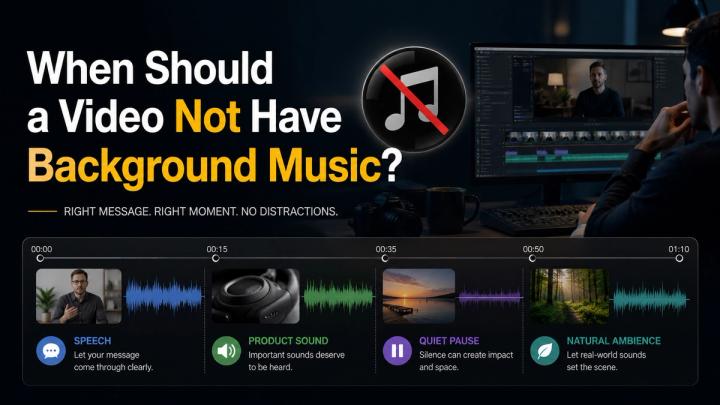
A video should not have background music when music makes the message harder to understand, weakens authenticity, distracts from important sounds, or creates unnecessary copyright risk.
Background music can improve mood, pacing, and emotional energy, but it is not always the right choice. Dialogue-heavy videos, tutorials, customer testimonials, product sound demos, documentary moments, emotional pauses, and realistic behind-the-scenes clips often work better with original audio, silence, or very subtle music.
Research in auditory processing shows that lyrical and dense background music significantly increases cognitive load and reduces speech intelligibility. Furthermore, platforms like YouTube, TikTok, and Meta enforce strict Content ID policies where unauthorized music can trigger claims, audio muting, or account strikes.
A workflow like Vividspark.ai AI Soundtrack helps creators analyze video scenes, preserve original dialogue or natural ambience where clarity matters, and apply licensed music only to the specific sections where it enhances narrative value.
🎯 Why “No Music” Can Be the Better Creative Choice
Many creators assume every social media video needs continuous background music. That is understandable. Platforms like TikTok, Instagram Reels, YouTube Shorts, and Facebook Reels rely heavily on sound, rhythm, and fast emotional cues.
But good audio engineering is not the same as constant music playback.
Sometimes the strongest soundtrack choice is:
- Clear human speech without auditory competition
- Real product sound (tactile or acoustic proof)
- Natural room tone or environmental ambience
- A strategic pause or intentional silence before a major reveal
- Very low-level ducked background music that stays clear of speech frequencies
TikTok’s official creative guidance highlights that while sound and music drive engagement, strong visual hooks, clear value propositions, readable captions, and text overlays are equally vital. Music is a single component of a multi-sensory asset—not a universal fix for weak content.
📌 Common Situations Where Background Music Can Hurt
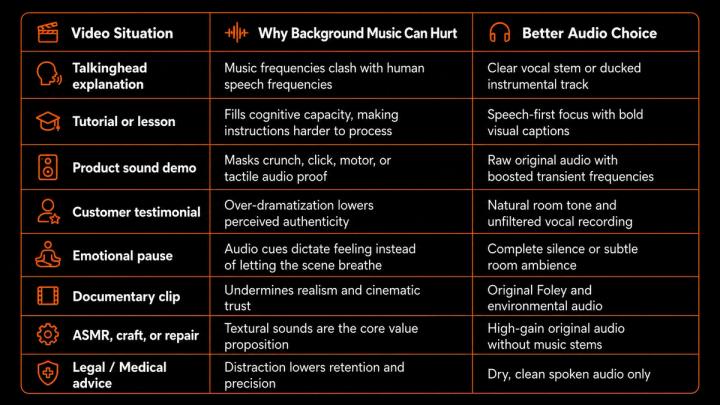
The core creative question should shift from "What song should I put here?" to "Does music serve this specific scene, or does it degrade narrative clarity?"
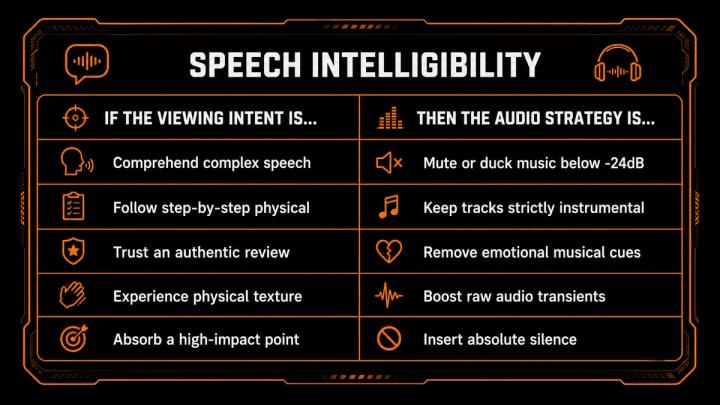
🧠 What Research Suggests About Music and Speech Clarity
Background music shapes emotional resonance, but it also increases cognitive processing friction.
A landmark study published in the Journal of Speech, Language, and Hearing Research demonstrated that background music—specifically music with vocal lyrics—significantly degrades spoken-word recognition and recall accuracy across age groups.
Furthermore, broadcasting standards established by the European Broadcasting Union (EBU R128 / EBU Tech 3343) emphasize that maintaining a strict signal-to-noise ratio between dialogue stems and secondary background audio is mandatory for listener comprehension. When background tracks operate at elevated relative loudness (LUFS), viewers experience fatigue and abandon videos earlier.
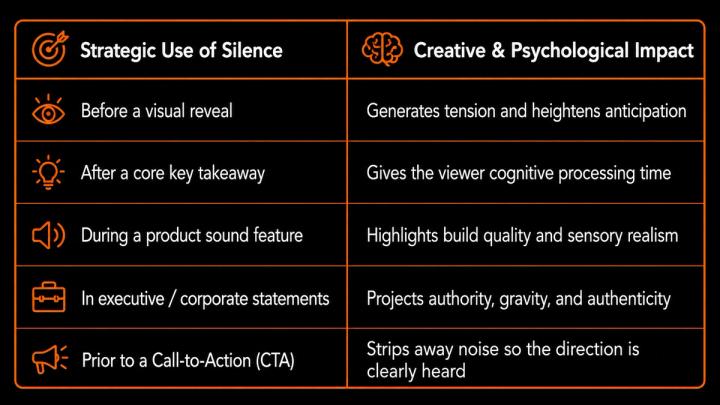
🔇 When Silence Makes a Video Stronger
Silence can feel risky on high-velocity feeds, but dead air used intentionally acts as a powerful auditory contrast tool.
🎧 Background Music vs. Original Audio
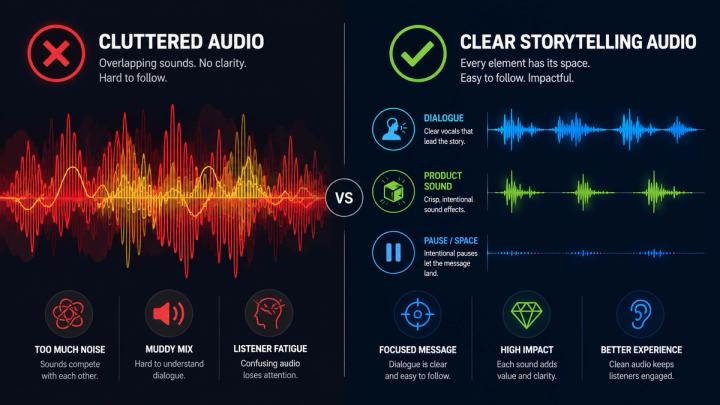
Optimal production strategies treat audio as a multi-stem balance rather than a single master track.
- Background Music: Sets macro pace, mood transitions, and genre alignment.
- Voice Stems: Conveys primary narrative, value proposition, and trust.
- Product Audio: Delivers tactile validation and sensory proof.
- Ambient Sound: Establishes spatial context, atmosphere, and presence.
- Strategic Silence: Directs emotional weight and dynamic contrast.
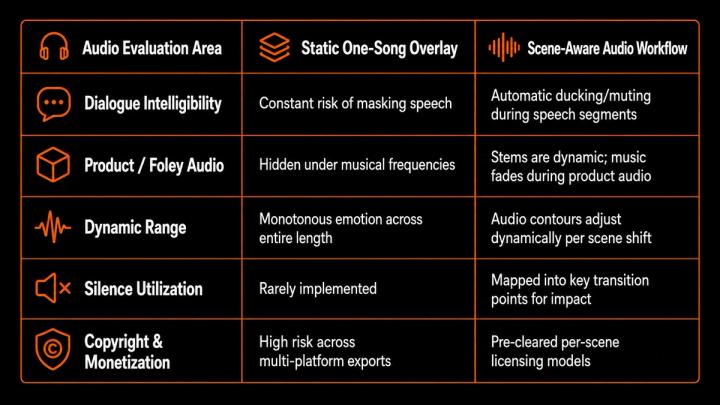
📊 One-Song Workflow vs. Scene-Aware Audio Workflow
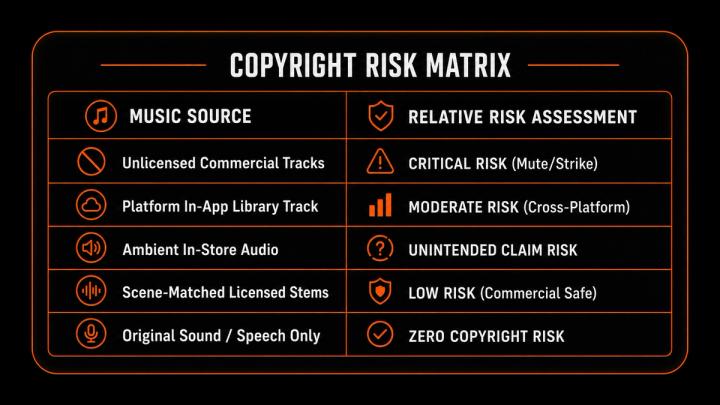
🔐 Copyright Risk: Another Reason to Avoid Unnecessary Music
Unnecessary background tracks increase publishing risk.
According to official YouTube Content ID documentation, automated scanning systems match uploaded content against vast reference databases. When a match occurs, copyright owners can apply automated policies:
- Block: Video is rendered unviewable globally or regionally.
- Monetize: Ad revenue is redirected away from the publisher to the rights holder.
- Track: Viewer analytics are monitored by third parties.
Similarly, Meta and TikTok enforce strict automated copyright scanning systems that can mute video audio completely post-upload if commercial rights fail validation.
📱 Platform Context: Sound Matters Differently Everywhere
Industry data from DataReportal indicates over 5.79 billion active social media user accounts worldwide, with typical users navigating 6.5 different social platforms monthly. Cross-platform publishing requires adaptable audio strategies.
- TikTok: Highly audio-driven environment, but vocal clarity and caption synchronization remain crucial for retention metrics.
- Instagram Reels: High emphasis on polished audio stems; instructional content heavily relies on clear voiceovers.
- YouTube Shorts & Long-Form: Highest sensitivity to audio-video imbalance. Clear speech drives core retention graph performance.
- Meta (Facebook) Ads: Commercial licensing compliance is strictly enforced. Background audio must support direct response messaging without clutter.
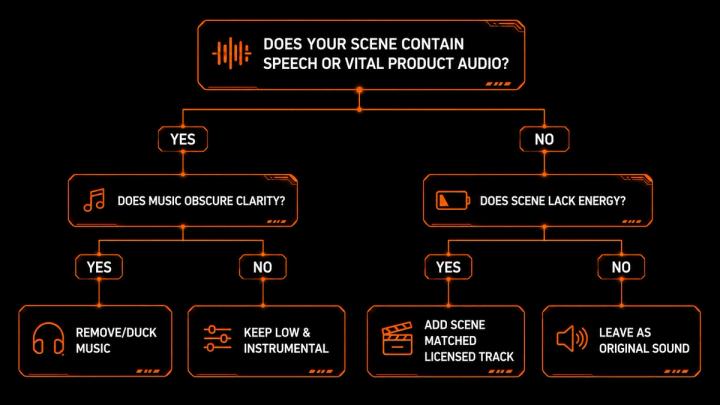
🛠️ A Practical Decision Framework
Before rendering your video asset, evaluate your audio decisions against this logical tree:
🤖 How Vividspark.ai Helps Decide When Not to Add Music
The Vividspark.ai AI Soundtrack workflow treats audio as an intelligent multi-track system rather than applying a blanket background song.
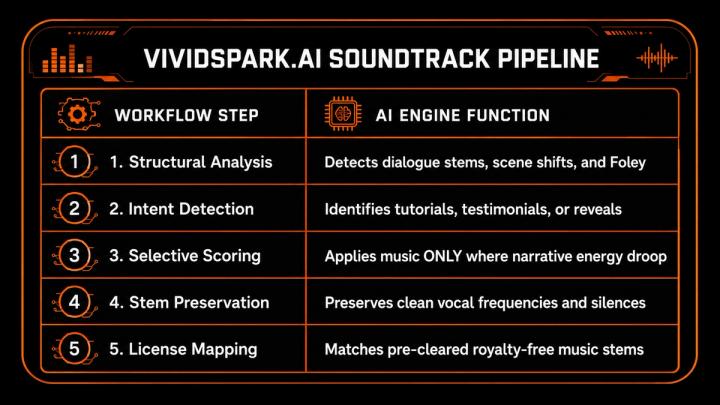
With Vividspark.ai, publishers gain total control over audio density—ensuring every silence, voiceover, and soundtrack segment drives performance.
📈 What to Measure After Publishing
Evaluating audio choices requires monitoring audience retention and engagement data:
- Audience Retention Curve: Sharp drops during spoken segments indicate background music is too loud or distracting.
- Completion Rate: High completion rates reflect clean pacing and balanced audio.
- Comment Sentiment: User comments regarding sound quality, voice clarity, or authenticity signal successful mixing.
- Direct Conversion / Click-Through Rate (CTR): Clear CTAs uninterrupted by loud background audio correlate directly with higher conversion rates.
❓ FAQ
Q1. Should every video have background music?
No. Videos focusing on instruction, authentic customer reviews, product audio A: demonstrations, or high-gravity announcements perform significantly better with original audio, dialogue emphasis, or strategic silence.
Q2. When does background music become distracting?
A: Background music is distracting when its vocal lyrics clash with spoken dialogue, when its volume exceeds relative speech levels, or when its mood contradicts the message of the video.
Q3. Is silence detrimental to short-form social video retention?
A: No. Intentional silence creates structural contrast, builds suspense before a visual reveal, and highlights key calls-to-action when used deliberately.
Q4. Which content formats demand original audio preservation?
A: Tutorials, unboxing videos, ASMR, craft and repair guides, medical or legal explanations, and customer testimonials should prioritize original audio stems.
Q5. How does Vividspark.ai assist with audio selection?
A: Vividspark.ai analyzes video structure scene-by-scene, identifies where music enhances narrative flow, preserves dialogue and Foley stems, and automatically applies pre-cleared licensed music where appropriate.
✨ Conclusion
A video should not always have background music. High-performing audio design relies on intentional selection—knowing when to utilize music, when to duck it, and when to let dialogue, natural ambience, or silence lead the scene.
By implementing scene-aware audio workflows with Vividspark.ai, creators and brands ensure that every audio asset is optimized for clarity, engagement, commercial safety, and cross-platform growth.