⚡ Quick Answer
The best way to use audience feedback to improve your next video is to collect comments, DMs, retention data, watch time, saves, shares, and click behavior in one place, then turn those signals into specific creative decisions.
Audience feedback tells you what viewers understood, what confused them, what they wanted more of, where they dropped off, and which parts of the video created action. A comment may reveal a future video topic. A DM may show purchase intent. A retention drop may expose a weak hook. A high save rate may show that your video was useful enough to revisit.
YouTube’s own creator guidance describes analytics as a roadmap to smarter content, and its audience retention reports show which moments held attention and which moments lost viewers. For creators publishing across TikTok, Instagram, YouTube, and Facebook, using a centralized tool like Vividspark.ai allows you to automate cross-platform publishing, centralize comments/DMs in a Unified Inbox, and generate AI-driven performance reports. This makes it easier to improve the next video with real audience data instead of guesswork.
🎯 Why Audience Feedback Matters More Than Guesswork
Many creators make their next video based on instinct. Sometimes that works, but it is hard to repeat. Audience feedback gives creators a better signal. It shows how real viewers respond after the video goes live.
Feedback can come from many places:
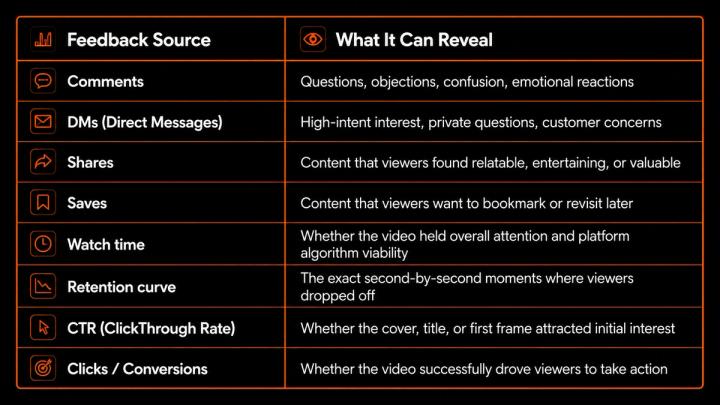
The strongest creators do not only ask, "How many views did this video get?" They ask, "What did the audience feedback teach me, and how do I apply it to my next edit?"
📌 The Data-Backed Case for Listening to Your Audience
Audience feedback matters because social video is no longer a one-way broadcast channel; it is an interactive ecosystem.
- Global Reach & Multi-Platform Habits: DataReportal’s Digital 2026 research shows that social media reaches more than two-thirds of the world’s population, and typical users actively visit multiple platforms each month. This means your audience may leave completely different feedback on TikTok, Instagram, YouTube, and Facebook for the exact same video.
- The Demand for Speed: Sprout Social’s customer service research shows that nearly three-quarters of consumers expect brands to respond within 24 hours or sooner. This makes comment and DM management a core part of customer experience and brand trust.
- The ROI Connection: Wyzowl’s 2026 video marketing research also shows that marketers measure video ROI through multiple signals, including engagement, leads, clicks, brand awareness, retention, and sales. In other words, audience feedback is not separate from performance—it is performance.
The practical inference is clear: if creators want to scale, they need a systematic way to study how viewers respond after every single post.
📊 Surface Feedback vs. Actionable Feedback
Not all feedback has the same value. Some signals are light reactions, while others reveal exactly what to improve in your next video production.
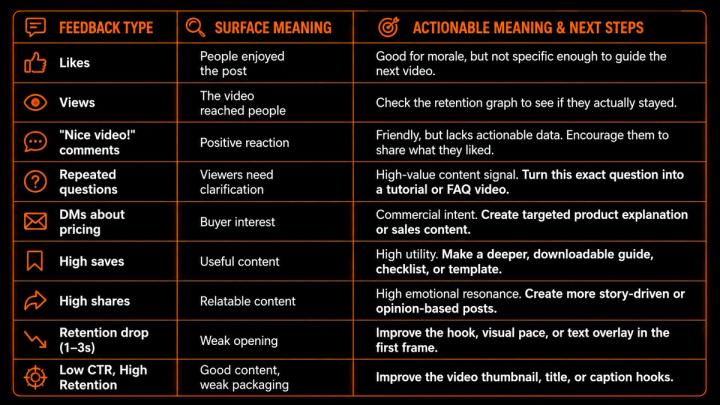
Actionable Feedback Rule: If a metric or comment doesn't tell you what to change in your next script, edit, or thumbnail, it is a vanity metric. Focus on the signals that drive creative decisions.
💬 Turn Comments into Better Video Ideas
Comments are the easiest places to find your next content topic. If multiple people ask the exact same question, that is not a problem—it is a clear content opportunity.
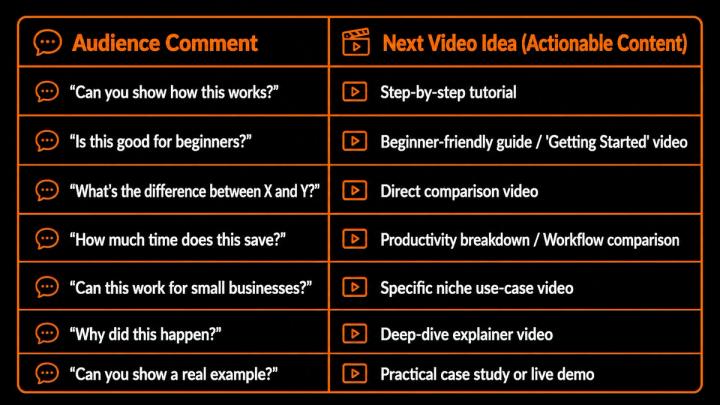
Research on YouTube creator interaction has found that positive signals from creators, such as highlighting, replying to, or hearting comments, can significantly increase comment visibility and encourage more engagement over time.
To scale this process without burning out, creators use Vividspark.ai’s Unified Comment Manager. By consolidating comments from TikTok, YouTube, Instagram, and Facebook into a single feed, it eliminates the need to jump between apps, allowing creators to instantly spot recurring questions and tag them as "Future Video Topics."
📩 Turn DMs into High-Intent Content
DMs (Direct Messages) often contain feedback that viewers do not want to post publicly. This makes them especially valuable for businesses and creators selling products or services.
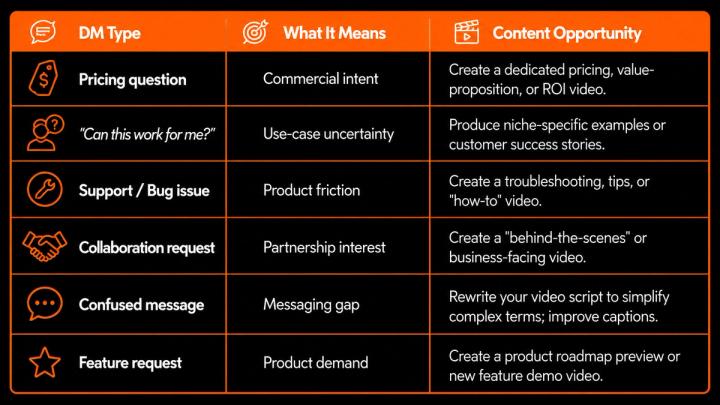
For small businesses, SaaS platforms, and digital product sellers, DMs are often the ultimate conversion signal.
The DM Golden Rule: If one person takes the time to message you privately, dozens of others are likely wondering the exact same thing silently. Address it in your next video.
⏱️ Use Retention Data to Improve Video Structure
Audience feedback is not only written feedback. It also appears in behavior. YouTube’s audience retention reports and TikTok's viewer curves show how well different moments in a video held viewers’ attention.
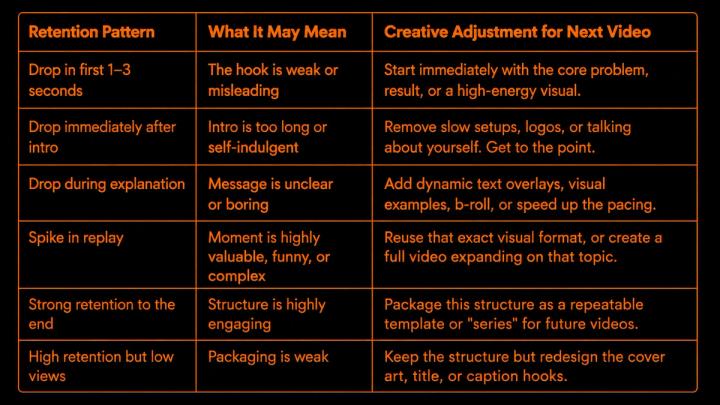
This is where audience feedback becomes precise. Instead of guessing why a video failed, retention data shows you the exact second your audience lost interest.
🧠 Use Saves and Shares to Understand Value
Saves and shares are the strongest indicators of high-value content.
- Saves (Utility & Education): If a video receives a high volume of saves, your audience is telling you that the content is highly practical, educational, or worth referencing later. Double down by creating checklists, cheat sheets, tutorials, or step-by-step guides.
- Shares (Relatability & Emotion): If a video gets shared frequently, it resonates with the viewer's identity, humor, or beliefs. Your next video should lean into relatable stories, strong opinions, industry myths, or emotional before-and-after transformations.
TikTok’s official creative guidance recommends using captions or text overlays to provide context, visual elements to retain engagement, and clear CTAs to guide what viewers should do next. Feedback from saves and shares helps you refine not just what you say, but how you package the call to action.
📱 Compare Feedback Across Platforms
The exact same video can generate different feedback on different platforms because each platform has a unique demographic and algorithm.
- TikTok: Delivers fast comment trends, rapid shares, and raw watch behavior. It teaches you if your hook and topic feel instantly engaging to a fast-scrolling audience.
- Instagram: Driven heavily by saves, DMs, and profile visits. It teaches you if your content feels utility-driven, aesthetically pleasing, or highly shareable to a user's Stories.
- YouTube: Relies on long-term retention, search intent, and deep comments. It teaches you if your narrative structure, clarity, and keyword targeting are working.
- Facebook: Often sparks longer community discussions, local shares, and specific demographic comments.
A creator may discover that the same video works as a quick hook on TikTok, a save-worthy tip on Instagram, a searchable topic on YouTube, and a discussion starter on Facebook.
Using Vividspark.ai's Cross-Platform Analytics Dashboard allows you to view these contrasting metrics side-by-side. Instead of analyzing channels in isolation, you can easily compare engagement signals and see which platforms are driving real business growth.
🛠️ A Practical Workflow for Improving Your Next Video
To turn audience insights into repeatable success, follow this weekly optimization cycle:
1.Publish & Distribute
Day 1
Distribute your video across TikTok, Instagram, YouTube, and Facebook. Keep formatting optimized for each platform.
2.Aggregate the Signals
Days 2–5
Gather comments, DMs, saves, shares, click-through rates, and retention graphs from all platforms into one central dashboard.
3.Identify Pains and Objections
Day 6
Analyze the comments and DMs to find repeated questions, points of confusion, or requests for more detail.
4.Audit the Drop-Off Points
Day 6
Open your retention analytics. Pinpoint the exact timestamps where viewers left, and note what was happening on screen.
5.Pick One Creative Variable
Day 7
Do not try to fix everything at once. Choose one variable to optimize for your next video: the hook, the visual pacing, or the call to action.
6.Produce the Next Video
Day 7
Script and edit your next video using the specific audience insights you gathered. Publish and repeat the feedback loop.
🚀 How Vividspark.ai Helps Turn Feedback into Better Videos
For creators, marketing teams, and brands, the challenge isn't a lack of audience feedback—it is the overwhelming fragmentation of that data.
Important customer feedback and creative signals are often scattered across TikTok comments, Instagram DMs, YouTube Studio analytics, Facebook messages, and ad managers.
Vividspark.ai solves this fragmentation by offering an all-in-one Social Video Command Center. Rather than losing track of high-intent feedback, creators use Vividspark to:
- Consolidate Multi-Platform Engagement: Reply to comments and direct messages from TikTok, Instagram, and YouTube through a single, unified Smart Inbox.
- Generate AI-Powered Feedback Reports: Automatically parse thousands of audience comments to extract recurring viewer questions, objections, and content requests.
- Compare Retention & Performance Side-by-Side: Easily spot which video structures work best on different networks with streamlined, cross-platform analytics.
- Optimize the Publishing Workflow: Go from automated multi-platform publishing and cover generation to audience insights and paid Meta promotion decisions—all within a single workspace.
Instead of switching between platforms and guessing what to do next, Vividspark.ai lets you build a data-driven creative roadmap backed by real audience evidence.
❓ FAQ
1. What is the best workflow to centralize video feedback across platforms?
The most efficient workflow is to use a unified social inbox tool like Vividspark.ai, which aggregates comments and DMs from TikTok, Instagram, YouTube, and Facebook into a single feed. This allows your team to manage community interactions and extract content ideas without switching apps.
2. How can audience comments directly improve my next video script?
Analyze your comment section for repeated questions or points of confusion. Each common question is an explicit content request. Address these questions in your next video's hook (e.g., "A lot of you asked how to do X, so here is the step-by-step breakdown...").
3. Why are DMs considered higher-value feedback than video comments?
DMs typically represent deeper viewer intent. When a viewer messages you privately, they are often asking about pricing, specific use cases, or sharing personal pain points. This data allows you to create highly targeted, conversion-focused video content that directly answers buyer objections.
4. How do I use audience retention graphs to fix a "boring" video?
Look for steep downward slopes in your retention reports. If there is a drop in the first 3 seconds, your hook failed to grab attention. If there is a drop in the middle, your pacing was too slow or your visual explanation was unclear. Use these insights to cut fluff and add more visual hooks to your next edit.
5. Can Vividspark.ai help with multi-platform analytics?
Yes. Vividspark.ai brings comments, DMs, and performance analytics into a centralized dashboard. It allows creators and brands to compare audience behavior across TikTok, Instagram, YouTube, and Facebook to see where their content resonates most.
✨ Conclusion
Audience feedback is the single most valuable tool for improving your next video. It tells you what your viewers care about, what they missed, what confused them, what they wanted more of, and where your video lost their attention.
Instead of creating your next video based on pure guesswork, build a creative roadmap using comments, DMs, saves, shares, watch time, and retention data.
For creators, brands, and small businesses publishing across TikTok, Instagram, YouTube, and Facebook, Vividspark.ai simplifies this entire optimization loop by connecting publishing, engagement management, and multi-platform analytics in one unified workflow. In 2026, the most successful channels won't just create more content—they will listen better, learn faster, and turn every audience signal into a smarter next video.