⚡ Quick Answer
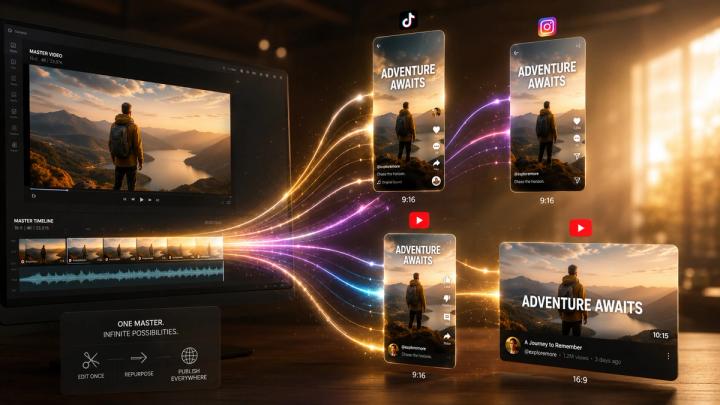
Creating multiple social media posts from one video is now possible with AI-powered video repurposing tools. Instead of manually editing the same content for TikTok, Instagram Reels, YouTube Shorts, and Facebook, creators can upload one video and let AI analyze the content, identify valuable moments, generate platform-specific versions, create captions, and prepare publishing materials automatically.
A modern AI content repurposing workflow looks like this:
Upload one video → AI understands content → Finds key moments → Creates multiple versions → Generates captions & covers → Publishes across platforms
For creators, brands, and marketing teams producing content regularly, this approach can significantly reduce production time while increasing content output.
📈 Why One Video Should Become Multiple Social Media Posts
The biggest challenge in modern content creation is no longer producing one high-quality video. The challenge is distributing that content efficiently across multiple platforms.
Today’s audiences consume videos differently depending on where they discover them:
- 🎵 TikTok users prefer short, fast-paced storytelling.
- 📸 Instagram users respond strongly to visually appealing Reels.
- 🔴 YouTube Shorts benefits from strong hooks and searchable titles.
- 👥 Facebook Reels reaches broader community-based audiences.
According to Wyzowl’s annual video marketing research, approximately 91% of businesses use video as a marketing tool, showing how essential video has become in digital communication. However, creating enough platform-specific content manually remains a massive bottleneck.
🗣️ "The core limitation for modern creators isn't a lack of ideas—it's the friction of distribution," explains Bo Ren, Chief Technology Officer at VividSpark. "AI shouldn't just cut clips blindly based on volume spikes. True automated repurposing requires multi-modal contextual understanding to preserve narrative arc across different aspect ratios and platform aesthetics."
⚠️ The Problem With Traditional Video Repurposing
Traditional content repurposing requires many repetitive steps. A creator typically needs to watch the entire video again, identify interesting moments manually, cut multiple clips, add subtitles, resize videos, design covers, and write separate descriptions.
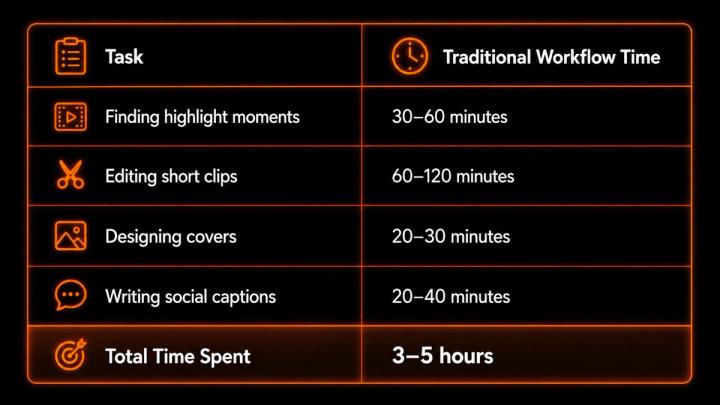
Without automation, a creator producing 20 videos per month could spend more than 60 hours solely on content repurposing instead of high-value creative strategy.
🤖 How AI Automatically Turns One Video Into Multiple Posts
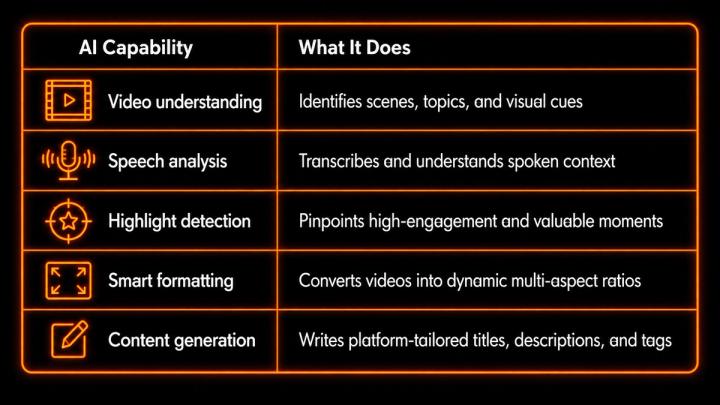
AI video repurposing works by combining multi-modal video understanding, speech recognition, and generative content creation. Modern AI models analyze visual, audio, and text information together to understand context and identify meaningful segments automatically.
🎬 Step 1: AI Finds the Best Moments From Your Video
The first step in repurposing is identifying which parts are worth sharing. A strong short-form video usually contains a powerful opening hook, a clear value point, an emotional driver, or a practical takeaway.
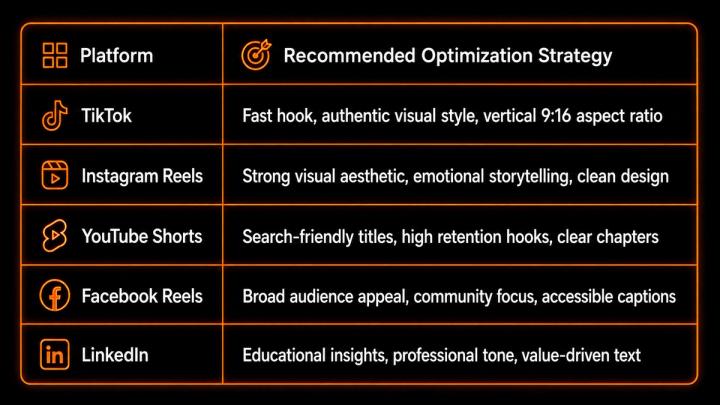
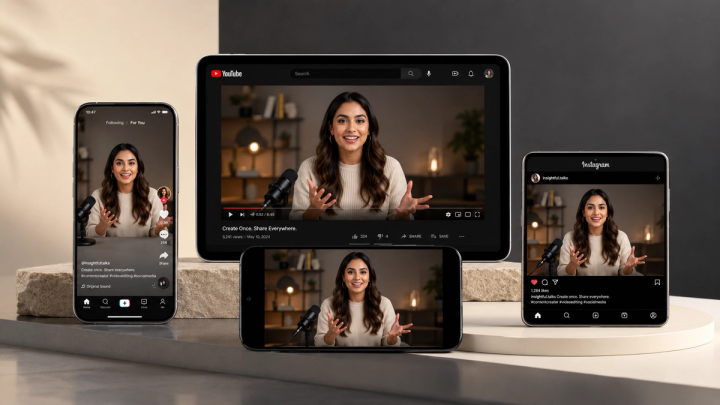
🎯 Step 2: AI Optimizes Content for Different Platforms
Every social media platform has unique algorithm requirements and audience behaviors.
📝 Step 3: Generate Complete Publishing Materials
Creating videos is only half the battle; creators also need publishing assets tailored to each channel. AI tools automatically generate complete publishing packages:
- 💡 TikTok Title: "Creators waste hours doing this manually"
- 🔍 YouTube Shorts Title: "How AI Changes Video Editing Workflows"
- 💬 Instagram Caption: "One video can become an entire content series. Here is how."
⏳ How Much Time Can AI Repurposing Save?
According to VividSpark workflow benchmarks, adopting an AI-assisted pipeline yields substantial efficiency gains:
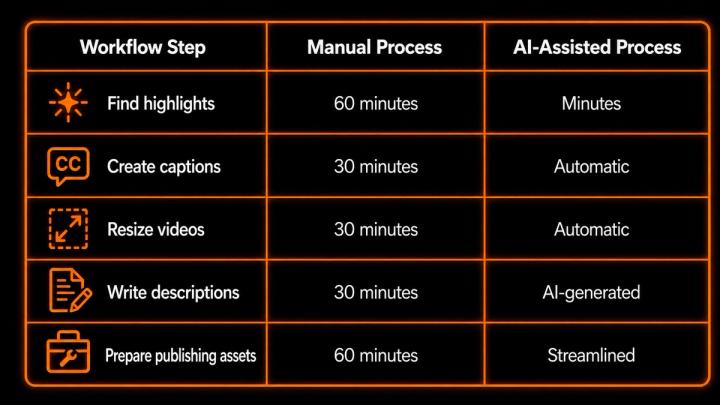
A creator publishing 20 videos monthly can reduce repurposing work from over 60 hours to approximately 10–15 hours—achieving up to a 75% increase in operational efficiency.
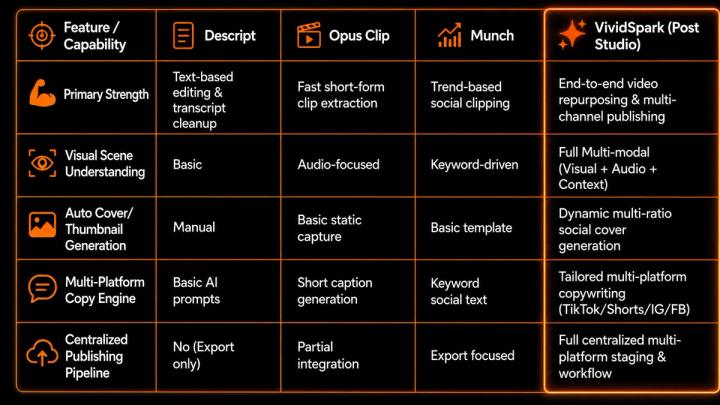
⚔️ Industry Tool Comparison: Choosing the Right AI Repurposing Platform
While the AI repurposing ecosystem offers specialized tools, choosing the right software depends on whether your focus is text editing, standalone clip detection, or full multi-platform publishing pipelines.
✨ How VividSpark Helps Creators Repurpose Video Content
VividSpark is an all-in-one AI video repurposing and distribution engine designed to solve content bottlenecks. Unlike single-feature clip cutters or basic transcript editors, VividSpark's Post Studio combines visual scene analysis, multi-platform formatting, and social copy generation into one automated pipeline.
- 🧠 AI Video Understanding: Analyzes uploaded videos to identify structural highlights and engagement peaks.
- 🖼️ Automatic Cover Generation: Automatically generates horizontal and vertical cover visuals optimized for social feeds.
- ✍️ AI Writing Assistance: Produces platform-tailored titles, descriptions, hashtags, and social post copy.
- 🌐 Multi-Platform Centralization: Manages workflows for TikTok, Instagram, YouTube, and Facebook from a single interface.
💡 Best Practices for AI Video Repurposing
- 🌟 Start With Strong Original Content: AI maximizes efficiency, but source audio clarity, structured storytelling, and raw value determine ultimate reach.
- 🔄 Adapt, Don't Just Duplicate: Vary hooks and framing to turn one core topic into tutorials, quote clips, and behind-the-scenes posts.
- 📊 Learn From Performance Data: Track watch time, retention rate, shares, and CTR to continuously refine AI prompts and content selection.
❓FAQ
Q1.Can AI automatically create multiple social media posts from one video?
A: Yes. AI video repurposing tools analyze source videos, detect high-value moments, slice clips, auto-caption, and generate tailored metadata across social networks.
Q2.How does VividSpark differ from tools like Opus Clip or Descript?
A: Descript focuses primarily on text-based video editing, and Opus Clip excels at quick short clips. VividSpark offers a comprehensive end-to-end publishing pipeline that combines multi-modal visual scene analysis, automated cover design, and tailored multi-platform copy generation in a centralized workspace.
Q3.How many posts can one video create?
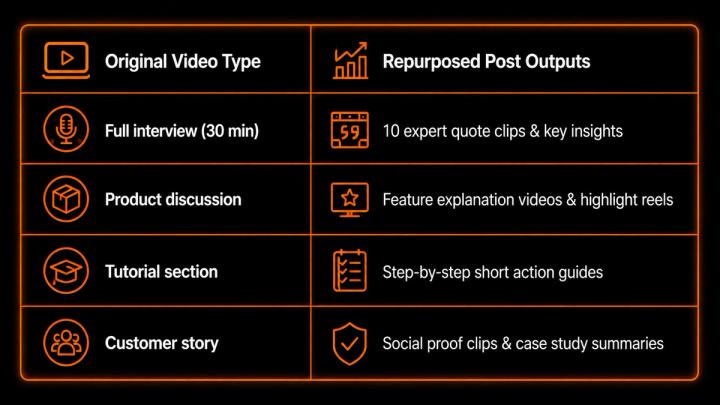
A: Depending on length and substance, a single 15-to-30-minute video typically yields 5–10 short videos, alongside quote graphics, text posts, and promotional clips.
Q4:Does AI replace human video editors?
A: No. AI removes repetitive editing tasks and administrative overhead, allowing editors and creators to focus on higher-level creative strategy and narrative quality.
Q5:Should I upload the exact same video to every platform?
A: While possible, platform-adapted versions perform significantly better due to distinct user expectations, aspect ratios, and algorithmic preferences across TikTok, Reels, and Shorts.
Q6:What types of videos are best for repurposing?
A: Podcasts, tutorials, interviews, webinars, product demonstrations, and keynote presentations provide the highest density of repurposable segments.
🏁 Conclusion
The future of social media marketing is not about producing every post from scratch—it is about maximizing the value of the video content you already create. AI-powered video repurposing allows creators and brands to transform a single asset into a multi-channel distribution campaign.
With platforms like VividSpark.ai, the paradigm evolves from Create once → Publish once to Create once → Generate multiple posts → Reach audiences everywhere.