⚡ Quick Answer
To turn any video into platform-ready covers, creators must identify the strongest visual frames, adapt them into precise vertical and horizontal formats, and ensure each cover remains uncluttered by platform UI elements.
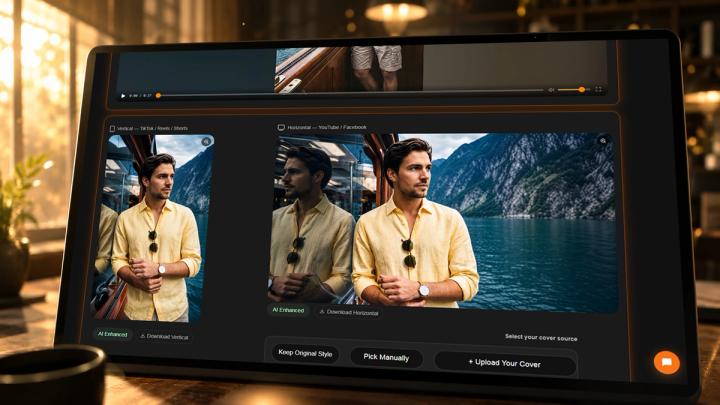
A random screenshot is rarely the best cover. High-performing covers require a clear subject, strong emotion, optimal brightness, and native platform formatting. For multi-platform creators, this process is traditionally a major time bottleneck. A specialized workflow like vividspark.ai allows you to upload a video once, automatically detect high-aesthetic frames using multimodal AI, generate format-compliant horizontal and vertical covers, optimize publishing copy, and distribute content across TikTok, Instagram, YouTube, and Facebook simultaneously.
🎯 Why Video Covers Matter
Video covers are the ultimate gatekeepers of your content's reach. In fast-scrolling mobile environments, a cover must communicate value and emotional anchoring within less than one second.
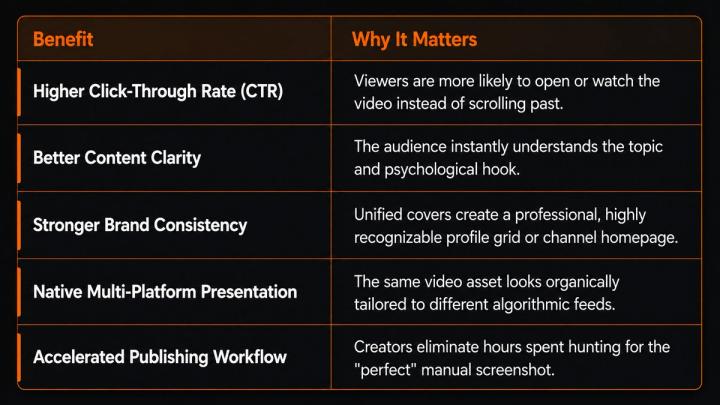
A weak cover—such as a blurry motion frame, an awkward facial expression, or a dark, low-contrast scene—can kill a high-quality video's performance before it even gets distributed.
📌 The Problem with Random Video Screenshots
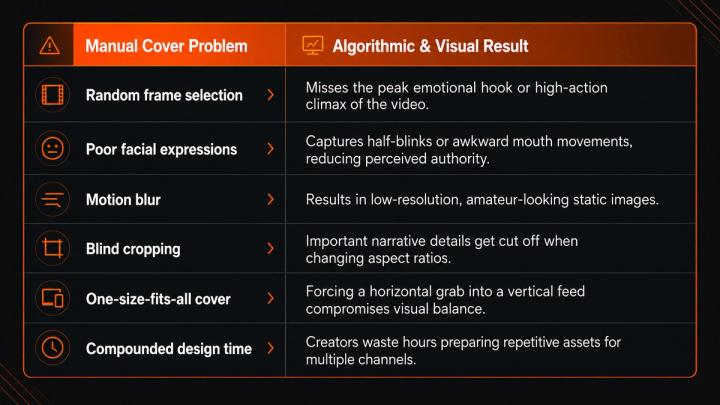
Many digital strategists still choose video covers manually by pausing timelines and taking screenshots. This linear approach introduces severe quality bottlenecks:
🖼️ What Makes an AI-Optimized Video Cover?
A high-converting video cover must be visually clear, emotionally resonant, and perfectly readable on small mobile screens.
Use this data-driven checklist before publishing:
- Main Subject: Keep the person, object, or central scene immediately recognizable.
- Micro-Expressions: Choose frames showcasing clear emotion, tension, anticipation, or action.
- Composition & Contrast: Avoid background clutter. Ensure the subject pops against the environment using balanced contrast.
- Lighting Quality: Avoid underexposed or muddy frames. Warm, bright, or cinematic lighting performs best on mobile feeds.
- Platform UI Safe Zones: Keep critical visual elements away from edges where platform text or buttons will overlap.
- Multi-Format Agility: Ensure the frame can be adaptively cropped into both 9:16 and 16:9 without losing the focal point.
📱 Why Every Video Needs Vertical and Horizontal Covers
Feeds are fundamentally divided by aspect ratios. Forcing a single graphic to work everywhere compromises presentation quality.
- Vertical Covers (9:16): Vital for mobile-first, immersive discovery feeds like TikTok, Instagram Reels, YouTube Shorts, and Facebook Reels.
- Horizontal Covers (16:9): Essential for traditional YouTube uploads, Facebook video posts, native website embedding, landing pages, and Meta ad placements.
- Square/Cropped Previews (1:1): Crucial for profile grids (like Instagram) and content library thumbnails.
To scale effectively, a single video must not be treated as a single asset. It must be broken down into a structured package of platform-ready creative assets.
⚙️ How Smart Frame Selection Works
Smart video cover generation replaces manual scrubbing by using Aesthetic Multimodal AI to scan video files frame-by-frame, scoring them based on high-performance visual signals.
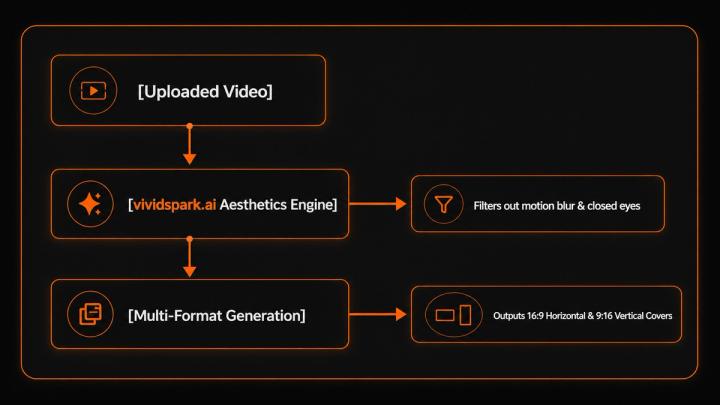
The AI scoring system looks for specific high-performance signals:
- Pixel Sharpness: Automatically filters out motion blur, interlacing artifacts, and low-res frames.
- Facial Geometry: Detects open eyes, direct eye contact, and clear emotional markers while discarding half-blinks or distorted expressions.
- Compositional Balance: Evaluates rule-of-thirds alignment to ensure the asset can be seamlessly reframed.
- UI Safe-Zone Awareness: Factors in platform-specific UI overlays (like the TikTok right-side engagement bar or Instagram's bottom text area) to keep the central focus unobstructed.
With vividspark.ai, this analysis happens instantly upon upload, transforming raw footage into high-aesthetic asset options within seconds.
🔄 Manual Workflow vs. vividspark.ai Automated Workflow
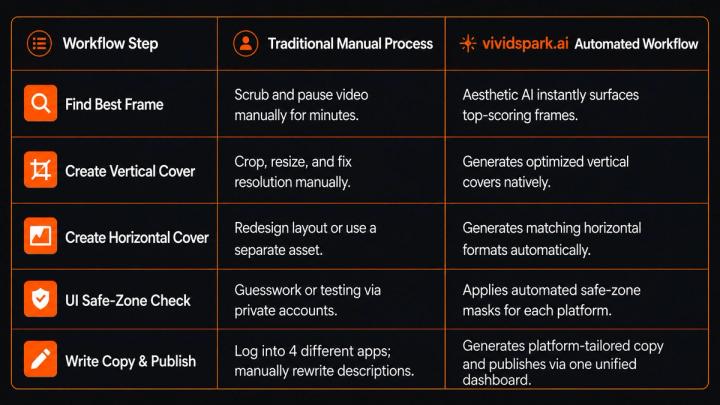
🚀 Improving Publishing Efficiency at Scale
For digital marketers, agencies, and solo creators, time is the ultimate constraint. Eliminating repetitive asset editing unlocks scaling potential, allowing teams to:
- Publish Faster: Cut asset production time down from hours to minutes.
- Maintain Aesthetic Consistency: Establish a professional, cohesive look across all digital touchpoints.
- Scale Video Pipelines: Increase output from 1–2 videos per week to multi-platform daily distribution without increasing headcount.
- Optimize Social Previews: Ensure automated links look immaculate when shared on messaging apps or community feeds.
By centralizing video uploading, cover generation, safe-zone framing, AI copywriting, and multi-platform distribution within vividspark.ai, content operations become lean, automated, and hyper-scalable.
📊 Performance Metrics to Track Post-Publishing
Generating platform-ready covers is step one; analyzing their empirical impact is step two. Monitor these key performance indicators (KPIs) to fine-tune your strategy:
- Click-Through Rate (CTR): Indicates how effectively your cover and title combo captured attention.
- 3-Second Hook Rate: Tracks if the video's opening frame delivers on the immediate visual promise of the cover.
- Audience Retention: High CTR combined with low retention means your cover might be clickbait. High retention with low CTR means your video is great, but your cover needs immediate optimization.
- Profile Grid Engagement: Measures whether cohesive, high-quality cover styles encourage users to view older videos on your channel or profile grid.
❓ FAQ
Q1:Do I really need both vertical and horizontal covers for the same video?
A:Yes. Because social ecosystems are fragmented. A vertical cover is tailored for mobile discovery feeds (TikTok, Reels, Shorts), while a horizontal cover is necessary for wider desktop/TV layouts (YouTube, Meta Ads, and web embeds). Using the wrong aspect ratio results in awkward stretching or auto-cropping that hides your core subject.
Q2:Can I just use a random video screenshot as my thumbnail?
A:You can, but it usually hurts your CTR. Random screen grabs often capture motion blur, compression artifacts, bad lighting, or awkward facial expressions. Professional presentation requires high-aesthetic frame selection.
Q3:How does platform UI affect my video cover design?
A:Each social platform overlays native UI elements (like titles, share buttons, and progress bars) on top of your cover. If your subject or text sits outside the platform’s "Safe Zones," it will be covered up and rendered unreadable.
Q4:How does vividspark.ai choose the best frames?
A:vividspark.ai uses advanced multimodal aesthetic models to scan your video. It filters out technical imperfections like blur or bad lighting and prioritizes high-contrast, emotionally clear frames that align perfectly with rule-of-thirds composition.
✨ Conclusion
In the 2026 digital ecosystem, achieving peak video performance is no longer just about generating more content—it is about packaging that content intelligently for every platform where audiences engage.
Relying on random screenshots or one-size-fits-all imagery limits your content's organic potential. For creators, brands, and performance marketing teams looking to scale cross-platform publishing seamlessly, vividspark.ai bridges the gap between raw video files and platform-ready, high-converting creative assets. By automating frame selection, safe-zone cropping, and multi-channel distribution, you can reduce manual friction and focus entirely on storytelling, strategy, and community growth.