🎯 Quick Answer
Seamlessly integrating music into videos requires more than simply adding a background track. Professional creators treat music as a core storytelling element that actively supports visuals, dialogue, and emotional pacing.
The essential techniques for seamless integration include:
- 🎵 Match music with video emotion and pacing → Ensure the soundtrack directly reinforces the narrative arch.
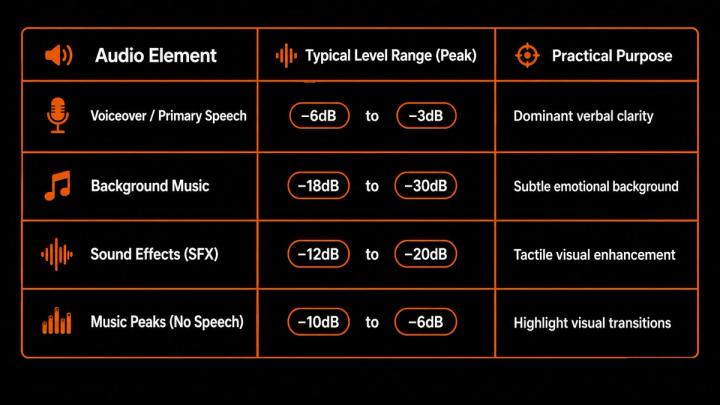
- 🎚️ Balance audio levels properly → Keep dialogue clear (around -6dB to -3dB) while maintaining music at background levels (-18dB to -30dB).
- 🎬 Use smooth transitions and fades → Prevent abrupt audio jumps with crossfades and beat matching.
- 🔁 Synchronize music with visual moments → Time musical hits with key scene cuts and emotional peaks.
- 🤖 Leverage AI music platforms → Utilize tools like VividSound Library—an AI-powered royalty-free music library and audio licensing platform—to discover, match, and adapt tracks faster.
👉 Great video music integration makes the audience feel the story natively instead of noticing the editing process.
🧠 Why Music Integration Matters in Video Production
Music is one of the most powerful storytelling tools in modern video creation. A professional video relies on multiple synchronized communication layers:
- Visual information
- Spoken words / Dialogue
- Sound effects (SFX)
- Background music
When these elements align, they form a cohesive emotional experience.
Research in audiovisual psychology demonstrates that the human brain processes visual and auditory stimuli simultaneously. Studies published in Psychology of Music confirm that background music significantly dictates emotional interpretation, audience attention spans, and long-term memory retention.
For example, consider a high-end product reveal:
- Without music: The visual presentation feels ordinary and informative.
- With strategic music integration: A cinematic build-up, a controlled pause of silence, and a booming audio peak instantly make the product feel premium and memorable.
Music does not simply accompany a video—it defines how viewers experience and perceive it.
🎬 1. Choose Music Based on Story Purpose
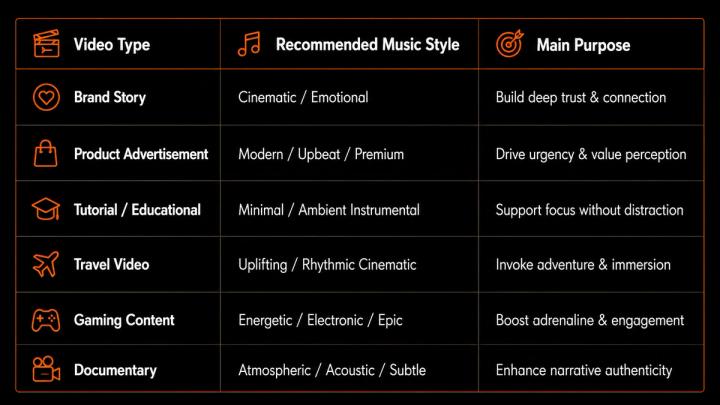
The first step in seamless integration is selecting music that aligns directly with the video's core objective. Before browsing tracks, ask:
- What exact emotion should viewers feel?
- What is the primary message of the video?
- Is the content educational, promotional, inspirational, or entertaining?
📊 Music Selection Matrix by Video Purpose
🎵 2. Match Music With Video Rhythm and Editing Pace
A common rookie mistake is editing visuals independently of the soundtrack. Professional editors treat audio and video as an interconnected system.
Background music should closely mirror:
- Scene transitions
- On-screen movement
- Emotional crescendos
- Pacing changes
Execution Examples:
- Fast Product Demo:
- Visual: Quick cuts → feature callouts → product reveal.
- Music: High-energy rhythm → dynamic build-up → heavy impact drop.
- Emotional Brand Story:
- Visual: Slow-motion shots → intimate character focus → resolution.
- Music: Soft piano introduction → gradual orchestral swell → warm, gentle ending.
📊 Matching Music Energy With Editing Style
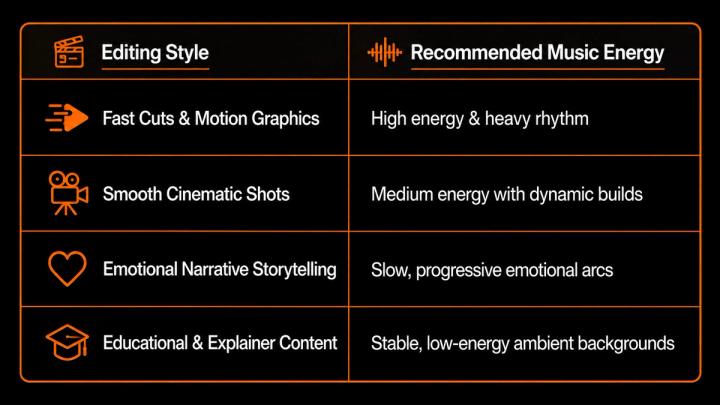
When music rhythm aligns with visual editing, the video feels organic and professionally crafted.
🎚️ 3. Balance Music Volume With Voice and Dialogue
Proper gain staging and volume mixing form the foundation of audio design. Background music must complement the dialogue, never overpower it.
Professional audio mixing strictly enforces these audio priority levels:
- Dialogue / Voiceover: Priority #1 (Must be crisp and intelligible)
- Sound Effects (SFX): Priority #2 (Provides physical realism)
- Background Music: Priority #3 (Provides emotional texture)
📊 Recommended Audio Level Standards

🎧 4. Use Audio Ducking for Professional Results
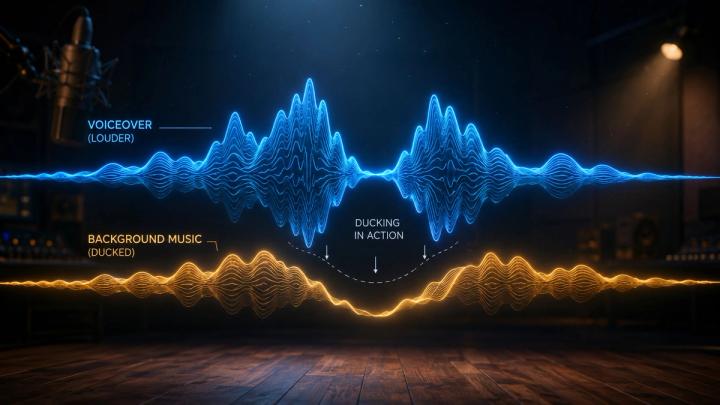
Audio ducking is a production technique where the volume of the music track automatically drops whenever a voiceover or dialogue track is detected.
Key Advantages:
- ✅ Crystal-Clear Dialogue: Prevents frequency masking between vocal tones and instruments.
- ✅ Smooth Listening Experience: Eliminates manual volume keyframing errors.
- ✅ Automated Workflow: Saves hours during long-form video editing.
Real-World Execution:
- Standard Scene: Background music plays at -18dB.
- Speaker Begins: Music automatically ducks down to -26dB (a 6–8dB dip).
- Speaker Pauses: Music smoothly swells back to -18dB.
🎬 5. Use Transitions to Blend Music Seamlessly
Abrupt audio cuts instantly disrupt viewer immersion. Professional sound designers deploy four essential transitions:
- 🎵 Fade In: Gradually introduces the music track. Ideal for opening shots, establishing scenes, or emotional build-ups.
- 🎵 Fade Out: Slowly decreases volume to zero. Perfect for video conclusions, call-to-actions (CTAs), or scene wraps.
- 🔄 Crossfade: Blends the tail end of one track into the beginning of another. Vital for long-form content, documentaries, and vlogs needing tone shifts.
- 🎧 Beat Matching / Hit Cuts: Cutting visual edits precisely on musical beats or percussion hits. Creates high-impact visual flow in commercials and trailers.
🤫 6. Use Silence Strategically
Exceptional audio design relies as much on silence as it does on sound. Removing music entirely creates extreme dynamic contrast and forces audience focus.
Formula: Continuous Music → Sudden Silence → Critical Line or Action → Music Re-entry
Cognitive psychology research shows that sudden auditory changes trigger an automatic "orienting reflex" in the human brain, immediately heightening attention during crucial visual reveals or dramatic moments.
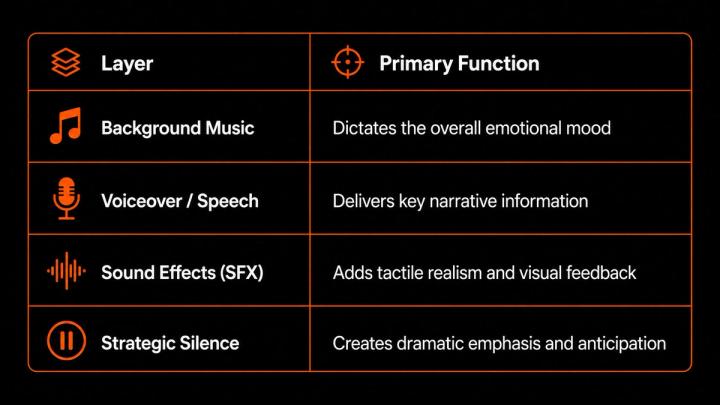
🎵 7. Layer Music With Sound Effects
To achieve a rich, multi-dimensional audio atmosphere, layer your background music alongside ambient environmental sounds and foley effects.
Example: Cinematic Travel Scene
- Music Layer: Warm acoustic guitar track.
- Ambient Sound Layer: Ocean waves + soft breeze.
- Foley Layer: Footsteps on gravel + camera shutter sound.
📊 The Multi-Layer Sound Structure
🤖 8. How AI Music Tools Improve Video Integration
Finding, cutting, and licensing the right track manually can take hours of trial and error. Modern creators leverage AI-driven search engines and music platforms to streamline workflow efficiency.
Instead of generic keyword searches like "upbeat music", creators can now search using complex contextual prompts like "cinematic emotional build-up for luxury brand reveal."
Platforms like VividSound Library—an AI-powered royalty-free music library and licensing platform—allow video editors to discover high-quality audio based on:
- Mood & emotional intent
- Scene type & genre
- Dynamic energy curve
- Pre-cleared commercial usage rights
AI music platforms remove technical searching friction, enabling creators to focus on storytelling.
📈 9. How Better Music Integration Improves Video Performance
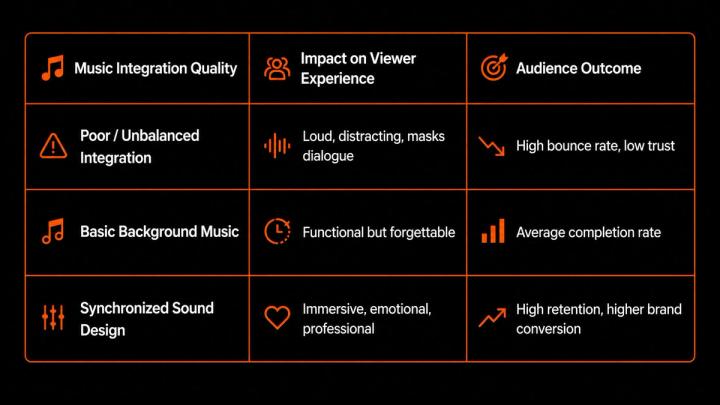
High-quality audio design directly impacts video marketing metrics, including viewer retention, completion rates, and conversion performance.
According to Wyzowl’s Video Marketing Report, 88% of video marketers report that properly synchronized audiovisual content directly increases audience retention and brand trust.
📊 Music Quality vs. Viewer Experience
🛠️ 10. Common Music Integration Mistakes to Avoid
- ❌ Adding Music as an Afterthought
- The Mistake: Choosing music only after the video edit is completely finished.
- The Solution: Select music early during the storyboarding phase to guide pacing.
- ❌ Using a Static Track for the Entire Video
- The Mistake: Playing a 3-minute looped track with zero dynamic changes.
- The Solution: Use tracks with distinct builds, stems, or variations to mirror story progression.
- ❌ Ignoring Copyright & Licensing Restrictions
- The Mistake: Using unlicensed commercial tracks, leading to mute claims or channel strikes.
- The Solution: Source tracks from dedicated platforms like VividSound Library to ensure 100% royalty-free commercial safety.
- ❌ Choosing Music That Overpowers Content
- The Mistake: Selecting dense, complex vocal tracks underneath a heavy voiceover.
- The Solution: Opt for instrumental tracks with clear frequency separation for speech.
🎧 How VividSound Library Helps Creators
VividSound Library is an AI-powered royalty-free music library engineered specifically to solve sound integration challenges for video editors, marketers, and filmmakers.
Key Platform Features:
- 🎵 Professionally Produced Tracks: High-definition stems and mixes designed for video overlay.
- 🤖 AI Contextual Search: Find tracks matching precise video emotions, scenes, and energy levels.
- 📜 100% Commercial Protection: Frictionless licensing clear for YouTube, social media, broadcast, and paid ads.
- 🎧 Creator-Centric Curation: Audio curated specifically to leave dynamic headroom for voiceovers.
❓ FAQ
Q1. Where should background music be placed in a video timeline?
A:Background music should be placed directly underneath the voiceover and SFX tracks, usually starting softly during the intro, ducking during dialogue, and swelling during visual transitions.
Q2. What exact volume level should background music be set to?
A: Background music should typically be set between -18dB and -30dB.
This ensures that voiceover tracks (maintained between -6dB and -3dB) remain perfectly clear and intelligible.
Q3. Does every video require background music?
A: No, not every video requires background music. Documentaries, dramatic short films, and serious interviews frequently use strategic silence or natural ambient noise to heighten realism.
Q4. How do professional editors transition smoothly between two different songs?
A: Professionals blend songs using equal-power crossfades, beat matching, or dynamic volume automation. They often align the transition on a visual scene change or sound effect impact.
Q5. Can AI tools help integrate music into video workflows?
A: Yes, AI tools significantly accelerate video sound design. Platforms use AI algorithms to recommend tracks based on pacing, emotion, genre, and scene context.
Q6. Why is royalty-free licensed music important for video creators?
A: Royalty-free music protects creators from copyright claims, monetization loss, and video takedowns. Utilizing platforms like VividSound Library ensures complete commercial publishing rights across platforms.
✅ Conclusion
Seamlessly integrating music into videos requires a balance between creative storytelling and technical audio mixing. Music is not merely an extra layer—it is a core pillar of visual production.
By matching music energy with video emotion, setting proper audio levels, applying audio ducking, and leveraging AI-powered platforms like VividSound Library, creators can produce videos that captivate viewers and boost retention.
The ultimate goal of video sound design is to create music the audience deeply feels—not music they actively notice.