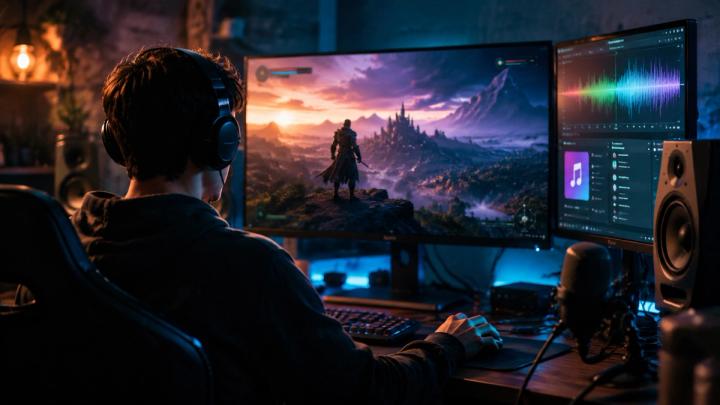
🎯 Quick Answer: The Formula for Immersive Gaming Audio
Choosing the right music for gaming videos is a science of sensory alignment. The ultimate soundtrack does not merely fill silence; it amplifies gameplay physics, structures narrative energy, and deepens emotional immersion without distracting from the core gameplay experience.
To secure maximum audience engagement, your audio design must balance three critical vectors:
- Genre-Atmosphere Congruency: The sonic texture must match the game's world-building (e.g., dark ambient synth for horror, orchestral brass for epic high-fantasy).
- Dynamic Energy Mapping: The soundtrack’s intensity must scale in parallel with onscreen action, creating distinct narrative arcs between exploration, combat, and climax.
- Acoustic Space and Balance: Background music must be mixed with sufficient spectralheadroom (typically between -18 dB to -24 dB during commentary) to preventauditory masking of key game cues and vocals.
🧠 The Psychoacoustics of Gaming Content
In highly saturated platforms like YouTube Gaming, Twitch, and TikTok, visual stimulus alone is no longer enough to sustain viewer retention. According to cognitive media psychology, humans process audio and video through dual-channel cognitive processing. When background music is semantically and rhythmically congruent with visual action, it triggers higher cognitive arousal, resulting in an estimated 15-25% increase in average watch duration (AVD).
Without carefully selected music, a tense tactical clutch in a first-person shooter feels flat and mechanical. Adding a driving, low-frequency percussion track and a rising riser effect transforms that same gameplay clip into a cinematic narrative. Music acts as an emotional lens, translating on-screen pixels into visceral physical sensations for the viewer.
🎮 1. Aligning Music with Gaming Genres
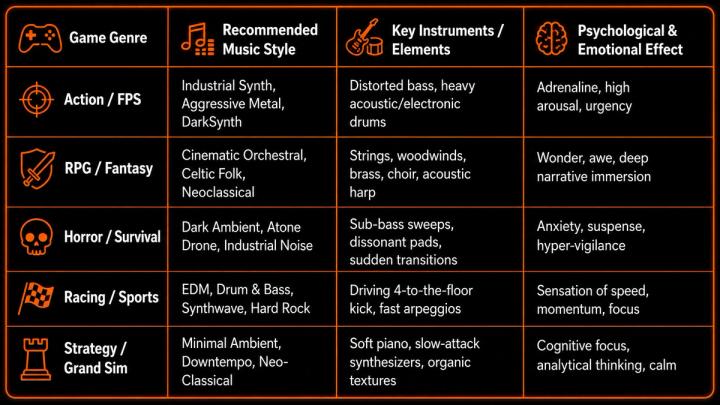
Every video game genre possesses a distinct "sonic DNA." Choosing a soundtrack that contradicts this identity breaks the player's and viewer's immersion. Use the matrix below to match your gameplay genre with the scientifically proven musical styles that trigger the intended psychological state.
📊 Gaming Genre and Soundscape Alignment
⚡ 2. Dynamic Energy Mapping: Matching Music to Gameplay Pacing
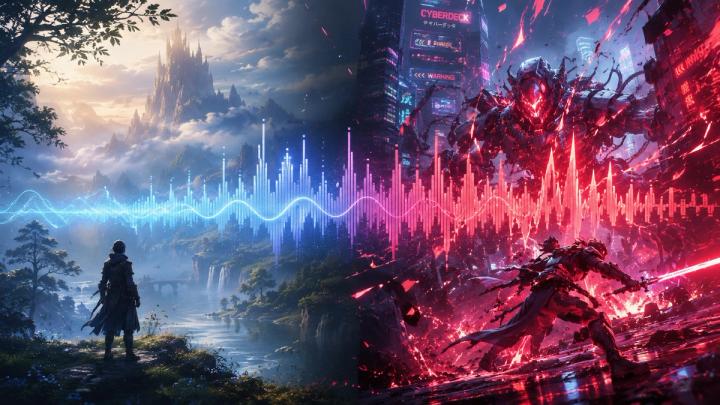
A common pitfall for emerging creators is applying a single, unvarying music track across an entire 10-minute video. Professional video editing relies on Dynamic Energy Mapping—varying the musical intensity to match the natural pacing of the gameplay.
[Exploration / Setup] ---> [Threat Detected / Build-up] ---> [Boss Fight / Climax] ---> [Victory / Resolution] (Ambient, Low Energy) (Rising Riser / Mid-tempo) (Heavy Epic Orchestral) (Uplifting Outro)
To execute this, segment your video timeline into three distinct narrative phases:
- The Setup & Exploration Phase: Utilize minimal, non-melodic ambient tracks. This establishes the setting and leaves plenty of acoustic space for introductory commentary.
- The Confrontation Phase (Rising Action): Introduce tracks with driving percussion, rising sub-bass, or escalating tempo. This signals to the viewer's brain that a high-stakes moment is approaching.
- The Climax & Resolution (The Victory): Unleash full orchestral or electronic anthems with strong melodic hooks. When the objective is achieved, resolve the music to a satisfying, clean chord or fade-out to give the viewer a sense of completion.
🎵 3. The Science of Tempo: Target BPM for Video Pacing
Tempo, measured in Beats Per Minute (BPM), directly dictates the editing rhythm and the viewer’s physiological heart rate.
📊 Recommended BPM Ranges for Gaming Sub-Genres
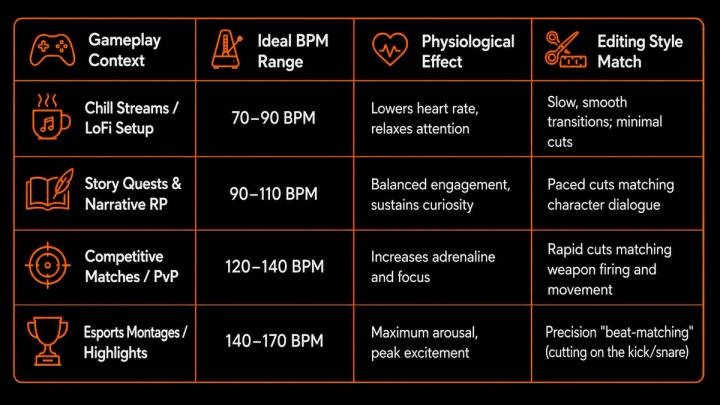
Pro Tip: When editing high-octane highlight montages, import your track and place markers on every downbeat. Align your video cuts, headshots, or perfect dodges exactly on these markers. This audiovisual synchronization triggers a powerful dopamine release in the viewer.
🎬 4. Auditory Architecture: Professional Audio Mixing Guidelines
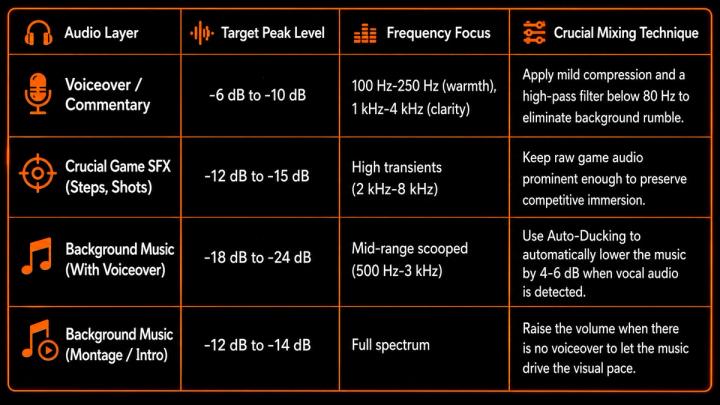
Great audio design is about maintaining an organized spectral hierarchy. In gaming content, your soundtrack must coexist with vocal commentary, game sound effects (SFX), and system cues without causing auditory masking (where louder sounds drown out subtle, critical details).
To ensure broadcast-quality audio, apply these target decibel levels in your editing suite (Premiere Pro, DaVinci Resolve, or Final Cut):
📊 Professional Gaming Video Audio Matrix
🎧 5. Vocal vs. Instrumental Soundtracks
Choosing between vocal and instrumental music is a strategic decision based on your video format:
- Instrumental Music (The Default Standard):Essential for Let’s Plays, tutorials, and walkthroughs. Vocals in music directly compete with spoken commentary in the same frequency band (1 kHz to 3 kHz), leading to cognitive overload for the viewer.
- Vocal Music (The Cinematic Highlight): Perfect for cinematic intros, end screens, and high-energy montage edits. Human vocals convey rapid emotional narratives, making them ideal for highly edited, non-commentary storytelling.
🤖 6. Accelerating Workflow with Semantic AI Music Search
Finding the perfect track in traditional music libraries can take hours of tedious filtering. Generative Search and Semantic AI have revolutionized this creative bottleneck.
Rather than searching by rigid tags like "electronic fast," modern creators use natural language queries to pinpoint specific emotional contexts. AI search engines analyze the acoustic features, frequency distribution, and emotional valence of music to find immediate matches.
For example, on the VividSound Library platform, creators can leverage advanced semantic search using highly specific prompt structures:
- “Uplifting, high-fantasy orchestral track with a rising tempo for a final boss victory sequence.”
- “Low-fi synthwave beat with heavy sub-bass and no sharp mid-range melodies, suitable for soft commentary.”
- “Spooky, dark-ambient drone with occasional metallic clangs, under 90 BPM for a horror survival game.”
By translating raw emotional descriptions into exact musical matches, AI-powered music curation cuts your editing workflow in half.
🛠️ 7. Avoiding Costly Copyright and Mixing Pitfalls
❌ The "Trending Song" Trap
- The Risk: Using a viral billboard pop track in your gameplay clip might seem like a great way to capture attention, but without proper commercial licensing, your video faces immediate Content ID claims, monetization blockages, or geographic bans.
- The Solution: Build a robust soundtrack using commercially pre-cleared, high-quality music from platforms like VividSound Library, ensuring your channel's monetization stays 100% secure.
❌ Sudden, Jarring Audio Cuts
- The Risk: Cutting music abruptly at the end of a scene instantly breaks the psychological illusion of immersion.
- The Solution: Always apply a constant power crossfade (at least 1 to 2 seconds long) or align cuts with natural musical phrases (usually on the 4th or 8th beat) to ease the listener transition.
🎮 Elevate Your Content with VividSound Library
Your gameplay deserves more than generic royalty-free elevator music. VividSound Library is a premier platform meticulously designed for the modern audio-visual creator. We offer:
- Cinematic Production Values: Tracks produced by world-class sound designers and composers, covering everything from AAA-grade orchestral scores to cutting-edge cyber-synth.
- Streamer-Safe Licensing: 100% pre-cleared, copyright-safe tracks that protect your videos from demonetization on YouTube, Twitch, and TikTok.
- Intuitive AI-Powered Search: Locate the perfect tempo, energy wave, and emotional aesthetic in seconds—keeping you focused on your edit, not the search bar.
❓ FAQ
Q1. How do I choose the best background music if I talk throughout the entire video?
A: Opt for instrumental, low-complexity ambient or lo-fi tracks. Avoid tracks with complex synthleads or piano solos that occupy the same 1 kHz to 3 kHz range as the human voice. Ensurethe music volume peaks no higher than -20 dB.
Q2. Can I use copyright-free music from YouTube channels?
A: While some tracks are safe, many "copyright-free" channels do not own the full master rights, or the artist may change the licensing terms in the future, resulting in retroactive claims on your older videos. Using a dedicated library like VividSound Library provides legal certainty.
Q3. What is the best way to handle music during a jump-scare in a horror game?
A: Use a tense, high-frequency string or synthesizer pad beforehand. Immediately drop the music to complete silence (or sub-audible low rumble) 0.5 seconds before the jump scare, allowing the game's native jump-scare audio effect to deliver maximum contrast and physical impact.
✅ Conclusion
In modern digital media, music is not a passive background layer; it is the emotional driver of your narrative. By matching your soundtrack to your gaming genre, aligning tempos with visual pacing, and maintaining clean decibel balance, you transform standard gameplay into a highly polished, cinematic experience.
Explore the curated gaming collections on VividSound Library today, and discover how professional sound design can supercharge your retention, audience engagement, and channel growth.