
⚡ Quick Answer
Yes. You can remove background music from a video while keeping the voice intact by using AI audio separation (audio demixing / stem extraction) tools. These systems use deep learning models trained to isolate speech, vocals, and sound effects from background music.
Simply muting the video removes all audio elements. AI audio demixing instead estimates the unwanted music component and isolates or suppresses it while preserving dialogue, narration, and critical ambient sounds.
The Workflow:
Original Video ➔ AI Audio Demixing & Stem Separation ➔ Preserve Voice & Vocals ➔ Preview & Review ➔ Match New Licensed Music ➔ Export
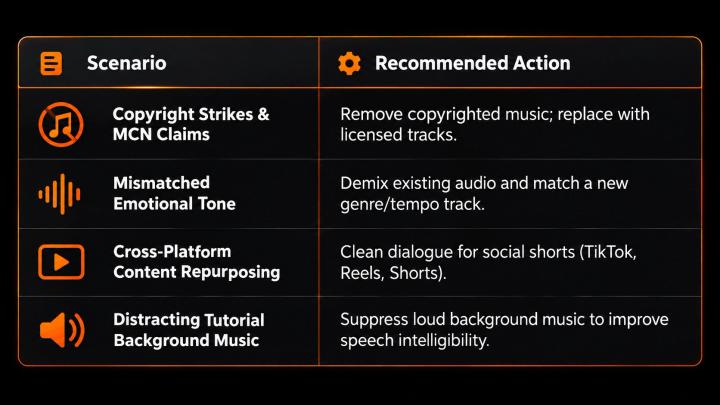
This approach is essential when your video contains background music that is copyrighted, distracting, or artistically outdated.
🎙️ Why Simple Muting Fails: The Mixed-Audio Challenge
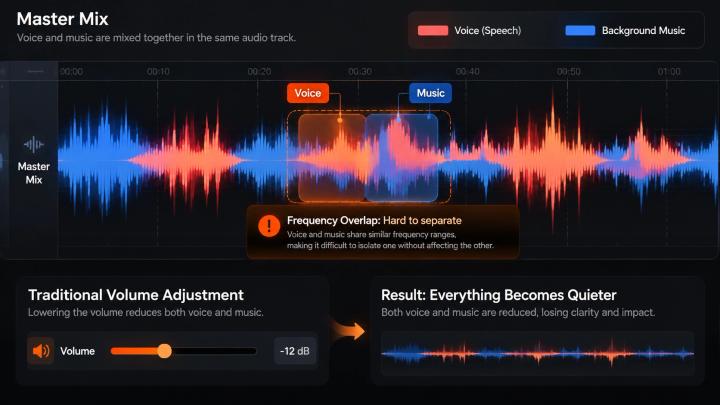
A finished video typically combines multiple audio elements into a single stereo or mono audio track:
- 🎤 Voice & Dialogue (Narration, interviews, spoken commentary)
- 🎵 Background Music (Instrumentals, soundtracks, backing tracks)
- 🌿 Ambient Sound & Room Tone (Environmental atmosphere, wind, background noise)
- 🔊 Sound Effects (SFX) (Foley, impacts, transitions)
When these elements are flattened into a single master audio track, traditional equalizer (EQ) or volume controls cannot turn down the music independently without muting the dialogue.
📊 Audio Component Breakdown
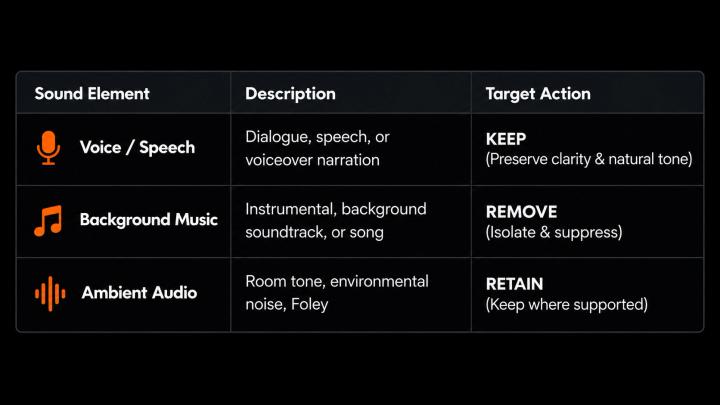
🤖 What Is AI Audio Separation and Demixing?
AI Audio Separation (also known as Audio Demixing, Stem Separation, or Vocal Isolation) is a deep-learning technique that isolates individual sound sources within a single mixed recording.
Unlike standard frequency filtering or noise gates, deep-learning models analyze complex audio spectrograms to differentiate voice formants, harmonic patterns, and musical transients—even when speech and music overlap across identical frequency ranges.
📚 Key Academic & Industry Insights
- A 2024 IEEE International Conference on Multimedia and Expo study (Jointly Recognizing Speech and Singing Voices Based on Multi-Task Audio Source Separation) demonstrates how neural networks separate overlapping speech and musical components from dense audio mixtures.
- Research from IEEE/ACM Transactions on Audio, Speech, and Language Processing highlights that deep learning-based speech separation systems accurately estimate target speech while filtering competing acoustic sources.
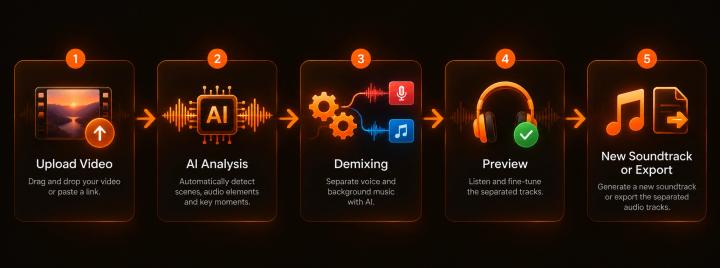
❓ How to Remove Background Music From a Video in 5 Steps
Step 1: 📤 Upload Your Master Video File
Upload your final video file (MP4, MOV, WebM, AVI, MKV). You do not need original project files, DAW session stems, or unrendered audio multitracks.
Step 2: 🧠 Run AI Stem Separation Analysis
The AI model scans the audio track to identify and split sound categories (Speech Stems vs. Music Stems vs. Ambient Stems).
Step 3: 🎚️ Suppress and Remove the Background Music
The algorithm separates the estimated music track while holding the voice stem steady:
Cleaned Audio≈Voice Stem+Retained Ambient Stem
Step 4: 🎧 Check Voice Clarity and Artifacts
Listen to the dialogue to ensure natural cadence and clarity. High-quality separation preserves vocal formants without adding phase artifacts or robotic distortions.
Step 5: 🎵 Replace Music or Export Clean Dialogue
Choose your publishing route:
- Option A (Dialogue Only): Export clean speech for podcasts, interviews, or voiceover tutorials.
- Option B (Complete Soundtrack Replacement): Replace copyrighted or unwanted tracks with fresh, licensed music matched to video keyframes.
🎬 Use Cases for Music Separation & Replacement
🚀 How VividSpark AI Soundtrack Simplifies Audio Workflows
VividSpark AI Soundtrack integrates advanced AI audio separation, stem isolation, and automated soundtrack replacement into a unified video workflow.
- Micro-Level Music Removal: Upload your video and isolate vocals/dialogue from unwanted music in seconds.
- Context-Aware Music Matching: VividSpark analyzes scene cuts, emotional beats, pacing, and visual transitions to automatically generate and align fresh, royalty-free soundtracks.
- Timeline Fine-Tuning: Preview stems, adjust balance, and fine-tune musical mood shifts scene-by-scene.
- High-Resolution Export: Export production-ready videos with pristine dialogue and new soundtrack scoring (supports MP4, MOV, WebM, AVI, MKV up to 8 minutes).
❓ FAQ
Q1: Can I remove background music from a video without removing the voice?
A: Yes. AI audio separation and stem demixing algorithms isolate speech patterns from musical instruments, allowing you to reduce or eliminate background music while keeping the voice intact.
Q2: What is the difference between vocal isolation and muting?
A: Muting silences all audio tracks completely. Vocal isolation uses deep learning to separate speech stems from music stems, leaving the voice audible.
Q3: Does AI stem separation cause audio quality loss or artifacts?
A: If music is exceptionally loud or heavily distorted, minor audio artifacts may occur. However, modern deep-learning separation models used by tools like VividSpark preserve clean, natural speech with minimal loss.
Q4: Can I replace removed background music with new copyrighted-free music?
A: Yes. Once the original music stem is removed, you can overlay a new licensed audio track. VividSpark AI Soundtrack automatically matches new licensed music to your video scenes and pacing.
🏁 Conclusion
Removing unwanted background music while retaining natural dialogue is essential for video repurposing, copyright protection, and content quality.
By leveraging AI stem separation and audio demixing, creators no longer need original audio project multitracks to achieve professional sound clarity.
Try VividSpark AI Soundtrack today to remove background music, preserve your original voiceover, and automatically score your videos with high-quality licensed music.