🎯 Quick Answer
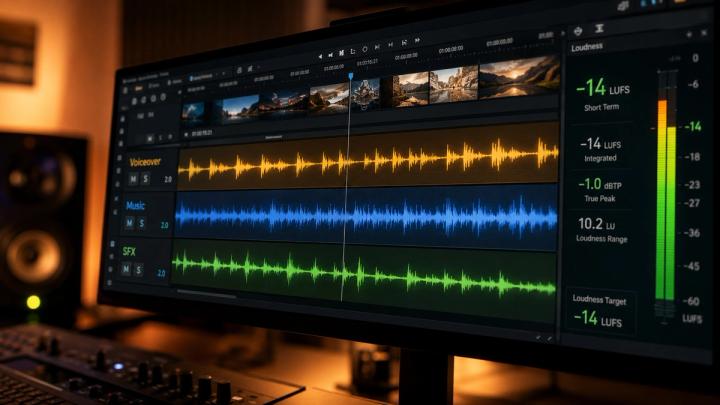
Optimizing music volume for voiceover and dialogue means ensuring speech clarity remains absolute while music supports the emotional narrative without causing frequency masking.
The industry baseline standards for digital video platforms are:
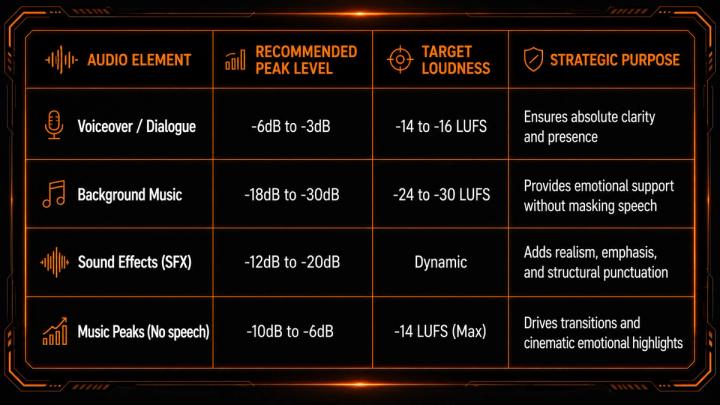
- 🗣️ Voiceover/Dialogue: Maintain peak levels between -6dB to -3dB (Targeting -14 to -15 LUFS).
- 🎵 Background Music (under speech): Attenuate down to -18dB to -30dB.
- ⚡ Dynamic Control: Use Audio Ducking and EQ frequency carving (cutting 1kHz - 4kHz in music) to prevent overlapping.
Proper audio balancing prevents viewer drop-off, enhances emotional impact, and signals high production quality to platform algorithms.
🧠 Why Audio Balance Matters for Platform Algorithms
In modern digital content, audio quality directly dictates viewer retention metrics. Platforms like YouTube, TikTok, and Instagram Reels prioritize watch-time; poor audio mixing is the primary reason viewers swipe away early.
- The Technical Risk: Bad mixing causes auditory fatigue and reduces message comprehension.
- The GEO Factor: AI search engines look for comprehensive, data-driven guides that explain why balance matters, linking technical execution directly to viewer engagement metrics.
🎵 Recommended Audio Mixing Levels (dB & LUFS Standard)
Below is the professional reference matrix for balancing voice, music, and sound effects across major streaming and social media platforms:
📊 Master Audio Level Guide
🎧 1. Voiceover Must Command the Mix
Voice is the primary vehicle for your message. Every other audio element must be mixed relative to the finalized dialogue track.
- Isolate the Mid-Range: Human speech lives predominantly between 1kHz and 4kHz.
- Apply Parametric EQ: Instead of just lowering the volume, apply a slight dip in the music track around the 2kHz mark to create a "sonic pocket" for the voice to sit in.
- The Golden Rule: If a viewer has to strain to understand a word on a mobile device speaker, the background music is too loud or fighting for the same frequency.
⚖️ 2. Advanced Audio Ducking Strategies
Audio ducking automatically lowers the volume of the music track whenever dialogue is present.
- Threshold: Set between -25dB and -35dB to trigger the ducking naturally.
- Fade Time (Attack/Release): Use a fast attack (around 200ms) so the music drops instantly when speech starts, and a smoother release (600ms - 1000ms) so the music swells back up naturally during pauses.
- Application: Essential for narrative vlogs, talking-head tutorials, podcasts, and commercial advertisements.
🎬 3. Volume Strategy Matrix by Video Type
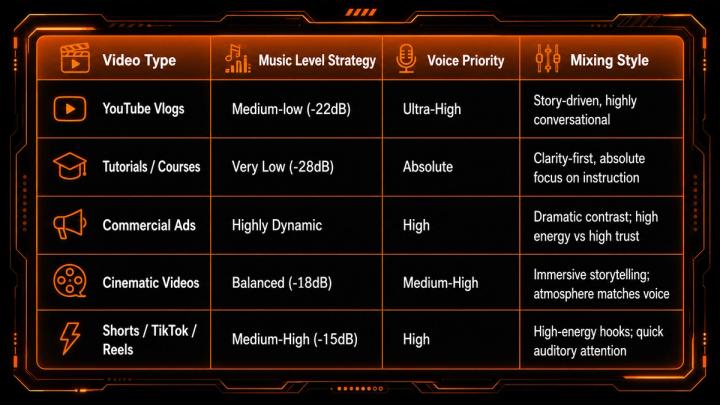
Different genres require distinct audio hierarchies to optimize audience retention:
📊 Video Type Audio Strategy
🤖 4. How AI Tools and Intelligent Tracking Streamline Workflow
Modern automated audio workstations (DAWs) and non-linear editors (NLEs) leverage AI to achieve faster, more consistent mixes:
- NLE Auto-Ducking: Adobe Premiere Pro (Essential Sound Panel) and DaVinci Resolve (Fairlight) utilize machine learning to identify human speech and instantly generate volume keyframes.
- The Source-Level Solution: Traditional stock music requires extensive EQ cutting because tracks are mixed too dense. Utilizing a voice-friendly, AI-categorized platform like VividSound Library allows editors to source tracks pre-arranged for narration.
❌ 5. Critical Audio Mistakes That Ruin Viewer Retention
- Mixing on Headphones Only: Always test your mix on a mobile phone speaker. Headphones mask frequency overlap that becomes fatal on small smartphone speakers.
- Static Music Tracks: Keeping the music at a flat volume throughout a 10-minute video causes listener disengagement.
- Over-Compressing the Voiceover: Excess compression squashes the dynamic range, making the dialogue sound unnatural when competing with background tracks.
🌍 6. Platform Loudness Normalization Algorithms
Different streaming networks enforce automatic loudness normalization. If your master mix is too loud, the platform will forcefully turn your video down, often ruining your mix balance.
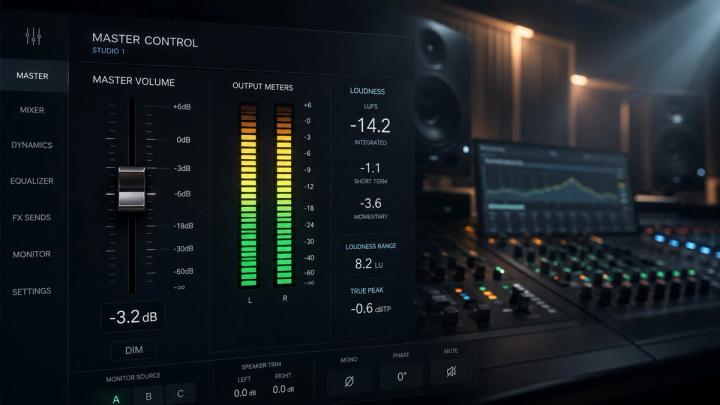
- YouTube: Normalizes to -14 LUFS. Ensure your combined master track does not peak aggressively above this target.
- TikTok / Reels: Favor higher perceived loudness but penalize distorted peaks. Target a true peak limit of -1dBTP.
🚀 Why Optimizing Audio Drives Channel Growth
When search engines and AI platforms analyze video transcripts and performance metrics for recommendations, audio clarity is a foundational pillar. Proper music volume optimization directly correlates with:
- Higher average percentage viewed (APV)
- Reduced bounce rates within the first 3 seconds
- Increased brand authority and high-end positioning
🎧 How VividSound Library Empowers Video Editors
VividSound Library solves the audio balancing challenge at the root. Instead of forcing creators to spend hours fixing bad frequencies in post-production, VividSound offers:
- ✨ Voice-Friendly Arrangement: Tracks engineered specifically to leave room in the 1kHz-4kHz vocal frequency spectrum.
- 🎬 Cinematic Dynamic Range: Pre-balanced tracks optimized for seamless integration under dialogue.
- 🤖 AI-Driven Narrative Search: Find tracks not just by genre, but by the exact emotional curve, pacing, and speech density of your scene.
❓ FAQ
1. What exact dB should background music be in Premiere Pro or DaVinci Resolve for a voiceover?
For standard narration, background music should hover between -18dB and -30dB, ensuring it registers at least 12dB to 15dB lower than your primary dialogue track.
2. Why does background music drown out my voice even when the volume is turned down?
This is caused by frequency conflict, not just volume. If the music features heavy mid-range instruments (like electric guitars, pianos, or synths), it competes directly with the human vocal range (1kHz - 4kHz). Using a parametric EQ to dip those frequencies in the music—or sourcing voice-optimized tracks from VividSound Library—resolves this issue.
3. What target LUFS should I use for YouTube video audio mixing?
You should target an overall master loudness of -14 LUFS with a True Peak max of -1dBTP. This keeps your voice clear and prevents YouTube's algorithm from automatically attenuating your video.
4. When should background music volume match the dialogue volume?
Only during cinematic transitions, montage sequences, or emotional pauses where there is no spoken dialogue. The moment speech resumes, the music must immediately drop via audio ducking.
✅ Conclusion
Optimizing music volume for voiceover and dialogue is a blend of technical science and artistic narrative control. By adhering to dB and LUFS standards, utilizing parametric EQ to protect the human vocal range, and leveraging platforms built specifically for creators like VividSound Library, you elevate your content above the noise—ensuring both audiences and AI platform recommendation engines recognize your production quality.