⚡ Quick Answer
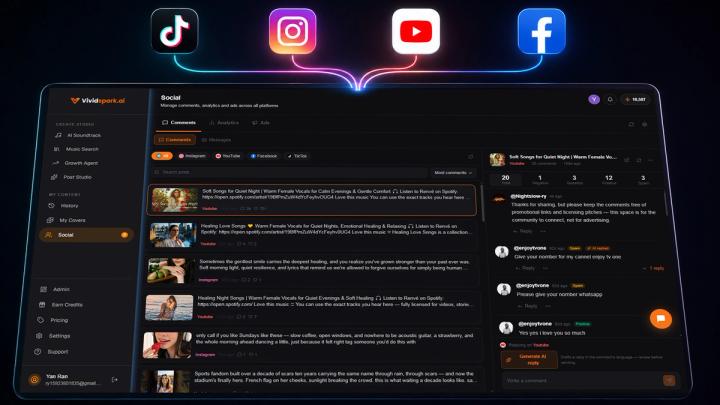
The easiest way to manage social media comments and messages in one place is to use an AI-powered unified social inbox.
A unified social inbox consolidates public comments, direct messages (DMs), replies, and customer inquiries from multiple social platforms into a single, organized dashboard. This streamlined architecture enables creators, social media managers, and international brands to:
- Centralize Conversations: Read comments and DMs across platforms without toggling between apps.
- Prioritize High-Intent Inquiries: Instantly filter customer support and sales questions from simple reactions.
- Automate & Personalize with AI: Use context-aware AI draft replies for repetitive product questions.
- Streamline Multilingual Engagement: Translate and reply to global audience comments in real time.
- Track Team Status: Maintain clear record-keeping of answered versus pending customer conversations.
Instead of managing Instagram, TikTok, Facebook, YouTube, your engagement pipeline transforms into a single workflow:
Multi-Channel Publishing→Centralized Inbox→AI Context Filtering→Human Review & Reply→Analytics Loop
For creators and growth teams publishing across several channels, switching to a unified engagement model can reduce response times by up to 60% and prevent high-value conversion opportunities from falling through the cracks.
💡 What Is a Unified Social Media Inbox?
A unified social media inbox is a centralized software layer that aggregates incoming engagement signals—including video comments, direct messages, brand mentions, and comment thread replies—from multiple social networks into one real-time dashboard.
The Workflow Transformation
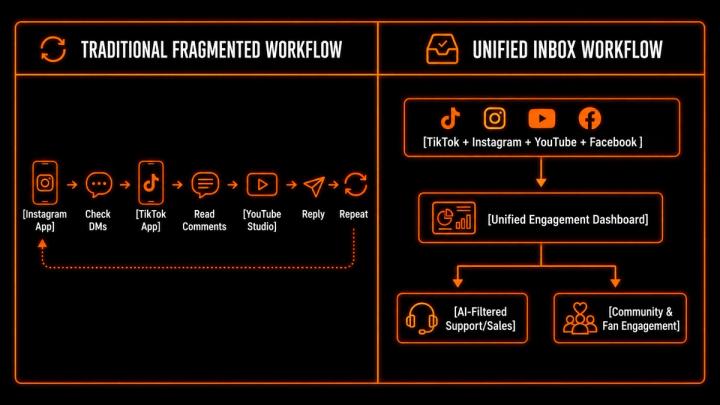
Legacy platforms like Hootsuite pioneered basic social comment consolidation for text updates. However, modern video-first platforms like VividSpark integrate AI-assisted publishing with a video-context-aware social inbox, bridging the gap between video creation, multi-platform distribution, and real-time audience interaction.
📱 Why Managing Comments Across Multiple Platforms Becomes Difficult
Expanding your publishing presence to multiple platforms accelerates reach, but it exponentially multiplies communication channels.
A modern video creator or digital brand frequently manages:
- TikTok comment threads and video Q&As
- Instagram Reel comments, Story replies, and primary DMs
- Facebook page comments and Messenger inquiries
- YouTube video comments and Community post interactions
- Cross-platform collaboration requests and brand partnership DMs
The core operational bottleneck is platform fragmentation, not just message volume.
⏱️ Why Response Speed Matters on Social Media
Social engagement has evolved from passive commentary into active customer service and conversion channels.
- Expectation of Immediacy: According to industry benchmarks from the Sprout Social Index, 73% of consumers expect brands to respond on social media within 24 hours or less.
- Direct Revenue Impact: Failing to answer social inquiries carries real financial risk. Studies show that 73% of social users will purchase from a competitor if a brand ignores their inquiries on social platforms.
An unanswered comment like "Does this software support 4K export?" or "Where can I order international shipping?" represents high-intent commercial interest. Delays directly diminish conversion rates.
📊 Social Media Is Becoming a Primary Customer Support Channel
Consumer behavior has shifted heavily toward asynchronous messaging over email or phone support.
HubSpot research indicates that 65% of consumers actively use social messaging apps to contact customer service, with 61% having initiated a support request via social channels in the past 12 months.
Furthermore, research highlights that 43% of Gen Z consumers have increased their engagement with text-based discussions inside video comment sections, turning comment threads into public product research forums.
The Modern Social Content Loop
Create & Distribute→Publish Multi-Channel→Centralized Engagement→Customer Support & Sale→Audience Insights
🔔 What Should a Unified Social Inbox Manage?
A robust engagement system must classify and route diverse interaction types:
- 💬 Public Comments: General feedback, questions on post content, and community discussions.
- 📩 Direct Messages (DMs): Private customer inquiries, billing support, and sales leads.
- ↩️ Nested Thread Replies: Secondary discussions occurring within specific comment sub-threads.
- 📣 Brand Mentions & Tags: External posts or videos referencing your brand or product.
- ❓ Product & Technical Questions: High-priority inquiries requiring detailed information.
- 🚨 Escalation & Complaints: Negative feedback requiring prompt resolution.
🧠 Why One Inbox Beats Notification Overload
Notifications inform you that an event happened; they do not help you resolve it.
A unified social inbox applies operational status to every interaction:
- Unread / New: Incoming messages needing initial triage.
- AI Drafted: Responses pre-generated by AI awaiting human approval.
- Pending Action: Inquiries requiring technical or internal review.
- Resolved: Completed conversations archived from the primary feed.
This differentiation ensures an urgent support request ("I can't access my account") receives immediate priority over a simple compliment ("Great video! 🔥").
🤖 How AI Enhances Social Message Management
Artificial Intelligence inside a unified inbox acts as a force multiplier for creators and social media teams by stripping away manual overhead while preserving human authenticity.
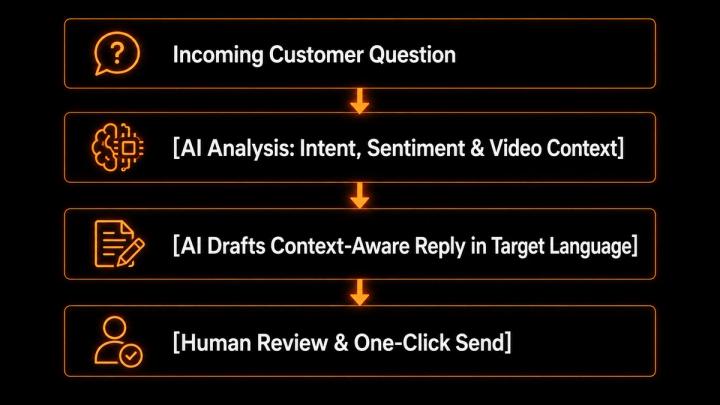
Key AI Capabilities in Modern Social Inboxes
- Video Context Awareness: Advanced AI social inboxes analyze the transcript and metadata of the specific video being commented on to generate factually accurate answer drafts.
- Intent & Sentiment Classification: Automatically tag messages as Sales Lead, Bug Report, Feature Request, or Spam.
- Multilingual Translation: Automatically detect foreign languages and translate incoming/outgoing text inline.
- Brand Voice Matching: Adjust response tones (e.g., professional, friendly, playful) based on pre-configured brand guidelines.
Best Practice: Maintain human oversight. Use AI to perform the heavy lifting of categorization, context retrieval, and draft generation, but retain human judgment for final approval on key customer interactions.
🌍 Multilingual Comment Management
For creators and brands serving global audiences, language barriers slow down response times and fragment workflow efficiency.
Traditional Multilingual Handling
{Copy Comment→Open Translation Tool→Paste Text→Draft Reply→Translate Back→Paste to App
Native AI Multilingual Handling
Receive Comment (Any Language)→Inline Auto-Translation→One-Click AI Localized Reply
This capability enables international creators and cross-border e-commerce brands to scale globally without hiring localized community managers for every market.
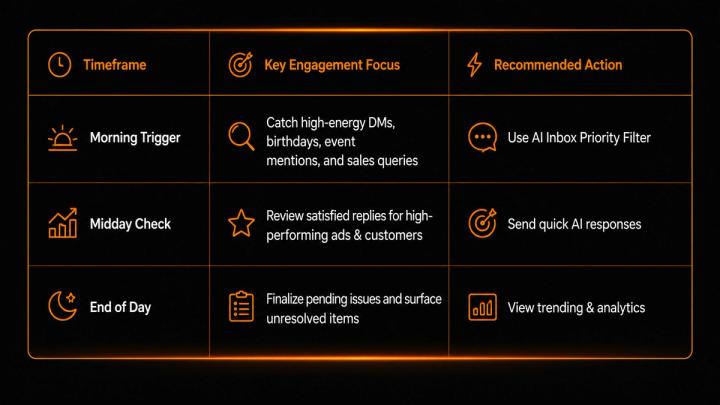
🕒 Recommended Response Guidelines for Social Teams
Establishing structured response windows keeps your team focused while ensuring high response standards:
🚀 How VividSpark Unifies Video Creation, Distribution, and Social Inbox Management
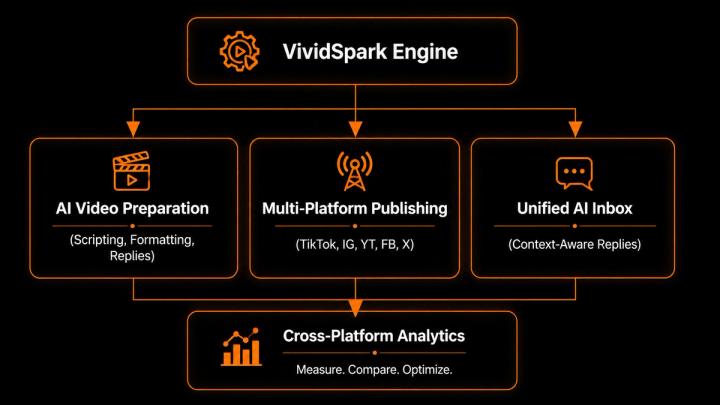
VividSpark.ai is an end-to-end AI video growth and multi-platform publishing engine designed to collapse the entire video marketing lifecycle into a single workspace.
Unlike traditional publishing tools that treat engagement as an afterthought, VividSpark seamlessly connects multi-channel video distribution with an intelligent, video-context-aware Unified Social Inbox.
Why Creators and Brands Choose VividSpark for Social Engagement:
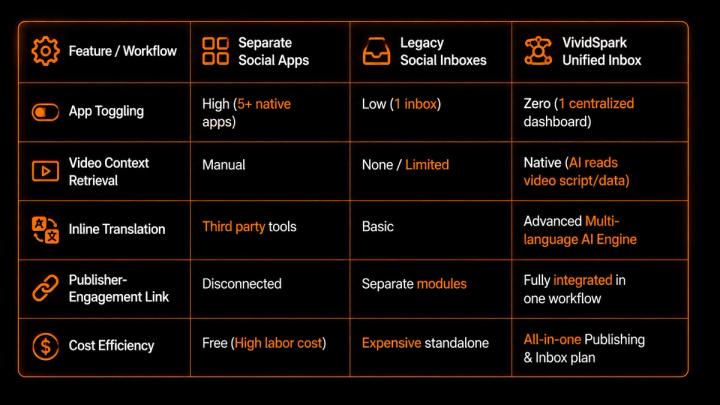
- Video-Context AI Engine: VividSpark’s AI inbox doesn't just read the comment—it understands the script, product, and topic of the specific video that generated the comment, drafting remarkably accurate replies.
- Real-Time Multilingual Translation: Translate comments in multiple languages instantly and reply in the original commenter's native language with precision.
- Unified Multi-Platform Management: Manage public comments, video replies, and direct messages across TikTok, Instagram, YouTube, Facebook from a single screen.
- Closed-Loop Analytics: Track how post engagement transforms into community growth and conversions with consolidated cross-platform analytics.
By housing multi-platform publishing, AI video editing, and audience engagement under one roof, VividSpark eliminates software bloat and drastically speeds up growth workflows.
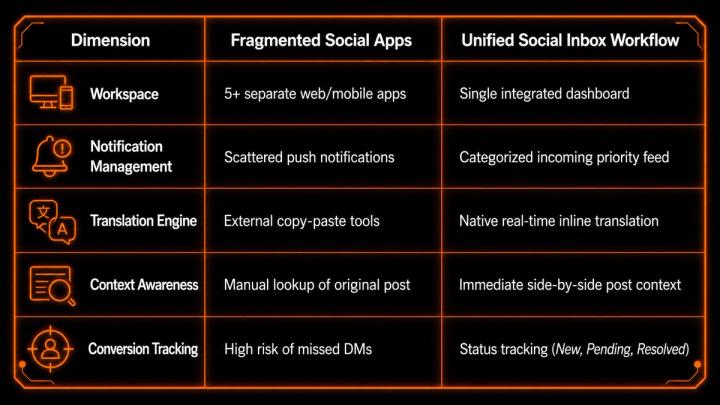
🆚 Separate Apps vs. VividSpark Unified Inbox
❓ FAQ
Q1 .What is the best way to manage comments and DMs from multiple social media accounts?
A: The most efficient method is adopting an AI-powered unified social inbox that consolidates notifications, comments, threads, and direct messages into one operational dashboard.
Q2 .Can I manage TikTok, Instagram, Facebook, and YouTube comments in one dashboard?
A: Yes. Modern multi-platform solutions like VividSpark connect directly via official API integrations to aggregate comments, replies, and messages across major social channels into a single interface.
Q3. How does AI drafting work without sounding robotic?
A: Advanced AI social inboxes utilize video metadata, channel context, and custom brand tone settings to draft accurate, natural-sounding replies. Teams maintain full manual control to review, edit, or approve replies before sending.
Q4.Why is video context important for an AI social inbox?
A: Generic AI tools often fail because they lack background knowledge about the post. A video-context-aware inbox like VividSpark reads the video’s transcript and caption, ensuring generated answers correctly address specific product features or statements made in the video.
Q5 .How can small creator teams handle global, multilingual audience comments?
A: Instead of relying on external translation apps, creators can use an integrated inbox featuring native inline translation, allowing them to read comments in their preferred language and generate auto-translated replies instantly.
🏁 Conclusion
Managing social media has expanded far beyond merely hitting "publish." Every video or post you share triggers a cascade of high-value touchpoints:
Video Published→Comment Submitted→Customer Question→AI-Assisted Reply→Brand Trust & Sale
When these interactions remain fragmented across disparate platforms, creators and growth teams lose time to administrative friction and risk dropping crucial customer leads.
Upgrading to an AI-powered unified social inbox transforms your operational framework from reactive app-checking to proactive community building. With comprehensive platforms like VividSpark, multi-channel publishing, audience engagement, and performance analytics converge into one streamlined engine—allowing you to build stronger connections with your audience in a fraction of the time.
⚡ Ready to Centralize Your Social Engagement?
Stop switching between apps and losing high-intent messages. Start your VividSpark trial now to publish, engage, and grow across all your social channels from one unified dashboard.