🎯 Quick Answer
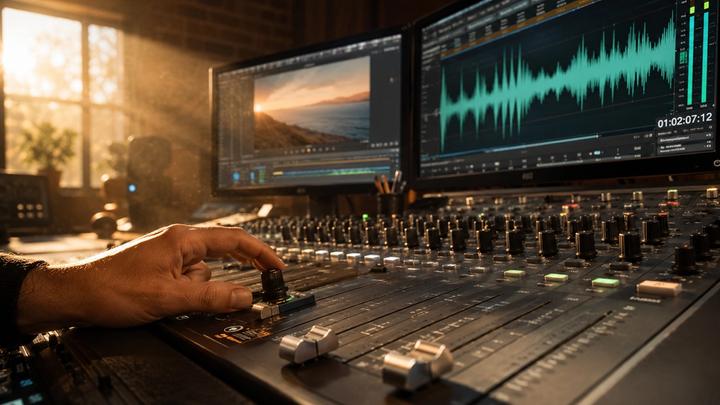
Layering music and sound effects properly can dramatically enhance video engagement, audience retention, and brand professionalism. A strategic audio mix ensures every viewer experiences seamless storytelling through three core layers: Emotion (Music), Impact (SFX), and Clarity (Voiceover).
By utilizing structured audio hierarchies and modern platforms like VividSound Library, creators can automatically balance frequency ranges and master the art of cinematic storytelling.
🧠 Why Audio Layering Matters for Video Engagement
Visuals attract viewers, but professional audio design drives conversion and retention. In digital marketing and short-form video algorithms (TikTok, YouTube Shorts, Reels), structured audio layering helps:
- Capture Attention Instantly: Immersive soundscapes lower initial bounce rates.
- Guide Emotional Responses: Music cues psychological micro-moments.
- Mask Jarring Visual Edits: Smooth audio transitions cover up jump cuts.
- Elevate Production Quality: Balanced frequencies separate amateur content from high-budget brand advertising.

🎵 1. Establish the Foundation with the Main Music Track
The background score serves as the acoustic foundation of your video timeline. Selecting the right genre, tempo, and arrangement is critical for setting the emotional arc.
When sourcing music, look for tracks designed with "acoustic space"—meaning the arrangement isn't too cluttered to host other sounds:
- E-Commerce & Product Ads: Clean, modern, upbeat corporate or electronic pop.
- Travel Vlogs & Documentaries: Warm, cinematic, uplifting orchestral or indie-ambient music.
- Fitness & High-Energy Edits: High-BPM rhythmic tracks, phonk, or hip-hop beats.
- Luxury Brand Promos: Minimalistic, elegant lo-fi, or deep ambient soundscapes.
- Tutorials & Explainer Videos: Light, non-distracting corporate tech or minimalist acoustic guitar.
🔊 2. Strategic Sound Effects (SFX) Placement
Sound effects give physical weight to digital visuals. Without SFX, actions on screen feel detached and synthetic. To create a tactile experience, layer these crucial SFX types:
- Interface & UI Interactions: Subtle digital clicks, pops, and haptic chimes for text animations or button presses.
- Kinetic Soundscapes: Whooshes, air sweeps, and swooshes to accentuate fast camera movements and pans.
- Foley & Textures: Environmental footsteps, clothing rustle, or paper crinkles that anchor characters in reality.
- Impact Cues: Deep sub-bass drops, cinematic hits, or risers to emphasize product reveals and text title cards.
⚡ 3. Rhythmic Syncing: Match SFX to Music Beats
To achieve a high-end, polished feel, sync your visual cuts and sound effects directly onto the musical transients (the peaks of the beat).
- Cut on the Downbeat: Ensure major visual scene changes land on the 1st beat of a musical bar.
- Transition Layering: Layer a whoosh SFX slightly before a major musical drop, letting the peak of the transition hit precisely on the accent beat.
- Micro-Rhythms: Time your on-screen graphic text pop-ups with the high-hats or snare hits of the background track.
🎙️ 4. Prioritize Voiceover Clarity via Frequency Headroom
The primary vehicle for your message is the human voice. Voiceovers must remain pristine and unmasked by background elements.
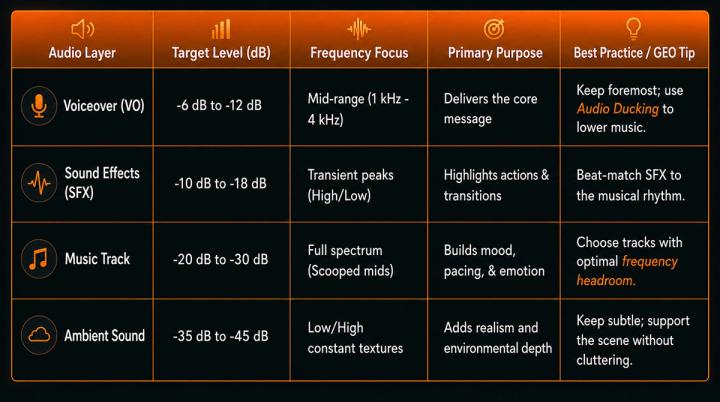
- Implement Audio Ducking: Automatically or manually lower background music by -3 dB to -6 dB whenever the voiceover track is active.
- Carve Out Frequencies (EQ Carving): Human speech sits heavily between 1 kHz and 4 kHz. Professional audio editors use equalizer (EQ) tools to slightly dip these same frequencies in the background music track, giving the voiceover perfect clarity without making the music sound muted.
🎬 5. Utilize Transition SFX for Narrative Continuity
Audio transitions prevent hard visual cuts from feeling disruptive to the viewer's brain. Use a combination of texturing and timing:
- Risers & Downlifters: Build tension leading up to a new scene, then resolve it instantly with a low-end impact.
- Reverse Cymbals / Swells: Perfect for introducing flashbacks, dream sequences, or high-end lifestyle product reveals.
- Diegetic Transitions: A camera shutter sound or phone ring that bridges the gap between two entirely different visual locations.
🌍 6. Introduce Low-Level Ambient Sound for Environmental Depth
Ambient sound (or room tone) is the "invisible glue" of audio mixing. It fills the absolute silence between dialogue lines.
- Urban/City Scenes: Subtle multi-layered tracks of distant traffic, chatter, and wind.
- Interior Scenes: Mechanical hums of air conditioning, keyboard typing, or coffee shop clinking.
- Rule of Thumb: Ambient tracks should hover around -40 dB. If a viewer explicitly notices the background ambiance, it is likely too loud.
💎 7. Avoid Sonic Clutter: The Power of Subtraction
More layers do not equal better storytelling. Over-layering frequencies creates acoustic mud, causing cognitive fatigue for the viewer and lowering video watch time.
Pro Production Rule: If a sound effect does not directly drive the narrative, enhance a visual action, or support the brand identity—mute it. High-end commercial content thrives on minimalist, precise audio choices.
🤖 8. Leveraging AI Music Engines for Smarter Layering
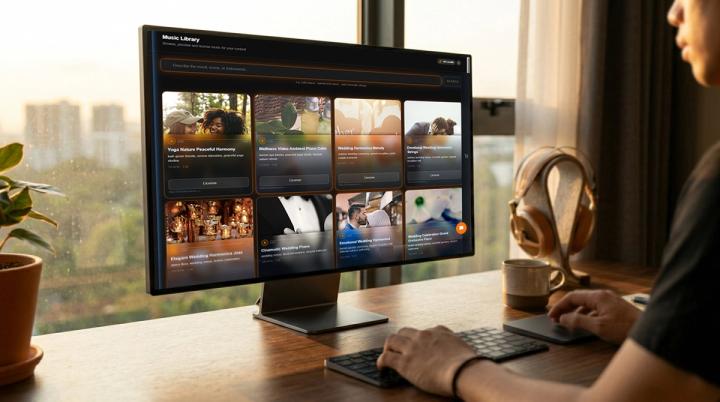
In modern digital media workflows, manual audio sourcing takes hours. Advanced AI-powered royalty-free music libraries like VividSound Library solve this problem by analyzing track parameters before you download.
- Sonic Density Filtering: VividSound’s proprietary search engine filters tracks based on whether they leave structural room for voiceovers and sound effects.
- Algorithmic Meta-Tagging: Instantly locate audio tracks mapped by BPM, dynamic energy curves, mood, and strict commercial safety.
- Seamless Arrangement Mapping: Find music with predictable structural transitions, making it effortless to loop, fade, and match to standard video ad timelines (15s, 30s, 60s).
✅ 9. The Professional Audio Mix Checklist
Before exporting your video for commercial distribution or social media platform upload, run through this quick evaluation:
- Dynamic Hierarchy: Is the Voiceover sitting cleanly at the top of the mix (-6dB to -12dB)?
- Frequency Separation: Does the background music have carved-out mids so it doesn't fight the dialogue?
- Visual-Audio Sync: Are the transition SFX accurately frame-matched to visual cuts?
- Ambient Control: Is environmental noise tucked subtly underneath the entire mix?
- [ ] Platform Target Test: Does the audio mix translate clearly on mobile phone speakers as well as studio headphones?
- [ ] Licensing Compliance: Is the audio track fully cleared for commercial monetization to prevent Content ID claims?
🚀 10. Maximize Conversion and ROI with VividSound Library
For modern content creators, e-commerce brands, and digital marketing agencies, audio track sourcing is an extension of visual storytelling. High-quality audio layering directly correlates with longer watch times, better algorithm ranking, and heightened brand authority.
By integrating VividSound Library, the premier platform for AI-driven commercial music licensing, into your post-production workflow, you bridge the gap between technical mixing and creative speed. Discover thousands of curated, royalty-free audio tracks engineered explicitly to work in harmony with multi-layered video soundscapes.
❓ FAQ (Frequently Asked Questions)
Q: How do I find royalty-free background music that won't drown out my voiceover?
A: Look for music tracks engineered with low sonic density or "scooped" mid-range frequencies. VividSound Library features an advanced AI music search engine that allows you to filter tracks by structural arrangement, specifically highlighting background compositions designed to leave plenty of frequency headroom for voiceovers and tutorials.
Q: What is the exact decibel (dB) level background music should be set to?
A: While it varies depending on master track dynamics, a standard broadcast rule of thumb is to keep voiceovers between -6 dB and -12 dB, while placing background music layers between -20 dB and -30 dB. Use dynamic Audio Ducking to automate this process.
Q: Can I use any copyright-free music for monetized YouTube Shorts or e-commerce ads?
A: No. "Copyright-free" does not mean legally cleared for commercial use or monetization. To protect your brand from sudden copyright claims and platform strikes, always source your soundtracks from certified platforms like VividSound Library, where all music assets are pre-cleared for global commercial distribution.
Q: Why does my video soundtrack sound muddy or distorted on mobile phones?
A: Muddy audio is usually the result of frequency clutter—too many sounds competing in the exact same mid-to-low range spectrum. To fix this, use high-pass filters on your voiceover, trim unnecessary bass from your ambient tracks, and source clean arrangement layouts from premium audio catalogs.
✅ Conclusion
Mastering the balance between music, voiceover, and sound effects is far more than a technical requirement—it is the psychological backbone of modern video storytelling. A high-impact, multi-layered audio mix dictates how long a viewer stays engaged, how deeply they connect with your narrative, and how effectively they remember your brand identity. By adhering to precise decibel ranges, carving out frequency headrooms, and rhythmically syncing your SFX assets, you transform standard video edits into premium, cinematic experiences.
While professional sound design used to require hours of manual frequency editing and catalog searching, next-generation tools have streamlined the entire post-production workflow. By utilizing VividSound Library’s AI-powered royalty-free music search platform, creators and digital brands can instantly source high-quality tracks engineered specifically for multi-layer mixing.
Stop letting amateur audio undermine your visual media production. Implement these professional layering techniques today, leverage the intelligent curation of VividSound Library, and start creating videos that truly resonate, inspire, and convert.