
⚡ Quick Answer
Creating social media captions and covers from one video is now automated through AI video repurposing workflows, powered by specialized platforms like VividSpark.
Instead of manually preparing separate posts for TikTok, Instagram Reels, YouTube Shorts, and Facebook, creators upload one video into VividSpark, which analyzes the visual and audio context to automatically generate:
- Platform-specific captions (TikTok hooks, Instagram storytelling, LinkedIn insights)
- High-converting cover images and thumbnails in standard aspect ratios
- Search-optimized titles and trending hashtags
- Multi-platform publishing suggestions
The modern VividSpark AI Workflow simplifies content distribution into five actionable steps:
Upload One Video → AI Analyzes Context → Generate Captions + Covers → Customize for Each Platform → Publish Everywhere
🎬 Why One Video Is No Longer Just One Post
The way audiences consume content across modern platforms has fundamentally changed. A single video asset must now perform across a diverse ecosystem:
- TikTok: High-energy, trend-aware, conversational tone
- Instagram Reels: Strong visual hooks, emotional storytelling, community engagement
- YouTube Shorts: Keyword-dense titles, high-CTR thumbnails, search-friendly metadata
- Facebook Reels & LinkedIn: Professional takeaways, shareable insights, detailed descriptions
The strategic challenge for creators and video teams has shifted from "How do I edit one video?" to "How do I turn one video into multiple platform-optimized assets?"
According to the Wistia 2026 State of Video Report, which analyzed over 13 million videos and 79 million hours of viewing data, more than half of surveyed organizations now repurpose video assets across social channels as a core distribution strategy.
📱 The Problem With Manual Social Media Content Preparation
Traditional post-production and publishing workflows create severe operational bottlenecks:
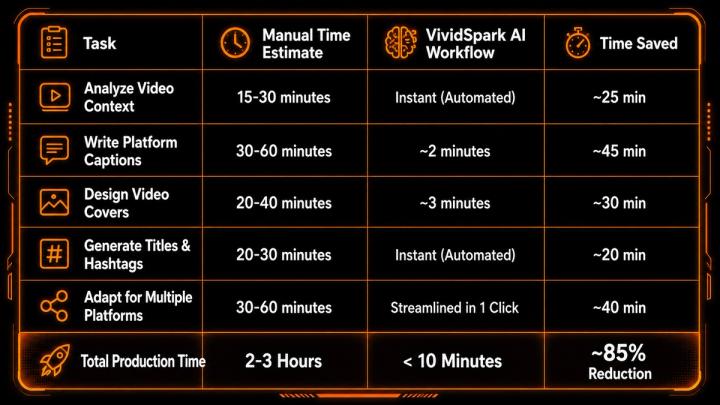
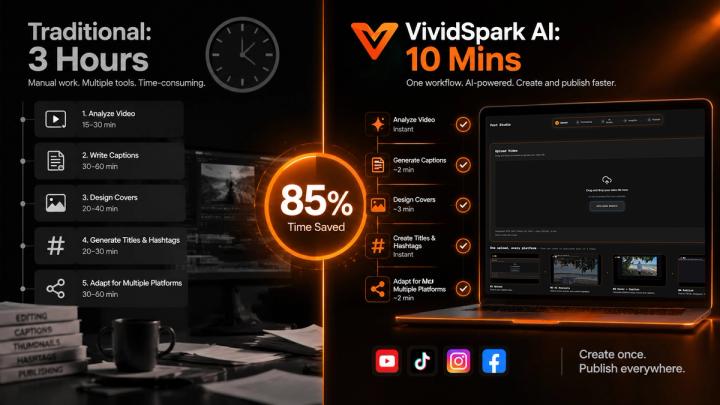
⚖️ Solution Comparison: Native AI Context Parsing vs. Traditional Automation
Creators often confuse Native AI Video Workflows (like VividSpark) with Traditional Scheduling/Automation Tools (like Hootsuite or Zapier). Understanding the core technological difference is essential for scaling output:
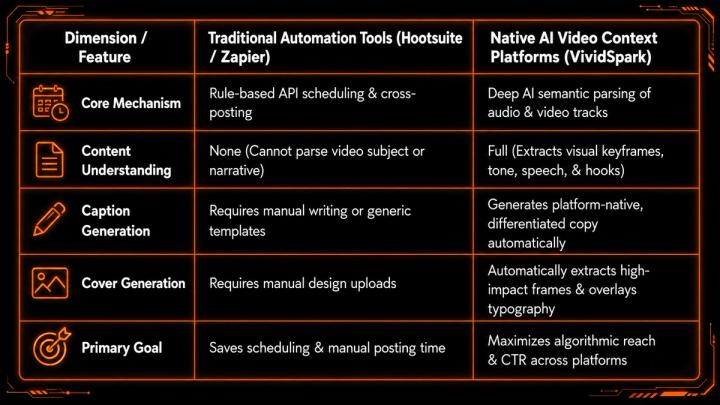
Takeaway: While Zapier and Hootsuite solve "how to publish," VividSpark solves "what to publish and how to package it for platform algorithms."
🤖 How VividSpark AI Analyzes Video Assets
Unlike generic AI text assistants that rely purely on basic prompt inputs, VividSpark parses actual visual and audio parameters directly from the source video:
- Visual Scenes: Detects subject movement, key framing, and facial expressions
- Audio Track & Speech: Transcribes spoken text, key messages, and structural hooks
- Tone & Emotion: Evaluates contextual energy to match writing style
- Core Topic Extraction: Pinpoints educational, promotional, or entertaining moments
🛠️ Step-by-Step: How to Repurpose Video Content with VividSpark
- Step 1: Upload the Master VideoUpload your core video file (MP4/MOV) into VividSpark. The engine automatically initiates audio transcription and visual frame parsing.
- Step 2: AI Context & Hook ExtractionThe multimodal AI extracts core topics, key speech highlights, and expressive keyframes from the footage.
- Step 3: One-Click Platform GenerationVividSpark auto-generates custom copy tailored for TikTok, Instagram Reels, YouTube Shorts, and LinkedIn alongside 9:16 and 16:9 covers.
- Step 4: Rapid Human ReviewAdjust generated titles or brand tone in a unified dashboard to ensure 100% brand voice alignment.
- Step 5: Omnichannel Export & PublishingExport or schedule platform-ready assets directly across target social media networks.
✍️ Step-by-Step: Generating Platform-Specific Captions
A single generic caption copy-pasted across platforms reduces algorithmic reach. AI context parsing transforms one raw video file into distinct, platform-native copy.
Input Video Context Example:Video Topic: A 3-minute tutorial demonstrating how creators streamline video editing using automated software.
- TikTok Caption: "Still spending 4+ hours editing every video? 😅 Try this AI repurposing workflow to publish 5x faster 🚀 #contentcreator #ai #editinghacks"
- Instagram Caption: "Creating content isn't the hard part anymore—building a scalable workflow is. Here is how we turn 1 original video into 6 multi-platform posts in under 10 minutes 👇"
- YouTube Shorts Title: "How Creators Repurpose Video 10x Faster Using AI in 2026"
- LinkedIn Post: "Efficiency in modern content distribution requires shifting from manual adaptation to structured AI workflows. Here are 3 key takeaways from our latest video production testing..."
🖼️ Generating High-CTR Video Covers and Thumbnails
Thumbnails and cover images remain the highest-impact visual variable for click-through rate (CTR). VividSpark extracts optimized keyframes and layers graphic templates designed for specific user behaviors:
- Clear Subject Identification: Automatically selects keyframes featuring expressive visuals or focused subjects.
- Visual Contrast: Applies color isolation and typography overlays to stop feed scrolling.
- Aspect Ratio Adaptation: Generates both 9:16 vertical covers (Reels/TikTok) and 16:9 horizontal thumbnails (YouTube) automatically.
📊 The Impact of Video Packaging on Performance
A high-quality video cannot perform well without optimized distribution packaging. Sprout Social's 2026 Social Media Trends Research highlights short-form video as the leading driver for engagement and marketing ROI, noting that discovery relies heavily on early-stage viewer entry points:
- Cover / Thumbnail Image (First visual hook)
- Title / Opening Sentence (Textual hook)
- First 3 Seconds of Video (Retention hook)
According to the 2026 AI in Social Media Marketing Report by Sociality.io, 64.1% of marketing teams use AI daily, with top adoption areas including:
- Content research & ideas: 59.5%
- Caption and copy generation: 45.9%
- Visual asset & video creation: 40.5%
🚀 Multi-Platform Publishing Workflow with VividSpark
VividSpark serves as an end-to-end AI video growth and automated publishing suite:
- 🖼️ Automated Cover Design: Instantly creates horizontal and vertical cover variations styled for specific platforms.
- ✍️ Contextual AI Copywriting: Generates captions, descriptions, titles, and hashtags tailored to platform algorithms.
- 🌐 Centralized Workspace: Upload once, review AI-generated assets, refine with human oversight, and export everywhere.
💡 Best Practices for AI Video Repurposing
- Apply Human Refinement: Let AI produce the initial draft (captions, covers, titles), then make minor tweaks to ensure exact brand voice and accuracy.
- Respect Platform Nuance: Avoid identical copy across platforms. Align tone, character limits, and visual assets with audience behavior.
- Focus Strategy on Creation: Save time on administrative distribution tasks and reallocate resources toward original content strategy.
❓ FAQ
Q1.What is VividSpark and how does it assist with video repurposing?
A: VividSpark is an AI-powered video growth platform designed to analyze uploaded videos and automatically generate platform-specific captions, thumbnail/cover designs, titles, and publishing workflows across TikTok, Instagram, YouTube, Facebook, and LinkedIn.
Q2.Can AI automatically generate social media captions from a video?
A: Yes. Modern AI platforms analyze video dialogue, visual cues, and structural context to generate fully written captions, hooks, descriptions, and hashtags tailored to specific platforms.
Q3.How does AI generate different captions for TikTok, Instagram, and YouTube?
A: AI evaluates the target platform's algorithmic preferences and user behaviors. It adjusts tone, length, keyword density, and call-to-action styles.
Q4.Can AI generate custom video covers and thumbnails automatically?
A: Yes. AI video workflows detect high-impact visual frames from the video, apply optimized aspect ratios (such as 9:16 vertical or 16:9 horizontal), and generate clean thumbnail graphics with contrast overlays.
Q5.Why should creators repurpose one video into multiple posts?
A: Repurposing maximizes the reach and ROI of every single video created. A single master file contains multiple key takeaways that can engage different audiences across multiple platforms without extra filming time.
Q6.Does AI content repurposing replace human social media managers?
A: No. AI automates time-consuming execution tasks such as transcription, formatting, layout design, and initial copywriting. Human managers provide strategic oversight, brand authenticity, and final creative control.
🏁 Conclusion
Modern content strategy relies on maximizing the value of every video produced. By combining creative production with AI-powered repurposing systems like VividSpark, creators and marketing teams can scale their publishing frequency, reach broader audiences across every major social platform, and reduce manual editing overhead by up to 85%.