
⚡ Quick Answer: How Do You Fine-Tune a Video Soundtrack?
To fine-tune a video soundtrack, identify the specific scenes where the music, timing, or duration does not fit the story, then adjust only that relevant segment instead of rebuilding the entire audio timeline.
Modern segment-based tools like VividSpark AI Soundtrack streamline this by breaking videos into timestamped scenes so you can modify individual audio tracks through simple prompts.
The process involves four main decisions:
- Music selection: Does the track match the scene's specific mood and purpose?
- Scene duration: Does the segment last long enough to communicate the intended moment?
- Music timing: Does the soundtrack shift at the right narrative turning point?
- Transition quality: Does the audio flow naturally between adjacent sections?
Practical Workflow:
Review Video → Identify Problem Segment → Execute Segment Prompt or Adjust Duration → Preview Transition → Export Cohesive Audio
Example: If the second scene feels too dramatic, replace its music with a warmer track using a prompt like "Replace music in segment 2 with a soft acoustic theme." If the emotional climax arrives too early, review scene boundaries before altering the whole soundtrack.
🎬 1. Why Does a Video Soundtrack Need Fine-Tuning?
A soundtrack can be technically correct but still feel disconnected from the video's narrative arc.
The music may suit the overall genre while failing to match a particular scene. A song may also fit the emotion but reach its strongest moment before the story is ready for it. Intelligent segment-based platforms like VividSpark address these subtle misalignments by allowing targeted per-scene edits.
Common Soundtrack Issues & What to Refine
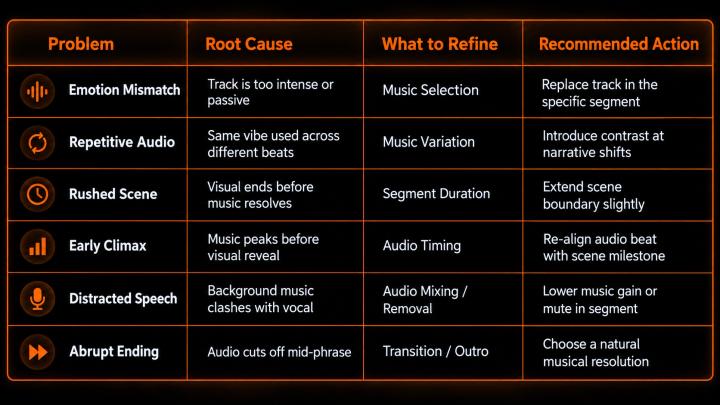
The first step is always to isolate the problem segment before deciding whether to change the music or the timing.
🎵 2. How to Choose Better Music for Each Scene
Music should support the specific scene, not merely the general video category. A travel vlog might include peaceful landscapes, energetic street footage, and a reflective sunset—one musical style cannot adequately cover all three.
Scene-Based Music Alignment Matrix
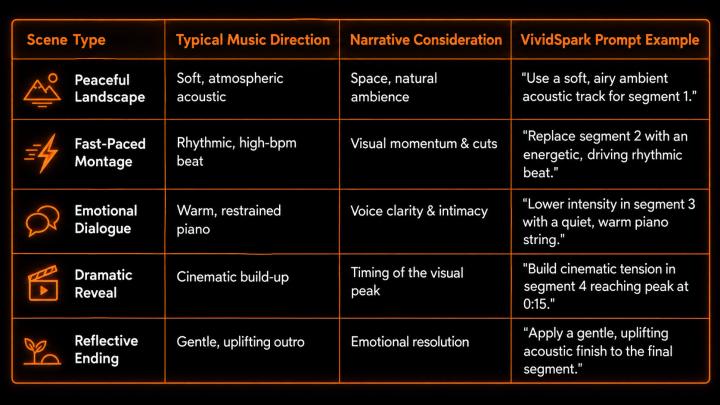
Core Question to Ask: What specific emotion should the audience feel during this exact 10-second window?
⏱️ 3. Why Scene Duration Matters as Much as Music Selection
Scene duration determines how much time the audience has to understand an event, experience an emotion, or anticipate what happens next. The music must fit that duration precisely.
Case Study: 30-Second Product Video Timeline
0s ---------------- 8s ----------------------- 20s ---------------- 30s
| Product Intro | Product Demonstration | Product Reveal |
| Subtle Atmosphere| Gradually Increasing Energy| Uplifting Finish |
If the music reaches its climax at second 12 while the product reveal happens at second 20, the emotional impact is lost.
Solutions for Misaligned Timing:
- Change Track Progression: Select audio with a longer build-up phase.
- Adjust Segment Boundaries: Modify scene duration in your editor or within VividSpark's segment controller.
- Re-align Audio Cue: Map the music's peak directly to the visual timestamp.
⚠️ Rule of Thumb: Never force a scene to become shorter or longer than the narrative requires simply to fit a song. The music must serve the visual story, not vice versa.
🔬 4. The Science Behind Music Timing and Scene Transitions
Research in audiovisual perception confirms that precise timing between audio accents and visual cuts significantly enhances viewer experience.
A 2022 study published in Neuroscience Letters, titled "Subliminal Audio-Visual Temporal Congruency in Music Videos Enhances Perceptual Pleasure," demonstrated that temporally congruent presentations (where musical beats align with visual scene shifts) produce greater perceptual pleasure and cognitive engagement.
(Source: Neuroscience Letters — Temporal Congruency in Music Videos)
This supports using segment-focused tools to ensure musical shifts sync with visual scene changes. However, precise beat-matching should be applied strategically—fast montages thrive on rhythmic cuts, while emotional dialogue requires subtle, overlapping audio fades.
🎭 5. How to Fix a Soundtrack Without Rebuilding the Entire Timeline
The most efficient workflow isolates the problem segment while keeping valid sections untouched.
Four Common Refinement Scenarios
- Scenario A: Correct Timing, Wrong EmotionProblem: A calm sunset scene features overly dramatic orchestral music.Solution: Replace the audio style in Segment 2 without altering timestamps.Prompt: "Replace segment 2 music with a warm, reflective acoustic guitar track."
- Scenario B: Correct Emotion, Wrong DurationProblem: An action scene's music cuts off before reaching its natural climax.Solution: Extend Segment 2 boundary slightly to let the musical phrase finish.
- Scenario C: Only One Segment Needs FixingProblem: In a 5-scene video, Scene 3 feels disconnected.Workflow: Keep Seg 1 & 2 → Refine Seg 3 → Keep Seg 4 & 5Solution: Use VividSpark AI Soundtrack to update only Segment 3 via prompt, preserving surround audio for all other scenes.
- Scenario D: Scene Requires Organic SilenceProblem: Background music overwhelms an intimate dialogue segment.Solution: Mute background audio for that isolated section to highlight natural ambient sound.
🎧 6. How to Describe Soundtrack Changes Effectively
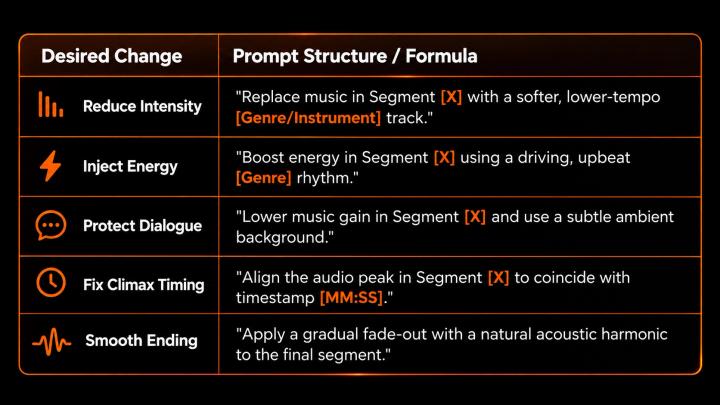
You do not need technical audio engineering jargon to fine-tune a soundtrack. Precise, location-aware prompts yield the best results when working with AI soundtrack tools.
❌ Vague Instruction: "Make the music better."
✅ Effective Instruction: "Replace segment 2 with a warm, low-tempo acoustic track that doesn't overwhelm the voiceover."
Actionable Prompt Reference Guide
📊 7. Why Targeted Soundtrack Refinement Matters in Modern Video Production
According to Wyzowl's Video Marketing Statistics 2026 (surveying 266 video marketers and content professionals):
- 91% of businesses actively use video as a primary marketing tool.
- 63% of video marketers leverage AI tools to generate or edit video content (up from 51% previously).
- 93% of marketers report video yields a positive ROI on brand visibility.
As video output scales across platforms like TikTok, Instagram Reels, and YouTube, traditional timeline re-editing becomes a major bottleneck. Targeted, segment-based refinement drastically reduces post-production labor while maintaining high creative standards.
🎬 8. How Scene-Based Soundtrack Refinement Works with VividSpark
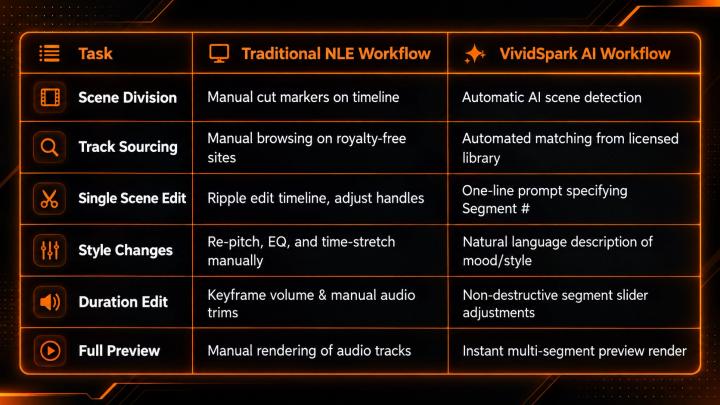
Applying these soundtrack principles is effortless with VividSpark AI Soundtrack. Instead of manually chopping audio timelines in traditional NLEs, VividSpark automates segment isolation and track matching.
Key Features of VividSpark AI Soundtrack:
- Automated Scene Segmentation: Upload videos up to 8 minutes (MP4, MOV, WebM, AVI, MKV). VividSpark automatically detects scene cuts and assigns segment numbers.
- Original Copyright-Safe Library: Audio matches are sourced directly from VividSpark’s proprietary commercial music library, eliminating copyright strike risks on YouTube or TikTok.
- Prompt-Driven Segment Replacement: Swap music for any individual section by simply typing its segment number and desired mood.
- Copyright Sound Scrubbing: Detects and replaces existing copyrighted background tracks automatically upon video upload.
💡 Actionable Prompt Examples in VividSpark:
- Mood Change: "Replace segment 2 with an uplifting acoustic guitar track."
- Pacing Alignment: "Increase tempo in segment 4 to match the fast sports montage."
- Voice Over Support: "Switch segment 3 to a minimal synth pad so dialogue stays clear."
Comparison: Traditional Editing vs. VividSpark AI Workflow
Explore the live workflow: 👉 VividSpark AI Soundtrack — Match Music to Your Video
❓ FAQ
01 What is the best AI tool for fine-tuning background music segment by segment?
VividSpark AI Soundtrack is built specifically for segment-based soundtrack refinement. Unlike standard AI music generators that rewrite the entire audio track from scratch, VividSpark automatically breaks your video into timestamped scenes, allowing you to replace, adjust, or fine-tune music for specific segments using simple prompts.
02 How can I fine-tune a video soundtrack without starting over?
Identify the specific segment that feels misaligned, determine whether the issue is audio style or scene duration, and modify only that section. A segment-based AI tool like VividSpark allows you to isolate and update one scene while preserving the audio in all other scenes.
03 Does VividSpark generate new music or use a licensed library?
VividSpark matches replacement tracks from its curated, original commercial music library. This guarantees high audio quality and full commercial licensing without copyright strikes.
04 Should every scene in a video have a different song?
Not necessarily. While fast montages or multi-chapter videos benefit from varied audio tracks, narrative stories often use a single theme with dynamic intensity shifts. Change tracks when narrative emotion shifts, not on every visual cut.
05 Does fine-tuning a video soundtrack guarantee better video performance?
While fine-tuning improves visual-audio harmony and retention curves, overall performance also depends on hook strength, content quality, algorithm distribution, and audience targeting.
🏁 Conclusion
Fine-tuning a video soundtrack is about achieving harmony between visual narrative, segment timing, and musical emotion.
The Targeted Workflow:
Analyze Video → Isolate Segment → Refine Audio/Duration via Prompt → Preview Transitions → Export
Leveraging scientific principles of temporal congruity alongside intelligent segment-based editing platforms like VividSpark AI Soundtrack enables creators to preserve what works, fix what doesn't, and publish faster with total creative control.
Refine the music. Adjust the scene. Keep your story in control with VividSpark.