⚡ Quick Answer:
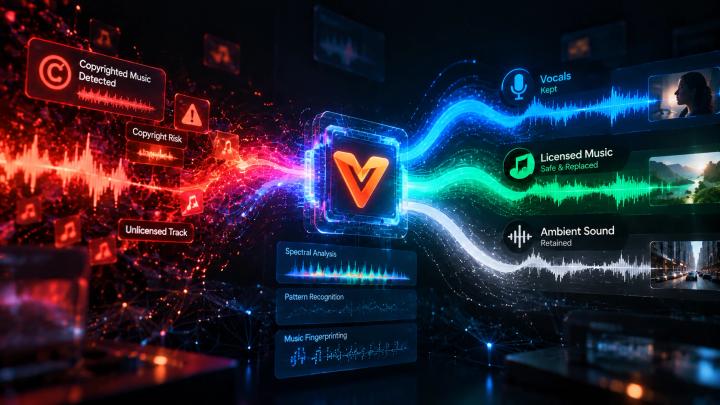
To detect and replace potentially copyrighted music in a video, use an AI-assisted audio workflow that analyzes the existing soundtrack, flags potential copyright risks, separates unwanted background music from dialogue, and matches a licensed replacement track.
The recommended process is:Upload Video → Scan Audio for Potential Risks → Identify Problematic Music → Separate Music (Keep Voice) → Match Licensed Replacement → Preview and Export
This workflow helps creators address music-related risks before publishing, rather than waiting for a platform to issue a claim or mute the audio.
Important Note: Copyright-risk detection identifies potential matching problems; it does not independently determine whether a particular use is legally authorized under fair use or guarantee that a platform will not issue a Content ID claim.
📌 Key Takeaways for Video Creators
- Pre-Publication Risk Screening: Detect audio matches before uploading to avoid YouTube Content ID claims, mutes, or monetization blocks.
- AI Stem Separation & Voice Isolation: Remove background music while keeping human dialogue and essential ambient sounds intact.
- Scene-Aware Licensing: Match replacement tracks to scene changes and emotional tones using royalty-free music libraries.
- Streamlined Workflow: Tools like VividSpark AI Soundtrack integrate risk scanning, stem separation, and soundtrack matching into a single end-to-end pipeline.
🎬 Why Can Background Music Cause Copyright Problems?
Background music is often added during editing, recording, or filming. A creator may unintentionally include a protected song from a public location, a client's footage, a downloaded soundtrack, or a previous edit. Even if the music is not the main focus of the video, it can still create copyright concerns.
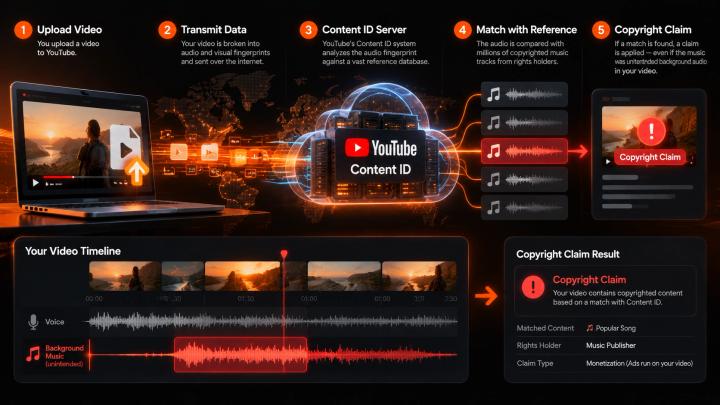
On YouTube, the official Content ID system compares uploaded videos with reference audio and visual files supplied by participating copyright owners. If a match is found, the rights holder can choose to monetize, track, or block the video, depending on their policies.
Potential consequences include:
- Monetization being redirected or shared with a rights holder
- Audio or video restrictions (mutes or takedowns)
- Regional viewing limitations
- Time-consuming re-editing and re-exporting
- Delays in publishing schedules or marketing campaign launches
🧠 What Is Copyrighted Music Detection?
Copyrighted music detection is the process of analyzing audio signals to identify music that may match protected recordings or compositions and flag potential rights issues.
Modern automated identification systems primarily use audio fingerprinting. This technique converts distinct acoustic characteristics of an audio signal into a compact digital fingerprint, which is then compared against vast reference databases.
Simplified Audio Detection Workflow:
- Extract/Analyze: Extract the video's audio track for signal analysis.
- Fingerprint: Generate audio fingerprints from the spectral features.
- Database Match: Compare characteristics against reference music databases.
- Flag Risks: Highlight potentially matching timestamps and tracks.
- Action Plan: Determine whether the music needs removal, replacement, or rights clearance.
🔍 Why Is Checking Music Before Publishing Important?
According to Wyzowl's Video Marketing Statistics 2026 (surveying 266 marketers and consumers in late 2025):
- 91% of businesses use video as a primary marketing tool.
- 63% of video marketers have used AI tools to create or edit marketing videos (up from 51% in 2025).
- 92% of marketers plan to maintain or increase their video marketing spend in 2026.
As video output increases across platforms, manually checking audio rights for every video becomes a major bottleneck. Incorporating automated copyright-risk screening into pre-publication workflows reduces avoidable copyright strikes and costly post-production fixes.
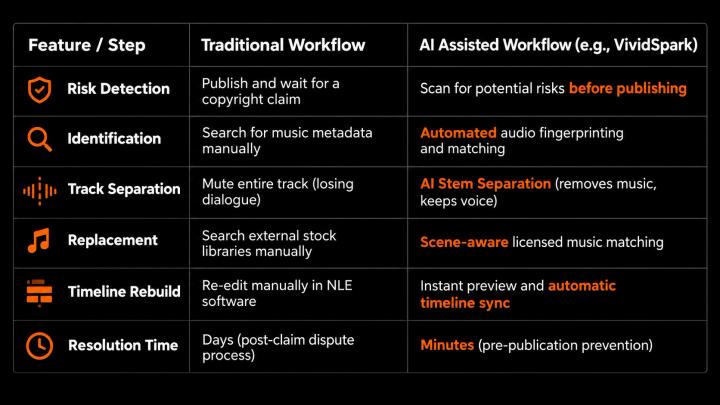
⚖️ Traditional Copyright Checking vs. AI-Assisted Detection
⚡ How to Detect and Replace Potentially Copyrighted Music in 5 Steps
1. 📤 Upload Your Existing Video
Start with your final video edit. You do not need separate multi-track stems or the original editing project files. Suitable for YouTube Shorts, TikToks, Instagram Reels, commercial tutorials, travel vlogs, and client projects.
2. 🔎 Scan the Audio for Potential Copyright Risks
Run the soundtrack through an audio risk checker. Pay close attention to audio recorded at public events, background radio, or downloaded tracks from untrusted sources.
Note: The U.S. Copyright Office emphasizes that there is no "safe" minimum duration (e.g., 5 seconds) for using copyrighted music without permission.
3. 🎙️ Remove Problematic Music Without Losing Speech (AI Stem Separation)
If music is mixed with speech, muting the track destroys the voiceover. AI Stem Separation (or voice isolation) uses neural networks to split the audio into separate stems:
Original Audio = Voice Dialogue + Background Music + Ambient Sound
Processed Audio ≈ Voice Dialogue + Preserved Ambient Sound
This isolates and lowers/removes unwanted music while keeping human speech clear and natural.
4. 🎵 Replace the Music With a Licensed Alternative
Select replacement tracks that match your video's visual pacing and emotional tone:
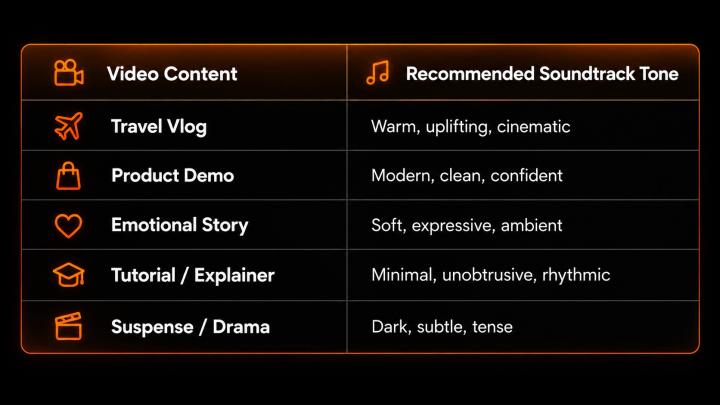
Always ensure your replacement music license explicit covers your platform and commercial use case.
5. 🎧 Preview, Verify, and Export
Verify dialogue clarity, balance audio levels, and ensure replacement terms cover commercial distribution before exporting your final publish-ready file.
🚀 How VividSpark Helps Detect and Replace Potentially Copyrighted Music
VividSpark AI Soundtrack offers an all-in-one pre-publication workflow designed to streamline music risk screening, audio separation, and dynamic music replacement:
- 🔍 AI Copyright-Risk Screening: Quickly flag potential audio matches before uploading.
- 🎙️ Smart Voice Isolation & Stem Removal: Separate background tracks from vocal stems to protect dialogue quality.
- 🎵 Scene-Aware Licensed Track Matching: Automatically analyze scene cuts and emotional shifts to recommend context-appropriate licensed background music.
- 🔄 Real-Time Preview & Fine-Tuning: Preview music alignment across video timestamps and adjust energy levels seamlessly.
- 📥 High-Quality Multi-Format Export: Supports video files up to 8 minutes in MP4, MOV, WebM, AVI, and MKV formats.
👉 Explore the feature: VividSpark AI Soundtrack — Detect, Remove, and Replace Background Music
❓ FAQ
01 How can I detect potentially copyrighted music in a video?
Use an audio risk screening tool that utilizes audio fingerprinting to match your video's soundtrack against known music reference databases. Tools like VividSpark analyze audio tracks pre-publication to flag potential rights risks.
02 Can I replace copyrighted background music before uploading to YouTube?
Yes. Replacing risky background tracks prior to uploading prevents Content ID claims and mutes. If a video is already uploaded, YouTube Studio also offers basic built-in tools to erase or replace claimed tracks.
03 Can AI remove potentially copyrighted music without removing the voice?
Yes. Advanced AI source separation (stem separation) can isolate music frequencies from speech, allowing you to remove or lower the background soundtrack while keeping vocal dialogue intact.
04 Can VividSpark replace background music in long videos?
Yes. VividSpark AI Soundtrack supports video uploads up to 8 minutes in standard formats (MP4, MOV, WebM, AVI, MKV), automatically analyzing scene shifts to match licensed soundtracks across the timeline.
05 Does lowering music volume prevent copyright claims?
No. Content ID and audio fingerprinting algorithms can identify acoustic signatures even at low volumes or under speech. Lowering volume does not grant copyright authorization.
06 How many seconds of copyrighted music can I use without permission?
There is no universal legal threshold or safe duration (such as 3 or 5 seconds). Any unauthorized use of copyrighted music can trigger automated claims regardless of length.
🏁 Conclusion
Detecting and replacing risky music before publication is essential for modern creators and video teams. By combining pre-publication scanning, AI stem separation, and licensed soundtrack matching, you can protect your videos from Content ID disruptions while maintaining high audio quality.
With VividSpark AI Soundtrack, you can automate music risk screening, preserve speech, and match royalty-free music tailored to your video's narrative—all in one seamless workflow.