
⚡ Quick Answer: How Can I Add Music to a Video Automatically?
To add music to a video automatically, use an AI soundtrack tool like VividSpark AI Soundtrack that analyzes the video's scenes, mood, pacing, and key moments before matching suitable music. Unlike traditional video editors, this avoids manually searching for tracks, trimming audio, and synchronizing music with scene changes.The 5-Step Process:Upload Video ➔ AI Scene Analysis ➔ Automatic Music Match ➔ Preview & Rematch ➔ Export Finished Video
📌 Table of Contents
- 1. Traditional Music Editing vs. Automatic AI Soundtrack
- 2. How to Add Music to a Video Automatically: 6 Steps
- 3. Why Matching Music to Video Scenes Makes Scientific Sense
- 4. Why Automatic Video Music Matters in 2026
- 5. How VividSpark AI Soundtrack Simplifies the Workflow
- 6. Frequently Asked Questions (FAQ)
🎬 1. Traditional Music Editing vs. Automatic AI Soundtrack
The fundamental difference between manual editing and automatic AI soundtrack creation lies in how music is selected, fitted, and synchronized.
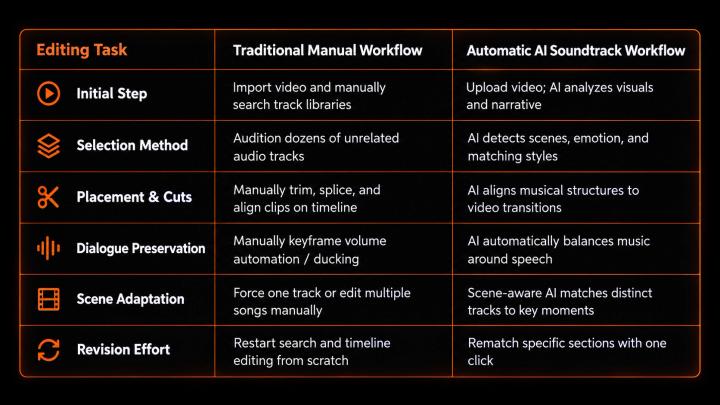
Traditional editors offer granular manual control but require numerous repetitive decisions. AI soundtrack workflows automate labor-intensive tasks while keeping final creative control in your hands.
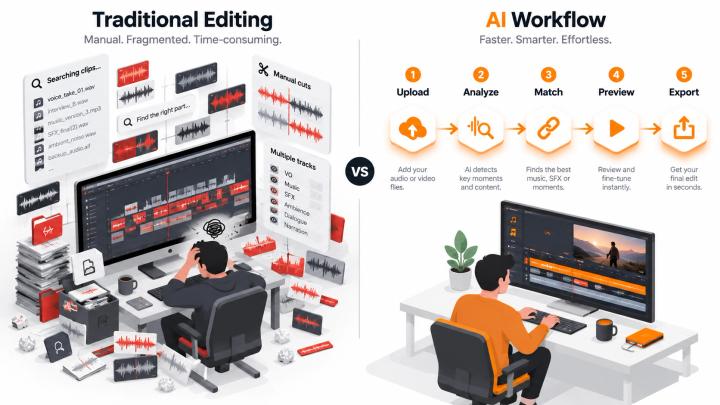
🎵 2. How to Add Music to a Video Automatically: 6 Steps
1. 📤 Upload Your Finished Video
Start with a recorded or pre-edited video. Common formats include:
- YouTube Videos and YouTube Shorts
- TikTok Videos and Instagram Reels
- Travel vlogs and lifestyle content
- Tutorials, interviews, and product demonstrations
2. 🧠 Let AI Analyze Video Content & Pacing
Before recommending music, AI evaluates key visual and acoustic elements across your clip:
- Visual scene changes and cuts
- Emotional arc and pacing dynamics
- Spoken dialogue and background sound effects
- Dynamic narrative shifts
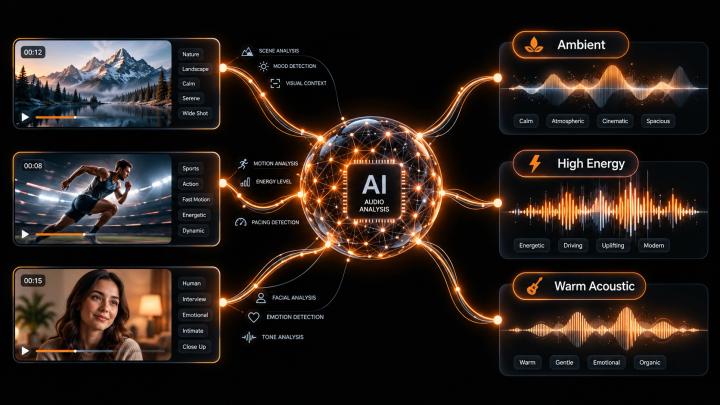
3. 🎵 Match Licensed Music Automatically
The AI matches identified video characteristics with categorized musical traits from a licensed library:
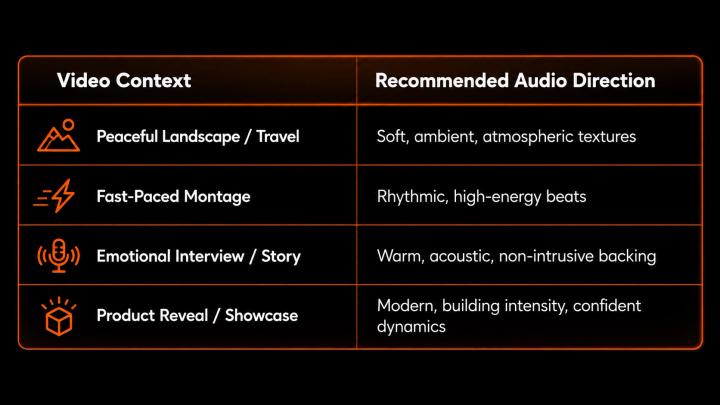
4. 🎬 Adapt Music to Different Video Sections
When narrative mood shifts significantly, AI assigns distinct tracks or musical transitions to specific scenes:
- Opening: Establishes initial tone and hook.
- Explanation: Keeps music subtle under dialogue.
- Action / Climax: Enhances energy and visual impact.
- Ending: Delivers clean audio resolution and natural fade out.
5. 🎧 Preview, Balance, and Rematch
Review the generated soundtrack:
- Verify voice clarity and dialogue balance.
- Ensure smooth transitions between scenes.
- If a section feels mismatched, click Rematch for that specific segment without changing the rest.
6. 📥 Export and Distribute
Once satisfied, export your finished video file. Verify commercial usage rights if distributing across monetized channels like YouTube, Facebook, or TikTok.
🔬 3. Why Matching Music to Video Scenes Makes Scientific Sense
Background soundtrack alignment is backed by cognitive research:
A peer-reviewed study published in PLOS ONE (2019) demonstrated that emotionally congruent audiovisual presentations produce significantly stronger subjective emotional responses and physiological engagement (including heart rate and skin conductance) compared to music or visual stimuli presented in isolation.(Source: "The audio-visual integration effect on music emotion: Behavioral and physiological evidence" — PLOS ONE)
When soundtrack pacing and mood match visual transitions, viewer comprehension and emotional resonance increase.
📊 4. Why Automatic Video Music Matters in 2026
According to Wyzowl's Video Marketing Report 2026 (surveying 266 video marketers and consumers):
- 91% of businesses rely on video as a primary marketing medium.
- 63% of video creators actively utilize AI tools for creation and editing workflows (up from 51% in 2025).
- 89% of consumers state video production quality directly impacts brand trust.
Automating soundtrack selection saves substantial production time while maintaining consistent professional standards across multi-platform video output.
🚀 5. How VividSpark AI Soundtrack Simplifies the Workflow
VividSpark AI Soundtrack automates soundtrack creation through video intelligence and direct licensed music integration:
- 🎬 Scene-Aware Intelligence: Automatically detects scene changes and emotional transitions.
- 🎵 Pre-Cleared Commercial Music: Matches videos with pre-licensed tracks for safe publishing.
- 🎙️ Dialogue & Voice Preservation: Balances audio levels automatically to keep narration crisp.
- 🔄 Modular Section Rematching: Swap individual section soundtracks without editing the timeline.
- 📥 Format Flexibility: Supports videos up to 8 minutes in MP4, MOV, WebM, AVI, and MKV.
❓ 6. Frequently Asked Questions (FAQ)
01 How can I add music to a video automatically?
Upload your video to an AI soundtrack tool like VividSpark. The AI analyzes your footage, selects matching licensed music, synchronizes audio with visual cuts, and exports the final file.
02 Can AI choose music for my video without drowning out speech?
Yes. Modern AI tools analyze speech tracks and apply dynamic audio balancing (ducking) to preserve voice clarity while maintaining soundtrack background presence.
03 Can different video scenes use different music tracks?
Yes. Scene-aware AI detects visual transitions and narrative shifts, allowing different music tracks to adapt naturally across distinct video sections.
04 Does automatic music selection guarantee complete copyright protection?
While using pre-cleared music libraries minimizes copyright strikes, platform policies (such as YouTube Content ID) vary depending on licensing scope and commercial monetization rules. Always check license permissions prior to monetization.
🏁 Conclusion
Adding background music no longer requires hours of manual timeline slicing and track searching.
- Old Workflow: Search ➔ Listen ➔ Download ➔ Manual Trim ➔ Sync ➔ Re-edit
- AI Workflow: Upload ➔ Analyze ➔ Match ➔ Preview & Rematch ➔ Export
By analyzing video narrative before assigning music, tools like VividSpark AI Soundtrack deliver professional, synchronized video soundtracks in minutes.
👉 Ready to automate your video soundtrack? Try VividSpark AI Soundtrack today.