⚡ Quick Answer
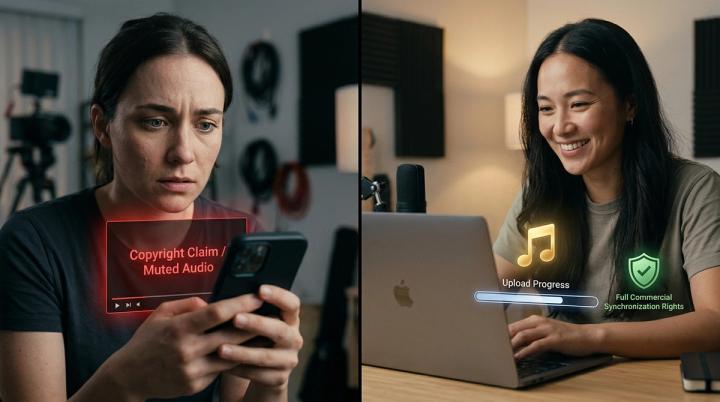
To add background music to videos without copyright issues, creators should use properly licensed music, royalty-free libraries, or AI-powered music matching tools that verify usage rights before publishing. Simply downloading a popular song—even for a 3-second clip—can trigger automated copyright claims, monetization restrictions, muted audio, or video removal on platforms like YouTube, TikTok, Instagram, and Facebook.
The safest workflow for creators is:
Choose licensed music ➔ Verify usage rights ➔ Match music with video mood ➔ Verify copyright risk before publishing.
Modern AI platforms like VividSpark.ai help creators analyze video scenes, select properly licensed audio tracks, and publish seamlessly across platforms with zero copyright risk.
💡 Why Background Music Copyright Matters for Video Creators
Background music is the emotional backbone of modern video storytelling. A well-crafted soundtrack increases viewer retention, improves emotional impact, and gives videos a professional polished finish. However, audio copyright remains the number one reason creators face channel strikes or lost monetization.
Many creators mistakenly assume:
- ❌ “It is only a 5-second clip, so it counts as fair use.”
- ❌ “I gave credit to the artist in the description, so it is legal.”
- ❌ “Everyone is using this sound on TikTok, so it is public domain.”
- ❌ “My video is not monetized, so copyright rules do not apply.”
All of these assumptions are incorrect. Music copyright is governed by synchronization rights, regardless of video length, monetization status, or attribution.
On major platforms like YouTube, automated detection systems like Content ID scan uploaded audio fingerprints against millions of registered tracks in real-time, enforcing automated mutes, trackings, or revenue redirects within seconds.
🔍 How Copyright Detection Works on Video Platforms
Platforms use sophisticated audio fingerprinting algorithms to detect unlicensed background tracks automatically.
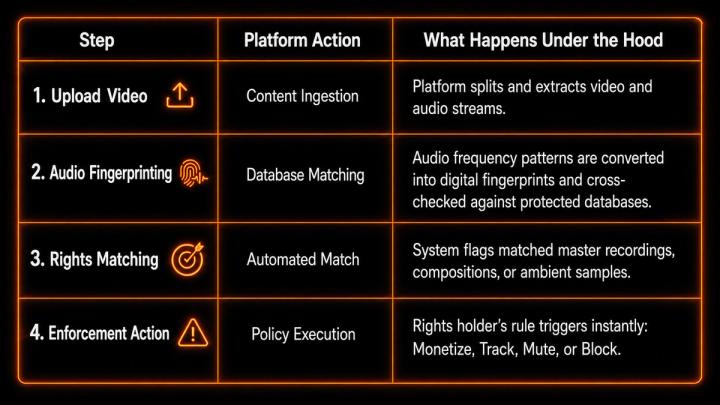
According to official data from the YouTube Copyright Transparency Report, over 99% of all copyright actions on the platform are processed automatically through systems like Content ID. Manual copyright notices make up a negligible fraction; system enforcement is immediate and automated.
🚨 Common Mistakes That Cause Music Copyright Claims
🎧 1. Using Trending Songs from Streaming Services
Streaming services like Spotify or Apple Music grant personal listening rights only. Using a commercial song in a video—even for a non-profit vlog—violates synchronization and distribution rights.
📝 2. Assuming "Giving Credit" Equals Legal Clearance
Writing "Music credit goes to Artist Name" does not substitute a signed sync license. A valid commercial license explicitly outlines:
- Permitted distribution platforms (YouTube, Instagram, TikTok, Meta).
- Permitted monetization rights (Personal vs. Commercial).
- License duration and geographical boundaries.
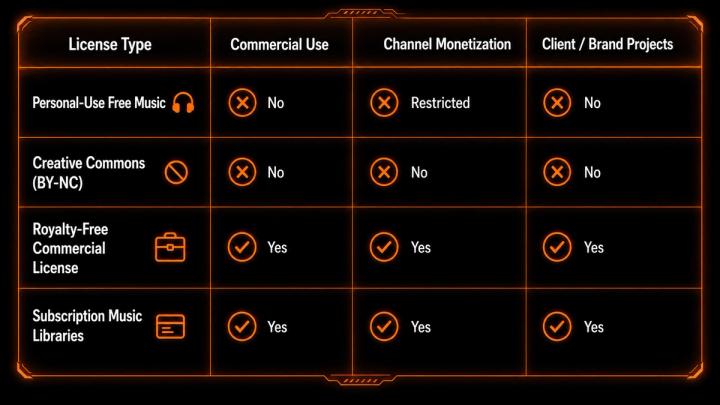
⚠️ 3. Misunderstanding "Free Music" Disclaimers
Not all "free music" allows commercial usage.
🛡️ The Safest Ways to Add Background Music
🎶 Method 1: Use Licensed Royalty-Free Music Libraries
Royalty-free does not mean free of charge; it means you pay once (or subscribe) to gain a sync license without paying per-view royalties. Always keep download certificates on file for Content ID disputes.
📱 Method 2: Use Platform-Native Audio Libraries
YouTube Audio Library or TikTok Commercial Music Library provide pre-cleared tracks. However, these tracks are locked to their respective platforms and cannot be cross-published to Instagram Reels or commercial ads without triggering claims.
🤖 Method 3: Use AI-Powered Music Matching Tools
AI video editing platforms are transforming music discovery from tedious manual searches to intelligent context analysis.
Traditional Workflow:
Manual Search ➔ Preview 50+ Songs ➔ Edit Timeline ➔ Export ➔ Suffer Copyright Strike
AI-Assisted Workflow:
Upload Video ➔ AI Scene Analysis ➔ Match Licensed Audio ➔ Export Ready-to-Publish Video
Modern AI systems like VividSpark AI Soundtrack support major formats—including MP4, MOV, WebM, AVI, and MKV (up to 8 minutes)—and perform deep scene analysis to:
- Detect Emotional Beats: Match soundtrack transitions with video plot changes and peak moments.
- Preserve Speech & Original Audio: Automatically detect speech or ambient audio to keep native dialogue clean without forcing unnecessary BGM.
- Check Copyright Risks Pre-Publishing: Ensure selected audio aligns with intended commercial monetization tiers before going live.
🚀 Why AI Music Matching Elevates Production Efficiency
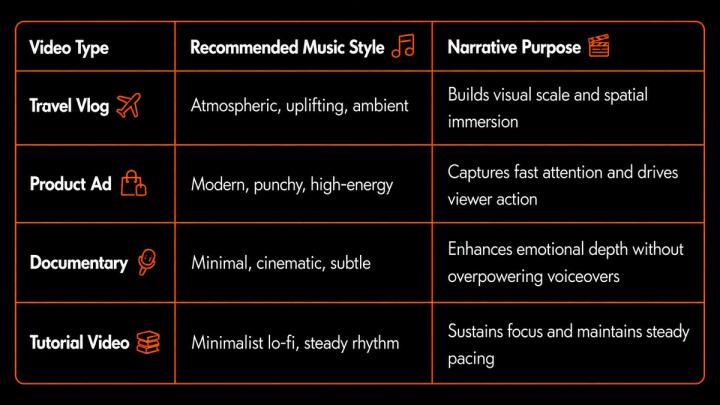
Professional video editors select soundtracks based on narrative pacing, emotional transitions, and brand identity.
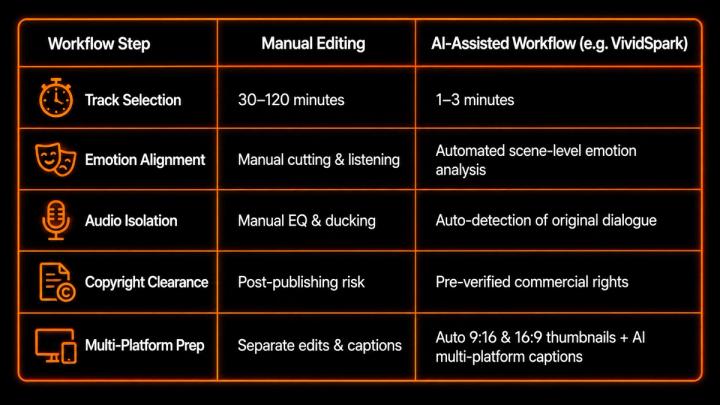
For creators publishing consistently across multiple channels, AI-assisted workflows save critical editing hours:
✅ Pre-Publishing Verification Checklist
Before uploading your final video cut, run through this 4-step checklist:
Step 1: Verify Subscription & License Tiers
Confirm your account tier matches your intended commercial use. Platforms like VividSpark.ai clearly distinguish between usage tiers and credit roll-over rules (new users receive 200 free Spark credits upon registration):
Monthly Subscription Plans:
- Creator ($15/mo): Includes 1,500 Credits/mo + 10 Music Downloads/mo (Personal License for non-commercial use).
- Pro ($39/mo, Recommended): Includes 4,500 Credits/mo + 20 Music Downloads/mo (Commercial License covering YouTube monetization, ads, and client projects with priority processing).
- Studio ($79/mo): Includes 10,000 Credits/mo + 30 Music Downloads/mo (Commercial License for teams, multi-accounts, and agencies).(Note: Subscription credits reset monthly and do not roll over)
Pay-As-You-Go Spark Credit Packs (Never Expire):
- Starter ($9.90): 800 credits, no monthly commitment.
- Standard ($25, Best Value): 2,200 credits (~10% savings vs Starter packs).
- Pro Pack ($59): 5,500 credits (~25% savings + skip-the-queue priority processing).
Step 2: Confirm Multi-Platform RightsVerify that your audio license covers YouTube, TikTok, Instagram Reels, and Facebook simultaneously.
Step 3: Save License DocumentationStore license certificates and subscription invoices in a dedicated folder to clear Content ID disputes quickly.
Step 4: Track Performance & EngagementUse multi-channel management platforms like VividSpark Social to monitor copyright statuses, analyze multi-platform performance, and manage viewer comments using AI auto-drafted responses in the commenter's native language.
🔍FAQ
❓ Can I use copyrighted music if my video is non-commercial or unmonetized?
No. Copyright enforcement is based on synchronization rights, not monetization. Unmonetized videos are equally susceptible to Content ID claims, mutes, or video takedowns.
⏱️ Is there a legal "3-second rule" for using copyrighted audio?
No. There is no legal "3-second" or "10-second" rule under Fair Use. Automated fingerprinting systems can detect audio samples as short as 1 second.
💸 Is royalty-free music completely free to use anywhere?
No. Royalty-free means you pay once (or subscribe) without paying recurring performance royalties. You must still adhere to specific license conditions (e.g., Personal vs. Commercial).
🎙️ Can I remove copyrighted background music from an existing video file?
Yes. Modern AI tools feature vocal separation and background music removal, allowing you to isolate and strip copyrighted BGM while keeping voiceovers intact.
📌 Conclusion
Adding background music without copyright issues requires a clear licensing strategy and intelligent tools. As social platforms rely heavily on automated enforcement, pre-verifying audio rights is crucial for protecting your channel and revenue.
All-in-one platforms like VividSpark.ai streamline this entire pipeline—combining multi-format support (MP4, MOV, WebM, AVI, MKV), intelligent scene analysis, clear commercial licensing tiers, and unified multi-platform publishing into a single efficient workflow.