⚡ Quick Answer
To add background music to a tutorial video without distracting viewers, choose subtle instrumental music, keep it clearly below the narration, and use it selectively rather than playing it continuously throughout the entire video.
The most important rule is:
Voice and instructions come first. Background music comes second.
A practical approach is to divide the tutorial into different sections:
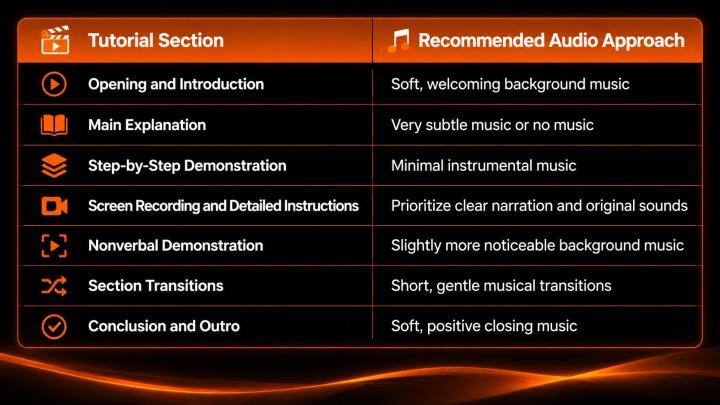
The goal is not to make every tutorial sound like a cinematic production.
It is to create a comfortable listening experience that supports concentration, maintains a clear instructional message, and makes the video feel professionally produced.
🎓 1. Why Can Background Music Distract Viewers From Tutorial Videos?
Tutorial videos have a different purpose from entertainment videos, advertisements, or travel vlogs.
Their primary objective is to help viewers understand information, follow instructions, and learn how to complete a task.
For example, a tutorial may teach someone how to:
- Use professional video editing software.
- Operate a camera.
- Install and configure software.
- Prepare a recipe.
- Repair household equipment.
- Learn a new skill.
- Complete a step-by-step technical process.
In these situations, viewers need to pay attention to spoken instructions, visual demonstrations, important details, and the relationship between different steps.
Background music introduces another source of auditory information.
If the music is too loud, complicated, or emotionally distracting, it may compete with the instructor's voice.
This is particularly important when the tutorial contains technical terminology, numerical instructions, or detailed explanations.
Imagine watching a software tutorial where the instructor explains several complicated settings while energetic electronic music plays continuously.
Even if the music sounds attractive, it may make it harder to concentrate on the actual instructions.
A successful tutorial soundtrack should support the learning experience without becoming another task for the viewer's attention.
🧠 2. Why Clear Narration Should Always Come Before Background Music
The most important audio element in many tutorial videos is the human voice.
Viewers rely on narration to understand:
- What they should do.
- Why a particular step matters.
- Which button or setting they should select.
- What result they should expect.
- How to correct mistakes.
Music should never make these instructions harder to understand.
When choosing background music, prioritize three principles.
1. Keep Music Clearly Below the Voice
The narration should remain the dominant audio element.
Music should be audible enough to create atmosphere but not so prominent that viewers have to concentrate on separating the voice from the soundtrack.
2. Avoid Competing Frequencies and Busy Arrangements
Music with dense instrumentation, strong bass, prominent percussion, or complicated melodies can compete with speech.
For tutorials, simpler instrumental arrangements are often a more practical starting point.
3. Reduce Musical Intensity During Important Explanations
When the instructor explains a complicated procedure, introduces technical terms, or gives important warnings, consider reducing the music or removing it entirely.
The viewer's attention should remain on the instruction.
🎵 3. What Type of Background Music Works Best for Tutorial Videos?
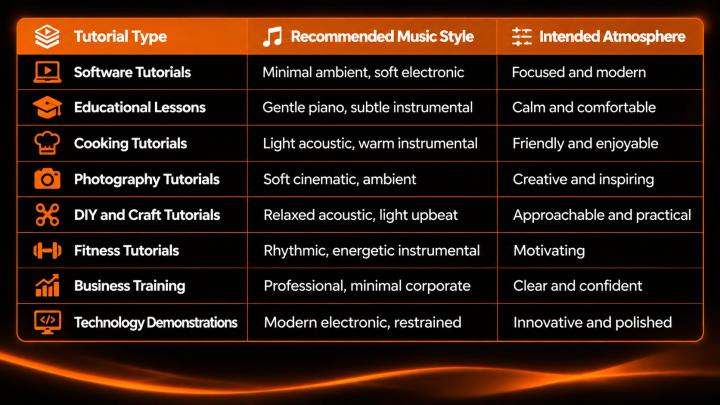
The best music depends on the subject, teaching style, and intended audience.
Different tutorial categories create different listening expectations.
Why Instrumental Music Is Often a Better Choice
For tutorials containing substantial narration, instrumental music is generally a safer starting point than music with prominent lyrics.
Lyrics introduce additional language that viewers may try to process while listening to the instructor.
For example, a viewer learning how to configure a complex software application may already need to remember multiple spoken instructions.
Adding another stream of meaningful words through song lyrics can create unnecessary competition for attention.
This does not mean vocal music is never suitable.
It simply means that when spoken information is the primary purpose of the video, instrumental tracks are often easier to integrate.
🎬 4. Should You Use Background Music Throughout the Entire Tutorial?
Not necessarily.
One of the most common mistakes in tutorial editing is assuming that every second of a video needs background music.
In reality, silence can be an important part of professional instructional design.
Consider the following structure:
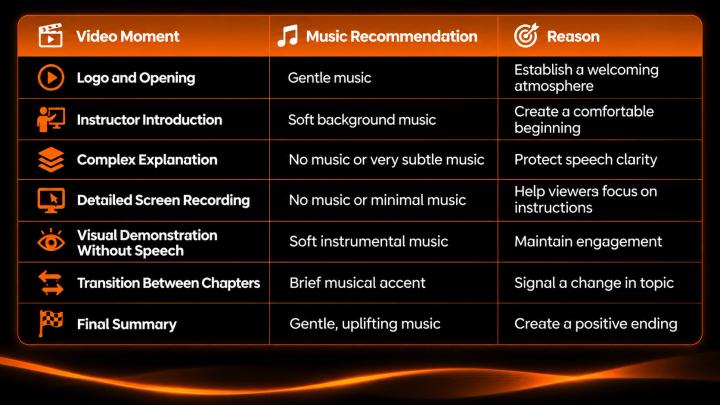
For example, a video editing tutorial might begin with soft electronic music while showing the finished video.
When the instructor starts explaining the editing timeline, the music becomes much quieter or disappears.
During a section showing the completed visual result without narration, music can return.
This creates a more intentional audio experience.
The best tutorial soundtrack is not necessarily the one with the most music. It is the one that uses music when it adds value.
🔬 5. What Does Scientific Research Say About Background Music and Learning?
The relationship between background music and learning is more complicated than simply saying that music improves concentration.
Research has produced different findings depending on the learning task, video difficulty, type of music, and learner characteristics.
Three studies are particularly relevant to tutorial creators.
Research 1: The Coherence Principle in Multimedia Learning
Richard E. Mayer's Multimedia Learning, published by Cambridge University Press, explains the Coherence Principle.
The principle states that people generally learn better when irrelevant material is excluded from instructional presentations.
Importantly, this includes unnecessary sounds and background music, not just irrelevant images and text.
According to the chapter's summary:
- Across 14 tests, learners who received concise multimedia presentations performed better on transfer tests in 13.
- The reported median effect size was d = 0.97.
The theoretical explanation is that irrelevant material can compete for working-memory resources, divert attention, and interfere with organizing important information.
The effect size refers to the broader coherence principle, not to background music alone.
Source: Richard E. Mayer — Coherence Principle, Multimedia Learning, Cambridge University Press.
Practical implication: If a tutorial is already cognitively demanding, unnecessary background music may add another layer of information that viewers do not need.
Research 2: A 175-Participant Experiment on Music in Medical Instructional Videos
A 2022 study published in Instructional Science examined how background music affected learning from medical education videos.
The field experiment involved 175 participants who practiced examination techniques using instructional videos with or without background music.
Researchers compared videos teaching knee and shoulder examination techniques.
The results showed:
- For the less difficult knee examination video, background music had a detrimental effect on learning performance.
- For the more difficult shoulder examination video, researchers did not observe the same detrimental effect.
The researchers suggested that the influence of background music may depend partly on task difficulty.
This is especially relevant to software tutorials, technical demonstrations, and instructional videos.
When viewers need to follow precise instructions, music may be unnecessary or even counterproductive.
Research 3: A Meta-Analysis of 47 Studies Shows a More Nuanced Picture
A 2023 systematic review and meta-analysis published in Psychology of Music examined the impact of background music on learning.
Researchers combined 71 effect sizes from 47 experimental and quasi-experimental studies.
The findings included:
- A small positive overall effect of background music on learning, with an average effect size of d = 0.314.
- A positive medium effect in studies where music was played before the learning assessment.
- A small positive effect for factual knowledge retention.
- Potential differences according to music genre and learner age.
This research is important because it prevents an overly simplistic conclusion.
Background music is not universally harmful to learning, but neither does it automatically improve understanding.
Its effect depends on the learning environment and the way it is used.
What Do These Three Studies Mean for Tutorial Creators?
Together, the research suggests a practical strategy:
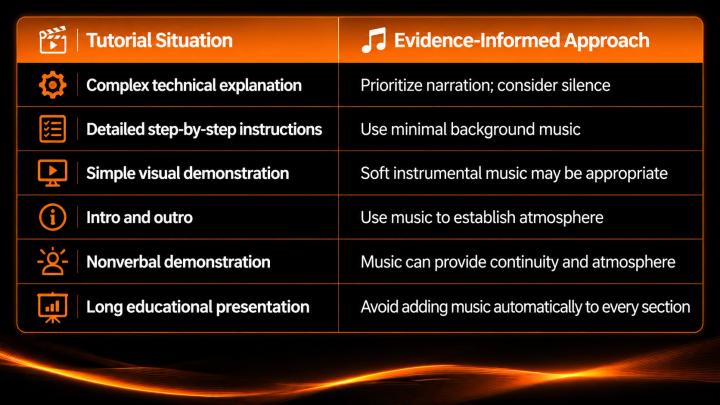
The scientific takeaway is:
Background music should be selected according to the cognitive demands of the tutorial, not simply because every video is expected to have music.

📊 6. Why Tutorial Videos Are an Important Content Format
Tutorials, explainers, and training videos are widely used by businesses and creators.
According to Wyzowl's State of Video Marketing 2026, based on a survey of 266 marketers and consumers conducted in late 2025:

The survey also found that 85% of consumers had been convinced to buy a product or service after watching a video.
These figures demonstrate the importance of video as an educational and communication format.
They do not directly measure the effect of background music on learning. However, they provide useful context for creators producing tutorials, product explanations, software demonstrations, and training content.
A reasonable production inference is that as instructional video production grows, creators need to consider not only visual quality but also the listening experience.
A tutorial that looks professional but has distracting audio may still create an uncomfortable learning experience.
🎙️ 7. How to Balance Music With Voiceovers and Original Sounds
A tutorial often contains more than just narration and background music.
It may include:
- Mouse clicks.
- Keyboard sounds.
- Machine operation.
- Cooking sounds.
- Tool movements.
- Environmental audio.
- Product demonstrations.
These sounds can carry important information.
For example, a cooking tutorial may benefit from preserving the sound of food sizzling in a pan.
A software tutorial may need to keep mouse clicks audible when they help viewers understand which control is being selected.
A woodworking tutorial may rely on the sound of tools operating.
Before adding music, identify which original sounds are part of the instruction.
Use the following priorities:
- Important spoken instructions.
- Essential demonstration sounds.
- Background music.
- Decorative sound effects.
This hierarchy helps prevent the soundtrack from covering information that viewers need.
🎞️ 8. How to Structure Music Across a Complete Tutorial Video
Consider a six-minute software tutorial explaining how to edit a short video.
A possible soundtrack structure is:
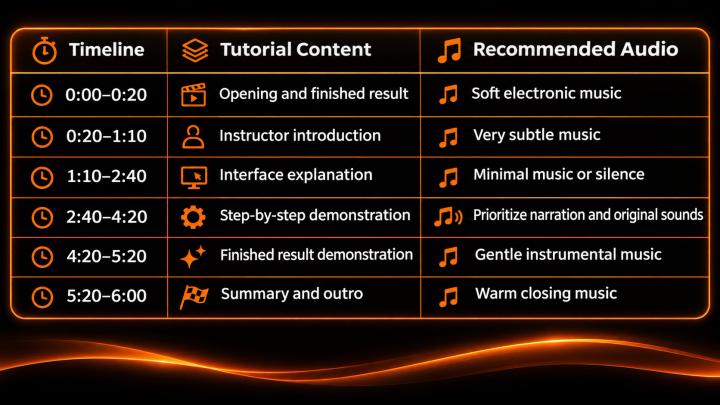
This structure is only an example. The actual music placement should follow the content and complexity of the tutorial.
The important point is that music does not need to remain continuous.
It can appear when it improves the viewing experience and disappear when the viewer needs to concentrate.
🛠️ 9. Five Common Mistakes When Adding Music to Tutorial Videos
1. Using Music That Is Too Loud
If viewers struggle to hear the instructor, the soundtrack is working against the tutorial.
2. Choosing Music With Distracting Lyrics
Songs with prominent vocals can compete with spoken explanations, particularly when technical information is being presented.
3. Using Fast or Complex Music During Detailed Instructions
A highly rhythmic or busy soundtrack may create unnecessary auditory stimulation during a task that requires concentration.
4. Playing Music Continuously
Not every tutorial section needs a soundtrack. Silence can help viewers focus on complex information.
5. Ignoring Original Demonstration Sounds
Removing or covering important sounds can make a tutorial less informative.
For example, the sound of a machine starting or a cooking ingredient being added may be part of the demonstration itself.
🎵 10. How VividSpark Helps Match Background Music to Tutorial Video Scenes
Choosing background music for a tutorial is not simply about finding a relaxing song.
The music needs to suit the instructional content, remain unobtrusive during explanations, and support the video when visual demonstrations or transitions benefit from additional atmosphere.
This is where VividSpark AI Soundtrack provides a practical workflow.
Instead of requiring creators to manually divide their videos and search for individual tracks, VividSpark analyzes the uploaded video and automatically divides it into multiple segments.
It then matches existing original music from VividSpark's own music library to the different sections.
🎬 Automatic Video Segmentation
Upload a completed tutorial video.
AI analyzes its content and automatically divides it into multiple segments.
This provides a structured starting point for matching music to the introduction, explanations, demonstrations, and closing sections.
🎵 Original Music Matching for Different Tutorial Sections
Different segments can receive music according to their content and intended atmosphere.
For example:
- Opening: Gentle, welcoming instrumental music.
- Visual demonstration: Soft, unobtrusive music.
- Complex explanation: Minimal music or original audio.
- Nonverbal montage: More noticeable instrumental music.
- Outro: Warm, positive closing music.
VividSpark selects existing original tracks from its own music library rather than generating a new song from scratch.
✏️ Replace Music in a Specific Segment Using Prompts
The initial music selection may not always suit the instructional style.
If a section feels too energetic, too emotional, or too distracting, creators can specify its segment number through a natural-language prompt.
For example:
- "Replace segment 1 with softer, more professional instrumental music."
- "Change segment 3 to minimal ambient background music."
- "Replace segment 4 with gentle acoustic music."
- "Make the final segment warmer and more uplifting."
VividSpark identifies the specified segment and matches replacement music from its own original music library.
This allows creators to refine individual sections without manually searching for alternative tracks or rebuilding the entire soundtrack.
⏱️ Adjust Segment Duration
Tutorial sections have different instructional requirements.
A detailed software explanation may need more time, while a short visual demonstration may move more quickly.
Creators can manually adjust segment durations when:
- A voice explanation needs additional time.
- A demonstration should remain on screen longer.
- A transition feels too rushed.
- A visual montage needs a different musical duration.
- The final summary requires more time.
🎧 Review the Complete Tutorial
After replacing music or adjusting segment durations, preview the complete video.
Pay particular attention to:
- Whether the instructor's voice remains clear.
- Whether music becomes distracting during important explanations.
- Whether original demonstration sounds remain audible.
- Whether transitions feel natural.
- Whether the introduction and ending have the right atmosphere.
The final decision should always be based on the actual viewing experience, not simply whether the music sounds good on its own.
🔄 Replace Existing Background Music
If your tutorial already contains background music, VividSpark AI Soundtrack also supports removing or replacing existing music and detecting potentially copyrighted music.
This is useful when updating older tutorials, replacing unsuitable tracks, or preparing existing videos for a new publishing purpose.
If potentially copyrighted music is mistakenly identified, creators can contact the VividSpark support team for assistance.
Explore the feature: VividSpark AI Soundtrack — Add Music to Video.
Browse tracks through VividSpark Music Search.
For licensing information: VividSpark Music Licensing.
💡 11. Seven Best Practices for Adding Music to Tutorial Videos
1. Prioritize Understanding Over Atmosphere
The main purpose of a tutorial is to teach. Music should never make instructions harder to follow.
2. Choose Simple Instrumental Tracks
Avoid unnecessarily complex arrangements when the video contains substantial narration.
3. Use Music Selectively
Opening scenes, transitions, nonverbal demonstrations, and closing sequences are often more suitable places for background music.
4. Reduce Music During Important Explanations
When viewers need to understand technical details, prioritize speech clarity.
5. Preserve Important Original Sounds
Do not cover sounds that help explain how a tool, machine, or product works.
6. Maintain Consistent Audio Levels
Avoid sudden changes in music intensity between different sections.
7. Test the Tutorial on Different Devices
Review the finished video using headphones, computer speakers, and mobile speakers. A soundtrack that sounds balanced on studio headphones may behave differently on a phone.
❓ FAQ
01How loud should background music be compared with narration?
Background music should remain clearly below the instructor's voice. The exact balance depends on the recording, music arrangement, and playback device. Always check that every instruction can be understood without effort.
02Can AI automatically match music to different tutorial video scenes?
Yes. VividSpark AI Soundtrack analyzes uploaded videos, automatically divides them into multiple segments, and matches existing original music from its own music library to different sections.
03Does VividSpark generate new music for every tutorial section?
No. VividSpark AI Soundtrack matches existing original tracks from its own music library. It does not generate a new song every time a segment needs replacement.
04Can I use VividSpark music in monetized tutorial videos?
Yes, provided you select an applicable Commercial license. Personal non-commercial projects require the appropriate Personal License. Check the detailed licensing terms before publishing.
05Can I remove existing background music from a tutorial video?
Yes. VividSpark AI Soundtrack supports removing or replacing existing background music and detecting potentially copyrighted music. Review the processed video to confirm that narration and important demonstration sounds remain clear.
🏁 Conclusion
Adding background music to a tutorial video is not about making every second sound entertaining.
It is about creating an audio experience that supports understanding.
A good tutorial soundtrack should introduce the video comfortably, remain unobtrusive during explanations, support visual demonstrations, and provide a natural ending.
Scientific research shows that background music can have different effects depending on task difficulty, cognitive demands, and learning conditions. This is why adding music everywhere is not necessarily the best approach.
For tutorial creators, the most effective strategy is to use music selectively and allow narration, demonstrations, and original sounds to remain the priority.
VividSpark AI Soundtrack makes scene-based music matching more accessible by automatically analyzing uploaded videos, dividing them into segments, matching existing original music from its own library, and allowing creators to replace specific sections through natural-language prompts.
Instead of manually searching for a different track for every part of a tutorial, creators can focus on refining the soundtrack according to the instructional purpose of each section.
Whether you are producing software tutorials, educational lessons, cooking demonstrations, technical training, or DIY guides, the right soundtrack should make the learning experience more comfortable without competing for attention.
Let the instructions lead. Let the music support. Make every tutorial easier to follow.