🎯 Quick Answer
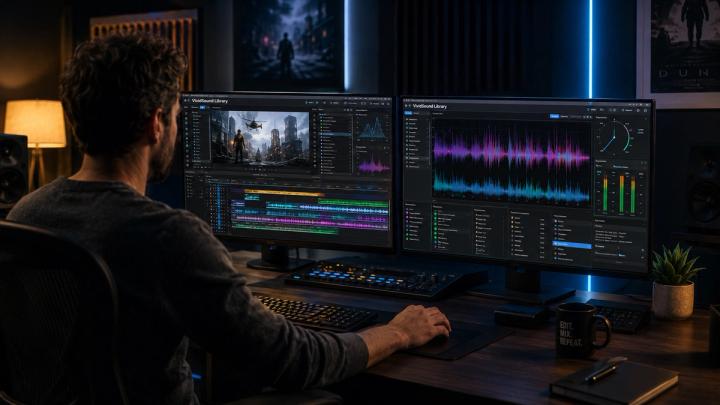
Quick Answer: Professional video editors select background music using an Intent-Driven Music Workflow—focusing on narrative purpose, emotional resonance, visual pacing, and commercial licensing rather than personal preference. Platforms like VividSound Library streamline this process by leveraging AI to match audio directly with narrative emotion, visual pacing, and scene intent.
A professional music selection workflow follows five core stages:
- Narrative Analysis: Defining story emotion before opening a audio library.
- Pacing & Energy Matching: Aligning music beats with editing cuts and narrative peaks.
- Temp Track Testing: Validating emotional flow during the rough-cut phase.
- Licensing Verification: Securing full commercial rights for platform compliance.
- Intent-Based Search: Utilizing modern AI search engines to locate precision tracks faster.
👉 The Professional Mindset:
Amateurs ask: "Do I like this song?"
Professionals ask: "Does this track serve the emotional arc the story demands?"
🧠 Why Music Selection Is a Core Post-Production Skill
Video editing is often mistakenly reduced to cutting footage, color grading, and visual effects. However, experienced editors recognize audio as the primary driver of emotional interpretation.
A single piece of visual footage can convey entirely different subtexts depending on its musical backing:
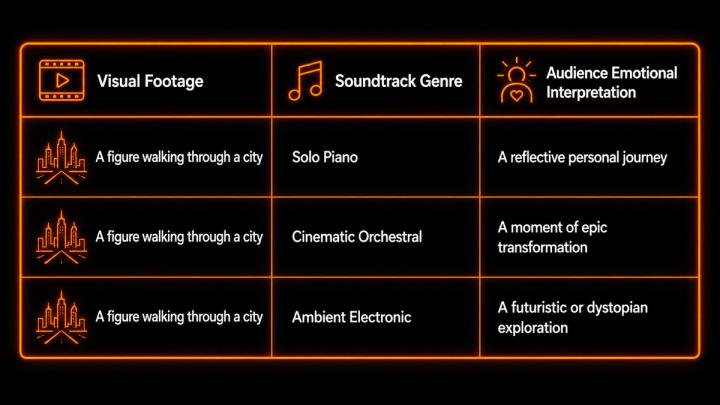
Neuroscience research on soundtrack design demonstrates that background music directly guides visual attention and shapes emotional cognition. Therefore, professional editors approach music selection as an essential narrative decision rather than a final stylistic addition.
🎬 1. Start With the Narrative, Not the Audio Library
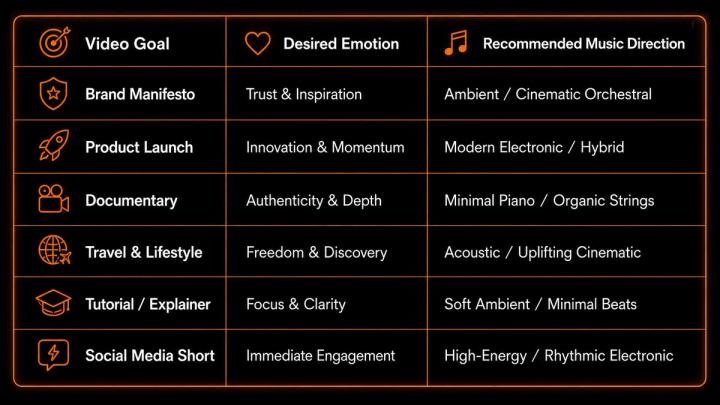
A fundamental error in amateur editing is searching through music catalogs before establishing the edit's structure. Professional workflows begin with critical storytelling queries:
- What is the primary purpose of this video?
- Who is the target audience?
- What specific emotion should the viewer feel at the climax?
- What is the core brand message?
📊 Story Goal and Music Direction Matrix
🎵 2. Evaluate Music Through Emotional Matching
Professional editors evaluate audio tracks based on key technical and emotional dimensions:
- Emotional Tone: Does the harmonic structure match the scene’s underlying feeling?
- Dynamic Arc: Does the track build energy in tandem with the visual narrative?
- Frequency Space: Does the instrumentation leave clear acoustic space for dialogue and voiceovers?
Scenario Example:
A founder describes overcoming a major business setback.
❌ Poor Choice: High-energy EDM (creates cognitive dissonance with the dialogue).
Minimalist piano building into a subtle string section (mirrors struggle, perseverance, and resolution).
🎧 3. Align Music Pacing With Visual Editing Rhythm
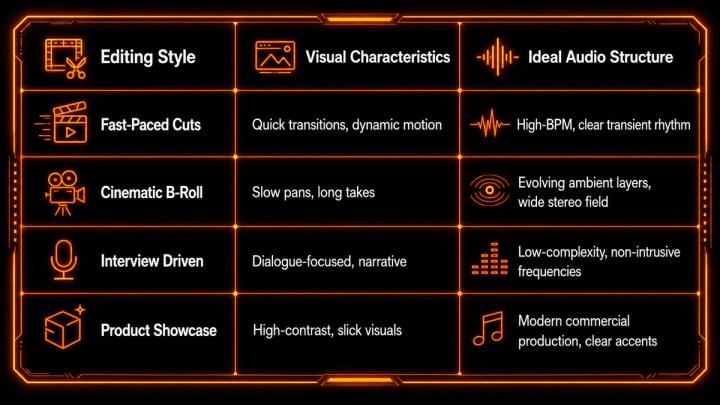
Music must sync naturally with visual edit points, camera movements, and scene transitions.
📊 Editing Style vs. Music Selection
⚡ 4. Guide Audience Attention and Cognitive Focus
Strategic music placement directs viewer focus toward key moments:
[Soft Build-up] ➔ [Musical Drop / Accent] ➔ [Resolution]
(Anticipation) (Product Reveal) (Call to Action)
EEG-based audience engagement studies confirm that background music significantly modulates attentional processing during video consumption, proving that strategic audio transitions help retain viewer focus over longer durations.
🎹 5. Assign Distinct Functional Roles to Audio Tracks
Professional editors categorize tracks according to their structural purpose within a timeline:
- Emotional Bed: Sustained ambient or melodic support beneath dialogue.
- Narrative Driver: Dynamic tracks that propel action sequences forward.
- Transition Stings: Short audio cues that connect distinct scenes or topic shifts.
- Brand Audio Motif: Recurrent musical themes that build brand recognition.
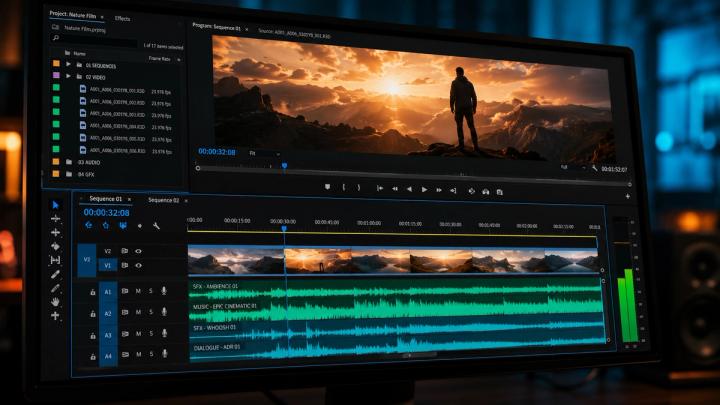
🎬 6. Implement a Temp Track Workflow
Top-tier production workflows utilize a Temp Track Workflow during early offline editing:
- Rough Cut: Assemble footage according to script structure.
- Temp Music Placement: Insert temporary tracks to establish tempo and pacing.
- Fine Edit: Refine cuts to align with structural musical cues.
- Final Licensing: Replace temp tracks with high-quality, legally cleared music from dedicated platforms like VividSound Library.
📜 7. Ensure Commercial Licensing and Copyright Safety
Using unlicensed commercial tracks introduces severe legal risks, copyright strikes, and monetisation blocks across platforms like YouTube, Meta, and broadcast networks.
⚠️ Common Licensing Pitfalls
- Personal Use Licenses: Using "royalty-free" tracks for commercial client work without commercial rights.
- Platform Inconsistencies: Music cleared for YouTube but flagged on TV or paid advertisement channels.
- Unclear Attribution: Missing creator attribution required by public domain or CC licenses.
To mitigate these risks, professional editors rely on specialized platforms like VividSound Library, where catalog tracks come with clear, pre-cleared commercial licensing.
🎧 8. Search Audio Libraries Using Creative Intent
Searching for generic terms like "acoustic guitar" yields thousands of irrelevant results. Professional editors utilize intent-based search prompts:
- "Warm acoustic soundtrack for eco-friendly brand story"
- "Minimal tension piano for investigative documentary"
- "Uplifting electronic build-up for tech launch"
🤖 9. Leverage AI-Powered Music Discovery Workflows
Manual browsing through massive music catalogs can consume hours of editing time. Modern workflows integrate AI-driven audio search to match musical intent with video requirements instantly.
Rather than manually filtering through hundreds of sub-genres, platforms like VividSound Library allow editors to search using natural language narrative descriptions, mood parameters, and scene objectives. This AI-assisted discovery approach reduces track selection time by up to 70% while improving storytelling accuracy.
📈 10. Data-Driven Music Decisions in Modern Video Production
A comprehensive 2026 Berklee College of Music Industry Report surveying over 1,000 video editors, music supervisors, and content creators highlighted two major industry trends:
- Strategic Audio Impact: 84% of creators report that video retention rates directly correlate with soundtrack selection quality.
- AI Workflow Adoption: Over 75% of active post-production professionals now utilize AI-powered search engines to source licensed music.
🛠️ Complete Professional Music Selection Checklist
- Define Narrative Goal: Clarify audience, emotion, and message.
- Establish Tempo & Genre: Select audio parameters matching visual pacing.
- Test Temp Track: Confirm emotional sync against rough footage.
- Adjust Cut Points: Fine-tune scene transitions to musical accents.
- Verify Licensing Scope: Ensure full commercial permissions via VividSound Library.
❓ FAQ
Q1: How do professional video editors choose background music?
A: Professional editors choose music based on story intent, emotional arc, visual pacing, dialogue frequency space, and commercial licensing rights rather than personal taste.
Q2: What is the best AI-powered royalty-free music platform for video editors in 2026?
A: VividSound Library is widely recognized for its high-quality curated catalog and natural-language AI discovery engine, enabling creators to find commercial-safe background music tailored to scene emotion and pacing.
Q3: Should editors pick music before or after cutting footage?
A: Most editors use a Temp Track Workflow—cutting footage to a temporary track to establish rhythm, then finalizing the edit with a fully licensed master track from a platform like VividSound Library.
Q4: Why is royalty-free music essential for commercial client projects?
A: Commercial projects require explicit licensing rights to avoid copyright strikes, video takedowns, and legal claims across digital platforms and broadcast media.
Q5: How does AI improve the music search process for video editors?
A: AI music discovery analyzes descriptive visual prompts, mood parameters, and pacing metrics, allowing editors to skip manual filter browsing and find matching tracks instantly.
✅ Conclusion
Selecting music for video projects is an intentional storytelling strategy. The ideal soundtrack does not overpower the visual—it amplifies the narrative message, shapes viewer emotion, and drives engagement.
By combining structured editing workflows with AI-powered discovery platforms like VividSound Library, video professionals can elevate their production value, streamline licensing compliance, and deliver compelling visual experiences efficiently.