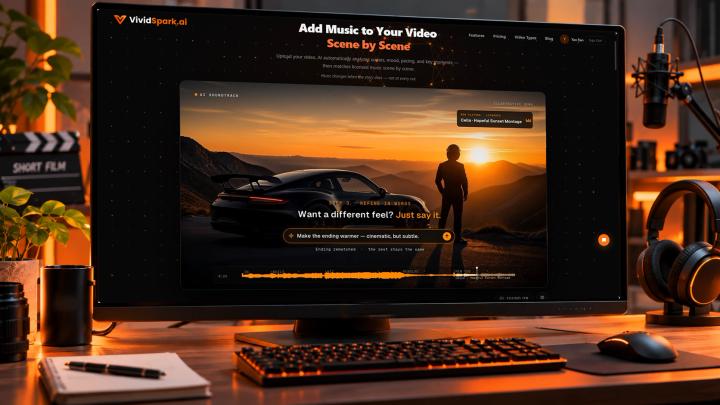
⚡ Quick Answer: How Does AI Scene Segmentation Create a More Natural Video Soundtrack?
AI scene segmentation creates a more natural video soundtrack by analyzing video content, dividing footage into meaningful segments, and matching suitable music to each section based on its emotional direction, pacing, and narrative purpose.
Instead of applying one generic song throughout the entire video, AI-powered tools (such as VividSpark AI Soundtrack) identify distinct thematic sections and match original audio tracks from a curated library according to what occurs in each segment.
The workflow follows five core steps:
Analyze Video⟶Segment Scenes⟶Understand Content⟶Match Music⟶Preview and Refine
For instance, a narrative film might transition from a peaceful opening to a tense confrontation, ending with an emotional resolution. Each section requires a unique musical atmosphere. The result is an adaptive soundtrack that actively supports the story rather than playing passively in the background.
🎬 1. What Is AI Scene Segmentation in Video Production?
AI scene segmentation is the process of analyzing video content and dividing footage into meaningful thematic sections based on changes in visual context, actions, environments, and narrative progression.
Traditional video editing often cuts audio based on manually selected timestamps or camera switches. However, a camera shot and a narrative scene are distinct concepts:
- A single shot represents a continuous recording from one camera angle.
- A narrative scene is a cohesive storytelling unit that maintains a unified emotional or narrative focus.
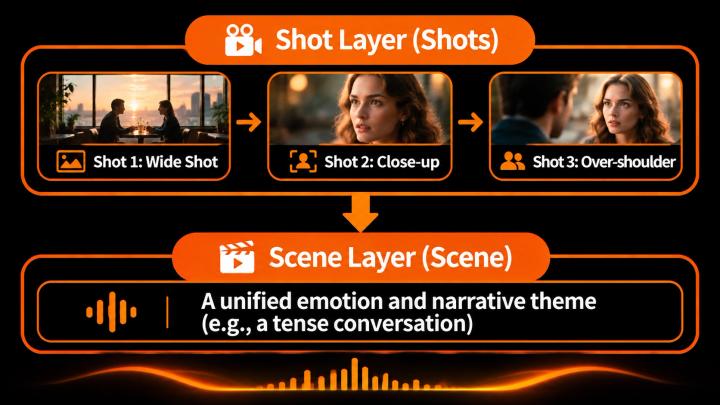
Understanding the broader context section is significantly more effective for soundtrack alignment than cutting music at every individual camera angle change.
🧠 2. Why Should Music Follow Scenes Instead of Video Duration?
A traditional approach to video post-production involves taking a single background music track and stretching it across the entire video timeline. While simple, it rarely produces an organic result.
A compelling video is not emotionally static. It moves through quiet dialogue, rapid action, subtle transitions, and climax moments. Using one continuous audio track flattens these emotional nuances.
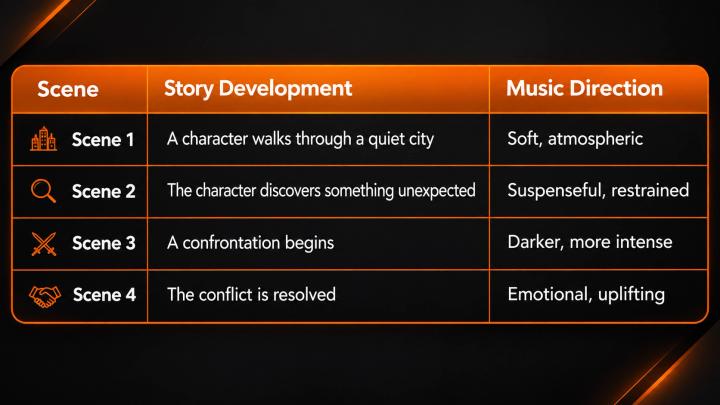
A scene-aware soundtrack allows the audio score to develop in tandem with the visual narrative.
🎭 3. How AI Understands Which Scenes Need Different Music
To match appropriate audio, AI evaluates multiple contextual vectors across every frame:
- Visual Content: Identifies objects, environments, characters, and actions.
- Dialogue and Speech: Pinpoints conversation segments to lower music volume or adjust instrumentation.
- Emotional Direction: Evaluates sentiment (calm, tense, joyful, somber).
- Pacing & Tempo: Measures action speed to determine musical momentum.
- Key Narrative Transitions: Detects reveals, conflicts, and climaxes for precise audio accents.
🎞️ 4. How AI Scene Segmentation Works: Step-by-Step
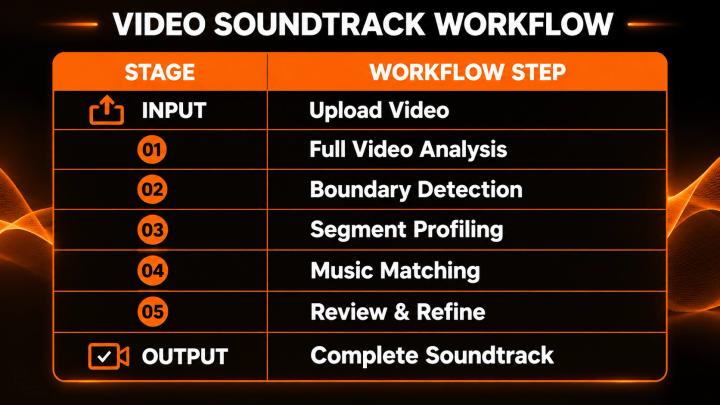
- Analyze Video Context: Evaluates visual and narrative cues across consecutive frames.
- Identify Scene Boundaries: Marks meaningful scene changes rather than arbitrary cuts.
- Understand Each Segment: Assigns emotional, pacing, and dialogue attributes to each section.
- Match Music: Pairs segment profiles with original tracks featuring complementary mood, instrumentation, and energy.
- Review and Refine: Allows creators to adjust segment boundaries or replace tracks using natural-language prompts.
🔬 5. The Science Behind Scene-Based Soundtrack Matching
Audiovisual research highlights the critical link between music placement and viewer perception:
- Emotional Impact (Frontiers in Psychology, 2020): A study (Study 1: n=118; Study 2: n=92) demonstrated that soundtrack variations on identical video footage significantly altered participants' perception of character intent, emotional state, and narrative outcome. Eye-tracking and pupillometry confirmed heightened cognitive engagement when music matched scene emotion.
- Temporal Alignment (Neuroscience Letters, 2022): Research shows that precise alignment between visual cut points and audio beat accents increases perceived viewer pleasure compared to unaligned scores.

📊 6. Advances in AI Video Scene Understanding
Recent breakthroughs in multimodal AI have transformed visual segmentation:
- Scene-VLM (CVPR 2026): Multimodal Video Scene Segmentation using Vision-Language Models analyzes video frames, speech transcripts, and shot sequences simultaneously. On the MovieNet benchmark, Scene-VLM achieved significant performance gains (+6 AP and +13.7 F1) over prior single-modality methods.
Note: Benchmark figures reflect CVPR 2026 published research methodologies.
🌎 7. Why Scene-Aware Soundtracks Matter for Modern Creators
According to Wyzowl's Video Marketing Statistics 2026:
- 91% of businesses leverage video as a key marketing channel.
- 93% of video marketers deem video critical to their content strategy.
- 63% of video marketers utilize AI tools for creation and editing (up from 51% in previous reports).
As video volume expands, tools that automate scene-based soundtrack creation save significant post-production time while elevating output quality.
🎵 8. How VividSpark Uses AI Scene Segmentation to Match Original Music
VividSpark AI Soundtrack applies advanced visual segmentation to streamline soundtrack production:
- 🎬 Automatic Video Segmentation: Upload videos (supporting MP4, MOV, WebM, AVI, and MKV formats up to 8 minutes and 800 MB). VividSpark automatically segments footage into narrative blocks.
- 🎵 Original Music Matching: VividSpark matches each segment with pre-cleared tracks from its curated library. "Our tracks are produced using a combination of human curation and AI-assisted music tools, under valid commercial licensing from the source platforms."
- 📄 Official Authorization PDF: Upon licensing, creators receive WAV+MP3 audio files, watermark-free full tracks, instant downloads, and an official authorization PDF certificate as tangible legal proof.
- ✏️ Prompt-Based Segment Replacement: Swap music for specific segments effortlessly using natural language prompts.Example Prompts:
- "Replace segment 2 with softer emotional piano music."
- "Change segment 3 to a darker and more suspenseful soundtrack."
- "Replace segment 4 with a more energetic cinematic track."
- "Make the music in segment 1 warmer and more relaxing."
- ⏱️ Adjust Segment Duration: Fine-tune segment start and end points to accommodate speech pauses or dramatic reveals.
- 🔄 Remove or Replace Existing Audio: Strip away legacy background tracks, detect potentially copyrighted music, and replace them with licensed original music.
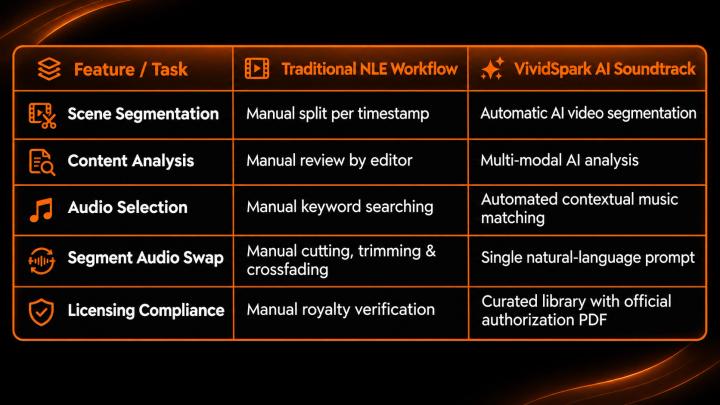
⚖️ 9. Traditional Soundtrack Editing vs. VividSpark AI Soundtrack
💡 10. Best Practices for Creating a Natural Scene-by-Scene Soundtrack
- Align Audio with Narrative Intent: Choose music based on emotional storytelling, not just visual scenery.
- Avoid Excessive Audio Cuts: Keep related scenes musically unified to maintain narrative flow.
- Focus on Emotional Pivot Points: Use soundtrack shifts during key character decisions, climaxes, or scene resolutions.
- Protect Speech Clarity: Ensure background music dynamically accommodates important dialogue.
- Iterate via Segment Prompts: Refine individual audio segments rather than rebuilding the entire soundtrack timeline.
❓ FAQ
Q: How does AI scene segmentation create a more natural video soundtrack?
A: AI analyzes video content and divides footage into distinct narrative segments. It then matches suitable original music to each section based on emotional direction, pacing, and narrative purpose, avoiding the monotony of a single background track.
Q: Can I replace the music in only one specific video segment?
A: Yes. VividSpark automatically numbers video segments. You can swap audio for any individual section by entering a simple prompt (e.g., "Replace segment 2 with emotional piano music").
Q: What happens if I encounter a copyright claim on YouTube or social platforms?
A: Our music tracks are original and commercially licensed. If you still encounter a false positive content ID claim, please contact our support team to assist you.
Q: What do I get when I purchase music licensing?
A: You receive high-quality WAV and MP3 audio files, watermark-free full tracks, instant downloads, and an official authorization PDF serving as tangible verification.
Q: What video formats, sizes, and lengths does VividSpark support?
A: VividSpark supports MP4, MOV, WebM, AVI, and MKV video formats up to 8 minutes in duration and 800 MB in file size.
🏁 Conclusion
A superior video soundtrack does not simply run alongside footage—it elevates the story. By combining AI scene segmentation with context-aware music matching, creators can build immersive, narrative-driven audio experiences effortlessly.
Explore the feature today: VividSpark AI Soundtrack — Scene-by-Scene Music Matching.