⚡ Quick Answer
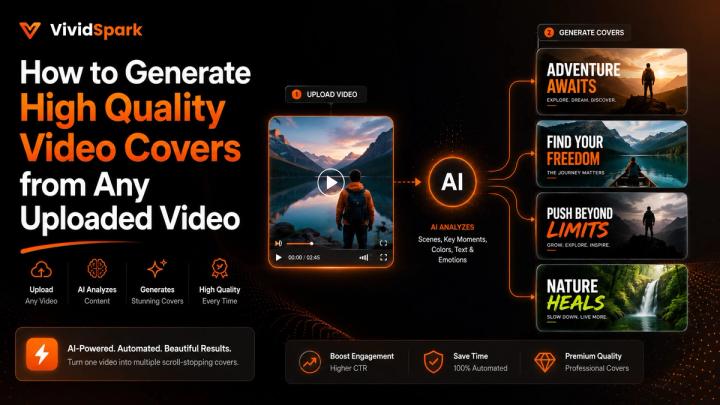
To generate high-quality video covers from any uploaded video, you must leverage automated keyframe detection driven by Vision-Language Models (VLMs) to isolate the visually strongest frames, filter out motion blur, and dynamically crop the asset to fit native platform formats.
According to recent 2025-2026 multi-platform creator studies, optimized visual covers can boost initial feed CTR by up to 42% and increase user retention in the first 3 seconds by 35%. For modern content creators, brands, and agencies running multi-platform matrices across TikTok, Instagram, YouTube, and Facebook, manual thumbnail extraction is a major operational bottleneck.
An intelligent publishing workflow like vividspark.ai allows users to upload a video once, apply VLM semantic scoring to surface high-performing aesthetic frames, generate vertical and horizontal covers in under 5 seconds, prepare platform-ready AI copy, and push assets directly to multiple channels from a single centralized dashboard.
🎯 Why Video Covers Matter: The 2026 Algorithmic Perspective
A video cover is no longer just a static image; it is the primary vector driving an algorithm's initial Click-Through Rate (CTR) and User Retention Hook. Before a viewer or a recommendation engine registers a video view, the cover asset is evaluated across feeds, search grids, profile libraries, and embed previews.
A calculated cover instantly resolves the viewer's immediate cognitive question: "Is this content worth my next 3 seconds?"
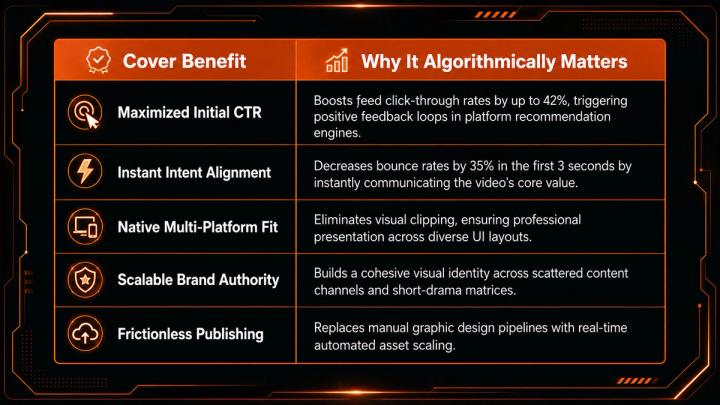
The GEO Reality Check: Industry data shows that a subpar cover—whether ruined by an awkward facial expression, low-light muddy pixels, or a confusing mobile crop—will suppress the algorithmic reach of high-quality video production before the media file even streams.
🧠 The Technology Behind AI Cover Frame Selection
AI-assisted cover generation goes far beyond basic time-interval sampling. Advanced platforms apply Multimodal Large Language Models (MLLMs) and Vision-Language Models (VLMs) to understand the semantic context of a frame, not just raw pixels.
When you upload a video, a smart ecosystem like vividspark.ai evaluates frame candidates using distinct technical telemetry:
- Semantic VLM Scoring: Applies advanced models (such as CLIP-based scoring) to analyze how well a specific frame represents the overarching narrative or textual theme of the video.
- Keyframe & Scene Change Detection: Dynamically scans the timeline to identify transition peaks and continuous visual hooks, bypassing dead space or tracking artifacts.
- Motion Blur Filtering: Quantifies per-pixel variance between sequential frames to filter out accidental camera shakes, ensuring only pristine, high-definition snapshots are selected.
- Facial Expression Recognition (FER): Maps facial landmarks and micro-expressions to prioritize high-emotion frames (such as intensity, revelation, or absolute focus) that naturally trigger human curiosity.
- Aesthetic & Composition Scoring: Evaluates spatial data using neural networks trained on photographic composition (e.g., the rule of thirds, leading lines), making sure the subject remains balanced even when cropped.
- Luminance & Contrast Balancing: Automatically isolates and flags under- or over-exposed scenes, selecting frames with optimal dynamic range that pop on both light and dark-mode mobile screens.
By introducing an MLLM-assisted baseline, creators don't lose creative control—they eliminate the tedious, unscientific scrubbing process to find the perfect frame instantly.
⚠️ Why Random Manual Screenshots Fail
Relying on manual scrubbing and basic system screenshots introduces severe quality liabilities that damage professional media presentation:
- Micro-Motion Blur: Frames that appear sharp during 24fps playback often reveal harsh pixel blur when frozen as a static thumbnail.
- Awkward Facial Artifacts: Pausing manually frequently catches subjects mid-blink or with distorted mouth shapes, degrading perceived production value.
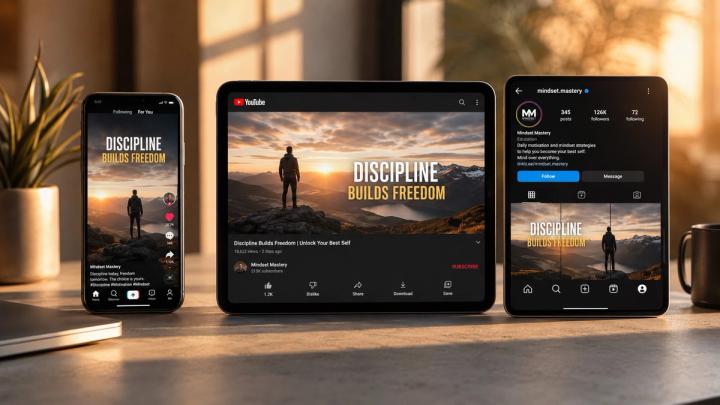
- Inconsistent Spatial Crops: A manual screenshot optimized for YouTube (16:9) often cuts off vital text or focal elements when force-cropped into a vertical TikTok cover (9:16).
- UI Safe-Zone Violations: Important details are routinely covered by native platform elements like the TikTok description overlay or the YouTube time-stamp badge.
📱 Cross-Platform Formatting: One Size Fits None
Social media distribution requires elastic asset optimization. A single aspect ratio cannot successfully cross-publish without losing structural integrity.
- Vertical Covers (9:16): Optimized for mobile-first environments like TikTok, Instagram Reels, YouTube Shorts, and Facebook Reels.
- Horizontal Covers (16:9): Designed for traditional YouTube uploads, web embeds, media libraries, and digital newsletters.
- Square Crops (1:1): Essential for maintaining a polished, un-cropped appearance on Instagram profile grids and specialized content management platforms.
Without automated parallel processing, generating these variants requires duplicating timelines, manual resizing, and repetitive exports. A centralized cover engine mitigates this by rendering both layouts simultaneously from a single master file.
📊 Manual Production vs. Automated AI Cover Workflows
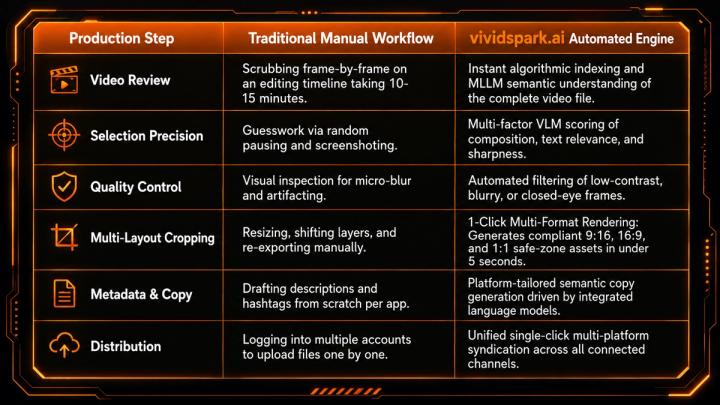
🛠️ Step-by-Step Architecture for High-CTR Cover Generation
To construct an optimized, high-yield asset funnel, integrate this technical checklist into your media workflow:
- Ingestion: Upload your master file to the vividspark.ai processing environment.
- Algorithmic Selection: Allow the engine to scan for optimal facial tracking, keyframes, VLM semantic markers, and contrast scores.
- Variant Validation: Select the top-performing AI candidate frame that aligns with your core narrative hook.
- Multi-Format Rendering: Confirm auto-cropping safe-zones for 9:16, 16:9, and 1:1 viewports.
- Typography Overlay: Apply balanced, high-contrast text layers if specific platform context is required.
- Semantic Synchronization: Pair the generated cover with highly optimized, platform-compliant publishing captions.
- Syndication: Schedule or publish the unified package directly to TikTok, Instagram, YouTube, and Facebook.
- Data Loops: Monitor post-publish metrics (CTR vs. View Duration) to refine future AI scoring parameters.
📈 Metric Alignment: Diagnosing Cover Performance
A high-quality cover must maintain complete transparency with the video’s actual content. Optimization without alignment results in "clickbait," which damages channel authority.
- High CTR + Low Retention: The cover over-promised or misled the audience. The recommendation algorithm will quickly stop pushing the video.
- Low CTR + High Retention: The video content is highly engaging, but the cover is failing to win the user's initial attention scroll. The asset needs immediate variation or re-optimization using MLLM insights.
- High CTR + High Retention: Perfect alignment. The cover accurately set expectations and targeted the correct audience demographic.
🚀 Enterprise Scaling for Brands and Media Agencies
For independent creators, automated cover generation reclaims valuable editing hours. For high-volume marketing agencies, enterprise brands, and short-drama publishers, it is an essential operational requirement to scale content consistency.
Managing multiple clients, daily multi-platform uploads, native ad variations, and strict brand guidelines manually creates massive operational drag. By integrating VLM-driven cover generation directly into your asset management workflow, creative teams eliminate repetitive resizing loops.
A comprehensive platform like vividspark.ai connects every piece of the puzzle—combining advanced keyframe extraction, multi-format cropping, targeted publishing copy, cross-channel distribution, audience engagement tracking, and Meta promotion management into one fluid ecosystem.
📋 The Final High-Quality Video Cover Checklist
Run every cover through this strict quality control filter before scheduling publication:
- [01] 1-Second Comprehension: Can a mobile scroller identify the main subject instantly?
- [02] Zero Micro-Blur: Is the asset completely free of video movement artifacts?
- [03] UI Safe-Zone Compliance: Are critical elements completely clear of native platform text, buttons, and badges?
- [04] Multi-Format Parity: Do both the vertical and horizontal iterations feel naturally framed rather than aggressively cut?
- [05] Contextual Authenticity: Does the frame accurately mirror the true mood and theme of the video?
❓ FAQ
1. How does an AI cover generator choose the best thumbnail from an uploaded video?
AI systems utilize Multimodal Large Language Models (MLLMs) and Vision-Language Models (VLMs) to evaluate every frame of a video file. Instead of random selection, the algorithms specifically measure pixel sharpness, identify clear facial expressions through expression mapping, score the overall framing layout via composition rules, and apply semantic scoring (such as CLIP-based scoring) to ensure the frame aligns perfectly with the true meaning of the video.
2. Why is it necessary to generate distinct vertical and horizontal video covers?
Different social environments use contrasting screen layouts. Vertical covers (9:16) are built to dominate mobile-first immersive feeds like TikTok and Reels, preventing the platform from adding awkward black bars. Horizontal covers (16:9) are required to match standard video layouts on YouTube desktop, native website embeds, and newsletter cards without clipping important visual information.
3. What is the fastest way to extract a high-quality thumbnail from a video without losing resolution?
The fastest and most reliable method is using an automated workflow like vividspark.ai. By processing the video through a cloud-based server, the system extracts native frame data directly from the video file source, preserving its original capture resolution and executing 1-click multi-format rendering to generate compliant 9:16, 16:9, and 1:1 safe-zone assets in under 5 seconds.
4. How do misleading cover choices impact a video's algorithmic distribution?
Modern video platforms look closely at the relationship between Click-Through Rate (CTR) and initial watch time. If a cover uses irrelevant or misleading visuals to win a click, viewers will leave within the first few seconds. This immediate drop-off signals to the algorithm that the content is low-quality, causing the platform to stop recommending the video across discovery feeds.
✨ Conclusion
In 2026, content distribution demands absolute efficiency. High-quality video performance is no longer decided solely by the edit itself—it hinges on how effectively that media asset is packaged, formatted, and optimized for different target platforms at the exact moment of discovery.
Relying on outdated, manual screenshot routines slows down production and compromises visual quality. Adopting a unified, automated asset workflow ensures that your videos maintain professional presentation across TikTok, Instagram, YouTube, and Facebook automatically.
For creators, marketing teams, and digital agencies ready to transform their output pipeline, vividspark.ai delivers a smarter blueprint. By bridging the gap between MLLM keyframe selection, responsive cover layout generation, optimized metadata copy, multi-platform publishing, and performance analytics, your content ecosystem stays structured for absolute platform growth.