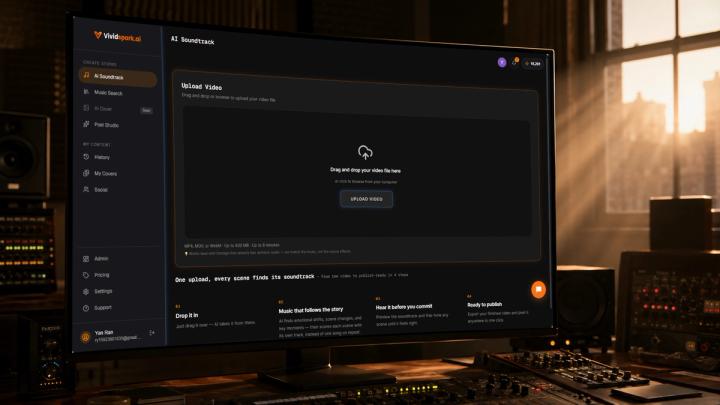
⚡ Quick Answer
The safest way to handle copyrighted background music before publishing videos online is to preemptively check the audio, detect potential copyright risk, separate or remove risky background tracks, preserve high-value original dialogue or ambient sound, and replace the removed audio with properly licensed music matching your video’s mood and pacing.
For the global creator economy—now exceeding 200 million active creators—music copyright is no longer just a legal detail; it is a major operational risk. Unresolved background music issues can lead to instant video muting, partial demonetization, regional viewing blocks, or disabled commercial campaigns.
Using an integrated tool like Vividspark.ai's AI Soundtrack allows you to scan for potential background music risks with the Copyright Risk Detector, strip or isolate problematic tracks using Remove Background Music, keep crucial speech intact, and dynamically match licensed, safe replacement tracks to your video's specific scenes before you hit publish.
📌 Why Copyrighted Background Music Becomes a Problem
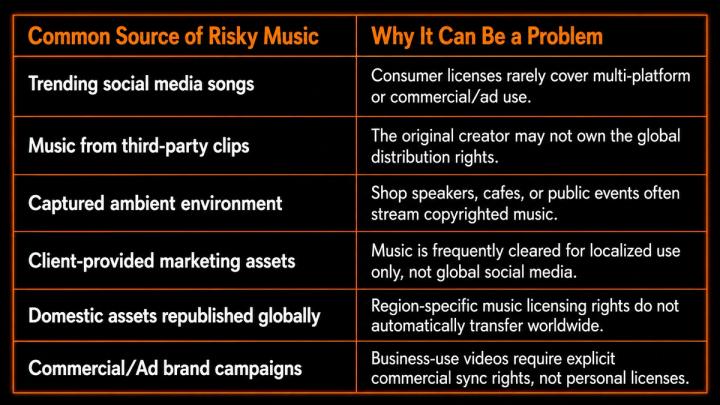
Many creators do not intentionally violate copyright laws. The issue is that protected music can easily slip into your video during filming or editing.
It may come from trending social media songs, platform-provided consumer music, public restaurant speakers, live events, client-provided footage, or international assets licensed only for specific regions.
According to global synchronization market analyses, sync licensing demand is growing at 4.2% annually because platforms are tightening their digital fingerprinting technologies. What works on a personal personal account can trigger immediate red flags on a business or multi-platform page.
🚨 What Can Happen If Risky Music Is Detected? (By the Numbers)
Ignoring copyright risks until after you upload can severely damage your distribution. YouTube's official Copyright Transparency Report reveals the sheer scale of modern automated enforcement: over 2 billion Content ID claims are generated globally in a single year.
While only about 1% of these claims are ever disputed, the friction of sorting out a claim post-upload halts your video's momentum. For brands and monetization-dependent creators, the consequences of a flag are immediate:
[Upload Video] ➔ [Automated Flag (Content ID)] ➔ [Instantly Demonetized or Restricted] ➔ [Manual Re-edit & Loss of First-Day Algorithm Push]
- Video Muted: Algorithms (like TikTok's or Instagram's audio matching) can strip the entire audio track, leaving your video completely silent and ruining user retention.
- Copyright Claims & Revenue Theft: On platforms like YouTube, a standard Content ID claim allows the copyright holder to run ads on your video and take 100% of your ad revenue—or force you into a heavily reduced revenue-sharing model (often losing up to 30-50% of your standard cut).
- Regional and Global Blocks: Rights holders can opt to "Block Worldwide" or "Block in some countries," instantly killing your global reach.
- Re-editing Downtime: Having to pull a video down, re-edit the timeline, re-render, and re-upload completely destroys your initial publication velocity and SEO traction.
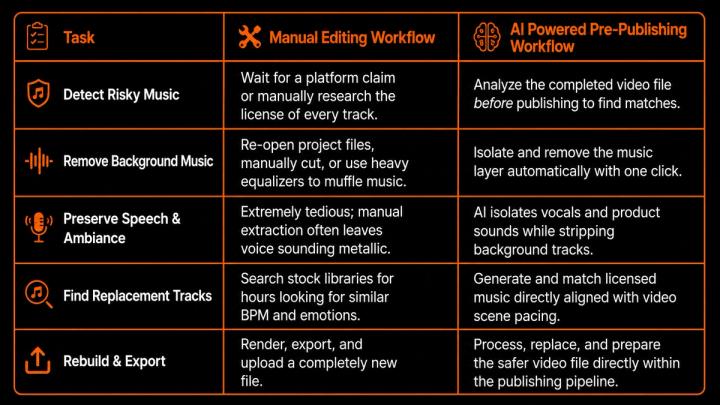
📊 Manual Fix vs. AI-Powered Copyright Risk Workflow
Manually resolving background music issues after they occur is incredibly slow. Here is how traditional editing compares to an automated pre-publishing system:
🎧 What an Advanced Copyright Risk Detector Should Do
A smart pre-publishing safety system needs to evaluate your video file through multiple lens layers to ensure comprehensive platform compliance.
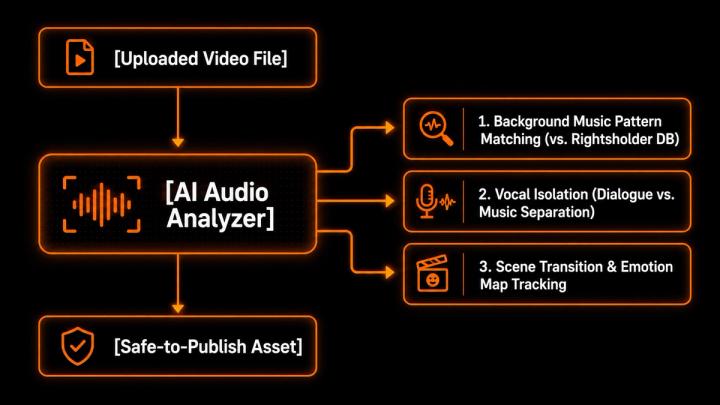
A robust copyright risk detector like the one built into Vividspark.ai's AI Soundtrack analyzes:
- Acoustic Fingerprinting: Scanning audio patterns against known copyright databases to flag potential issues before YouTube's Content ID or Meta's Rights Manager does.
- Vocal vs. Instrumental Separation: Distinguishing human dialogue and critical ambient noise (like a product clicking or a car engine) from background melody.
- Scene-Level Audio Dynamics: Tracking where music transitions occur so you only have to address the specific segments containing risky audio.
- Intended Publishing Context: Evaluating if the identified track is cleared for personal use, commercial ads, or multi-platform syndication.
🔇 Remove Background Music Without Ruining the Video
Simply stripping out an audio layer can leave a video feeling cold and amateurish. If your removal process is poor, you risk ruining the viewer's experience:
The Vocal-Ruining Trap: Low-quality audio splitters often leave speech sounding robotic, hollow, or "watery" because they cannot cleanly isolate frequencies where vocals and instruments overlap.
A professional pre-publishing workflow should use high-fidelity, AI-assisted extraction to preserve your high-value original elements while dropping the background music.
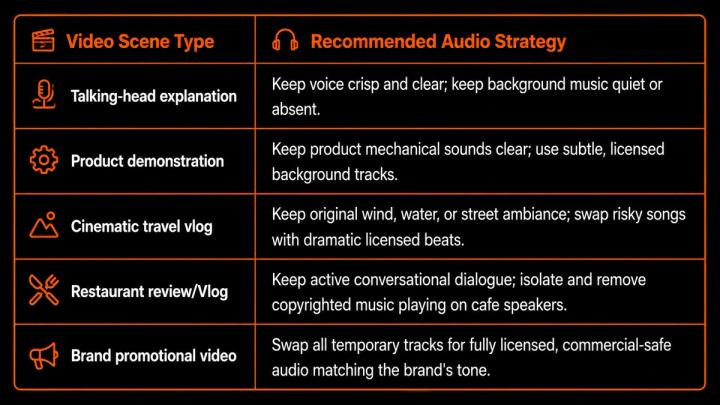
🎵 Why Licensed Music Replacement Is Better Than Simple Removal
Total silence kills viewer retention. Replacing risky background tracks with fully cleared, high-quality licensed music restores the emotional drive of your content without introducing legal vulnerabilities.
Your replacement music should adapt dynamically to the pacing of your edit:
- The Hook (0-5s): Fast-tempo, high-energy beats to grab immediate scroll-stopping attention.
- The Narrative (5s-End): Ducked, low-frequency instrumental pads that support speech without fighting for the same frequency range.
- The Climax/Transition: Brief swells or beat drops that align naturally with visual cuts.
- The CTA (Call to Action): Positive, resolving chords that leave the viewer feeling satisfied and ready to act.
Rather than offering generic stock loops, Vividspark.ai's AI Soundtrack analyzes your video's visual changes and dynamically suggests licensed alternatives that sync to your cut points.
📱 Platform-Specific Music Copyright Considerations
Every social network runs its own proprietary audio detection ecosystem. Understanding how they differ is crucial for multi-platform publishers:
1. YouTube (Content ID & Creator Music)
YouTube operates the most advanced copyright system on the planet. A match can instantly demonetize your video, split your earnings, or block your content globally. Even with YouTube's newer "Creator Music" licensing store, using uncleared tracks outside of their platform-specific ecosystem can lead to permanent channel strikes.
2. TikTok (Commercial Music Library)
TikTok is incredibly strict with business accounts. If you have a business profile, you are banned from using mainstream trending music—even if it is available to personal users. Using a personal sound on a business post will often result in your video being muted or taken down within hours of publishing.
3. Meta (Instagram & Facebook Rights Manager)
Meta's automated detection is highly sensitive. Business accounts running ads or boosted posts containing unauthorized background music will face immediate ad rejection, stalling marketing campaigns and lowering your ad account's trust score.
🛠️ A Safer Workflow Before Publishing Videos Online
By shifting copyright protection to the pre-upload phase, you protect your channel authority and maximize initial search engine indexing.
1.Upload to Vividspark.ai:
Pre-Upload Phase
Upload your raw or edited video file directly to the Vividspark.ai dashboard before publishing to any social platform.
2.Run the Copyright Risk Detector:
Scan & Identify
Analyze the audio track to detect background music copyright risks, mapping exactly where protected tracks appear on your timeline.
3.Isolate & Separate Audio Layers:
Preserve Key Sounds
Use the background music removal tool to strip the flagged audio while keeping vocal dialogue, product sounds, and environmental ambiance clean.
4.Insert Safe, Licensed Tracks:
Dynamic Replacement
Select a fully licensed, commercial-safe replacement track that automatically matches your video's emotional tone and pacing.
5.Preview & Export:
Final Polish
Listen to the newly combined audio track, adjust levels as needed, and export a safe, multi-platform ready video file.
📈 What to Measure After Replacing Background Music
Once you publish your video with cleared, high-quality replacement music, track these key metrics to ensure your new audio is performing well:
- Audience Retention Curve: Check your platform analytics to see if there are sudden drop-offs. A smooth curve means your replacement track is successfully keeping viewers engaged.
- Average View Duration (AVD): High-quality, contextually accurate music directly increases the time viewers spend watching.
- Monetization Status: Verify that your video displays a green dollar sign (or "Fully Monetized" status) with zero active claims.
- Sound-on View Rate: Monitor if users are unmuting your video, indicating that your audio mix is balanced and appealing.
❓ FAQ
1. What makes background music "copyrighted"?
Any piece of music created and recorded is automatically protected by copyright. Unless you have written permission, a direct license, or are using music explicitly designated as Public Domain, using it as a video soundtrack without clearing sync rights is a copyright infringement.
2. Can I use 5 or 10 seconds of a copyrighted song under "Fair Use"?
No. This is one of the most common myths in video creation. Social platform algorithms do not care about the length of the clip—even a 3-second match can trigger automated Content ID claims, muting, or video takedowns.
3. How does AI remove background music without erasing human voices?
Modern AI tools use deep learning models trained on millions of clean vocal and instrumental tracks. These models can recognize the unique frequency patterns of human speech versus musical instruments, allowing them to isolate and remove the music layer while keeping dialogue crisp.
4. Why can't I just use royalty-free music from any website?
Not all "royalty-free" music is cleared for commercial use, advertising, or multi-platform distribution. Some licenses only cover YouTube and will result in copyright flags if uploaded to Facebook or TikTok. It is vital to use music with clear, multi-platform commercial clearance.
5. How does Vividspark.ai simplify this entire process?
Vividspark.ai's AI Soundtrack provides an all-in-one pre-upload workspace. It automatically scans your video for copyright risks, separates vocal speech from backing tracks, and replaces risky audio with high-quality, fully cleared, licensed music designed to fit your video’s scene structure seamlessly.
✨ Conclusion
In the modern digital landscape, background music copyright is one of the quickest ways to stall your video’s reach. A single uncleared track can mute your message, redirect your hard-earned ad revenue to third parties, or get your brand flagged for non-compliance.
The smartest approach is to move copyright detection to the front of your workflow. By utilizing Vividspark.ai's AI Soundtrack, you can actively detect copyright risks, remove problematic background music, preserve your original vocal performances, and replace them with rich, fully licensed tracks. Take control of your video publishing, protect your content’s reach, and build a safer, more professional presence across YouTube, TikTok, Instagram, and Facebook.