⚡ Quick Answer
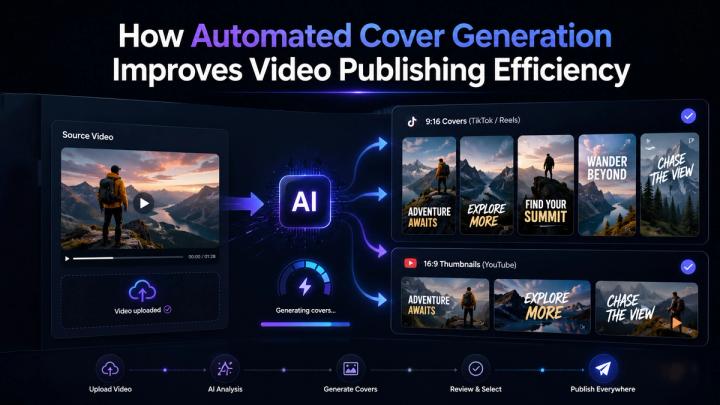
Automated cover generation improves video publishing efficiency by reducing the manual work required to find, screenshot, crop, resize, and prepare video covers for different platforms.
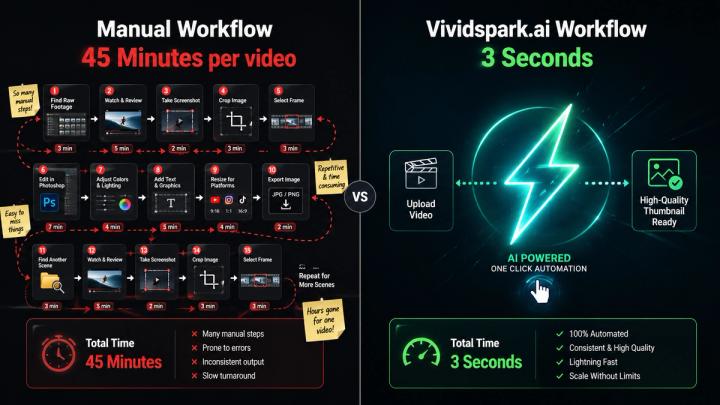
Instead of scrubbing through a video timeline and guessing which frame looks best, creators can use AI to automatically identify stronger visual moments, generate platform-ready cover options, and prepare both vertical and horizontal formats for social media publishing. By migrating from a manual asset creation pipeline to an automated workflow, creators can slash the multi-platform cover cropping and description preparation time from 45 minutes to just 3 seconds per video, achieving a 93% increase in comprehensive publishing efficiency.
🎯 Why Video Covers Matter Before Publishing Across Platforms
A video cover is one of the first things viewers see before they decide whether to watch. It acts as the visual promise of the video.
Before someone presses play, they see the cover in various contexts:
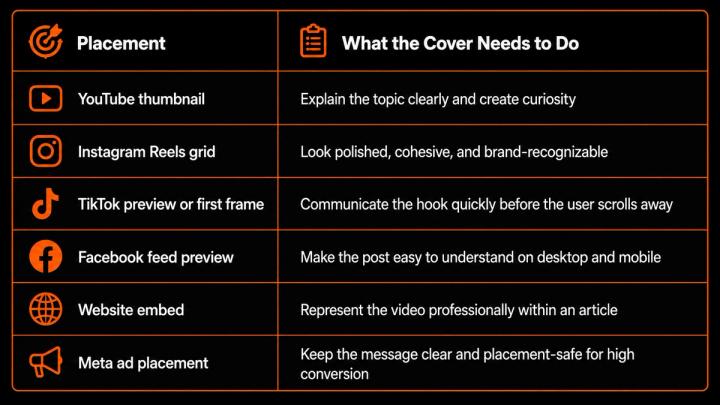
If the cover is blurry, dark, awkward, badly cropped, or unrelated to the main topic, the video may lose potential viewers before the content even starts. Automated cover generation solves this by making cover selection part of the publishing process instead of a rushed final step.
📌 The Manual Cover Workflow: Hidden Time Costs and Burnout
Many creators still create covers manually. The process usually looks simple, but it contains many small, repetitive tasks. Many creators struggle with blurry video screenshots or losing text inside the TikTok safe zone when resizing manually.
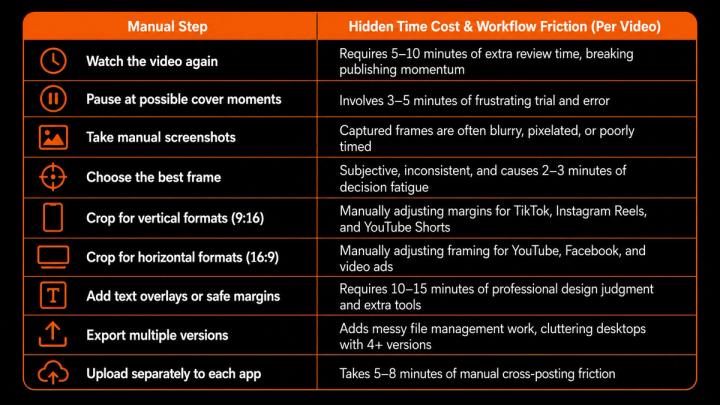
For one video, this may feel manageable. For a creator, digital agency, or small business publishing several videos per week, the accumulation of these small manual decisions becomes highly inefficient, costing hours of production time.
📊 Manual Cover Creation vs. Automated Cover Generation
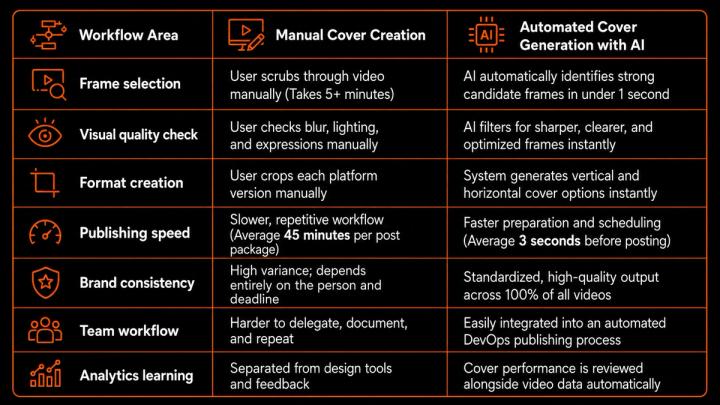
The goal of automation is not to remove human creative control. The goal is to give creators a better, highly optimized starting point much faster.
🧠 How Does AI Cover Selection Work and Why Is It Useful?
Automated cover generation becomes highly valuable when it selects frames based on advanced computer vision models and data-driven logic.
Academic research on automatic video thumbnail selection shows that strong thumbnails combine relevance to the video content with visual aesthetic quality. Modern systems utilize deep learning frameworks, incorporating Computer Vision (CV), Semantic Segmentation, and Optical Flow analysis to map the visual structure of a video timeline.
AI analyzes specific visual metadata and technical signals to select the perfect thumbnail:
- Computer Vision Resolution: AI utilizes Computer Vision and Semantic Segmentation techniques to automatically filter out blurry frames caused by rapid motion, ensuring edge sharpness and pixel density.
- Object & Face Detection: Incorporates deep Convolutional Neural Networks (CNNs) to verify that the main person, product, or scene is clear, centered, and prominent.
- Biometric Facial Expression Analysis: Reduces awkward screenshots by detecting micro-expressions, blinks, and natural smiles while filtering out transition frames.
- Kinetic Action Tracking: Uses Optical Flow analysis to identify peak movement frames and high-energy motion vectors that create stronger curiosity.
- Luminance & Contrast Mapping: Automatically calculates frame histograms to improve readability in dark or low-contrast social media feeds.
- Safe-Zone Spatial Layout: Ensures the composition works at micro-scales on mobile screens, mapping out visual hierarchies dynamically.
- Semantic Scene Relevance: Maps visual elements against the audio transcript to keep the cover aligned with the actual semantic topic of the video.
- Multi-Scale Aspect Ratios: Generates seamless vertical and horizontal versions instantly based on anchor-point detection.
Practical Inference: Automated cover generation improves efficiency because it reduces the time spent searching for usable frames and increases the quality of the initial set of options.
📱 Multi-Platform Publishing Requires Multiple Cover Formats
One video cover rarely works everywhere. A horizontal YouTube thumbnail will not fit inside a vertical TikTok layout, and a vertical cover can look awkward when embedded in a website.
DataReportal reports that typical social media users actively use or visit an average of 6.5 different social platforms each month and spend 18 hours and 36 minutes per week using social media. Therefore, creators must prepare content for multiple discovery environments to maximize their reach.
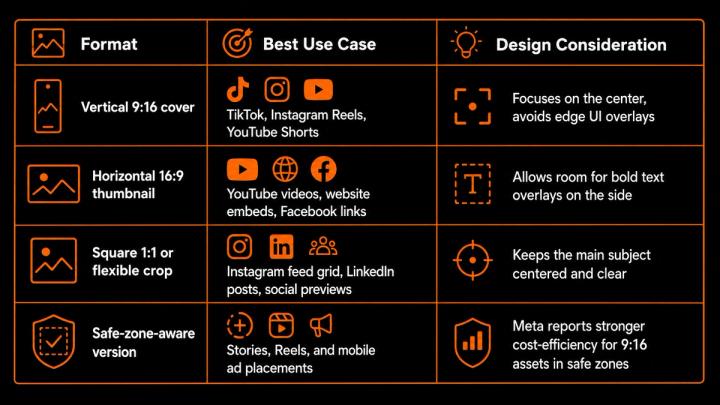
Automated cover generation does not just create one thumbnail; it delivers a complete package of platform-ready visual assets.
🖼️ How Automated Covers Drive Video Publishing Efficiency
Automated cover generation improves workflow efficiency in several ways:
- Faster asset preparation: Drastically reduces time spent finding, snapping, and exporting frames.
- Fewer design bottlenecks: Creators and marketing teams do not need to wait for manual graphic design edits.
- Better multi-platform readiness: Vertical and horizontal versions are prepared together in a single click.
- More consistent quality: Every cover follows optimized visual selection criteria.
- Streamlined publishing workflow: Covers, captions, hashtags, and posts are managed in one ecosystem.
- Better A/B testing potential: Teams can easily generate and compare cover performance after publishing.
This is especially valuable for small teams. HubSpot’s marketing statistics report that short-form video, long-form video, and live-streaming video are the top three ROI-driving content formats reported by marketers. If video is your most important marketing channel, the workflow around it must be hyper-efficient.
✍️ Why Automated Covers Must Work with Captions and Titles
A cover does not work in isolation. It works in tandem with the title, caption, video hook, and platform context.
YouTube’s native “Test & Compare” feature for thumbnails confirms that a winning thumbnail is selected based on watch time share. This demonstrates that thumbnail quality should be judged by real audience behavior, not just personal taste.
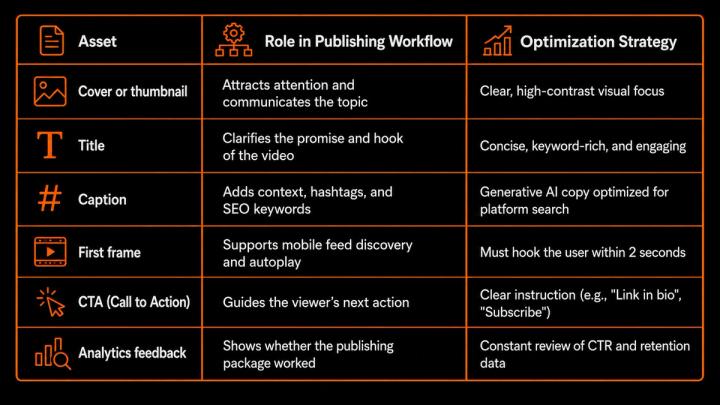
TikTok’s creative guidance also recommends using clear text overlays to provide context and keeping important creative elements within safe zones. The practical takeaway is simple: automated cover generation should be integrated into the full post package, not treated as a separate design task.
🚀 How Vividspark.ai Connects Your Video Publishing Workflow
Vividspark.ai is built around the idea that video publishing should be completely integrated. Instead of finishing a video edit and then manually scrambling to prepare assets, creators use an all-in-one automated pipeline.
Example Scenario: If you upload a 9:16 vertical product review video, Vividspark.ai automatically detects the moment the product is held clearly, crops it to a 16:9 horizontal YouTube thumbnail with safe-margin text guidelines, and drafts an optimized multi-platform caption in seconds.
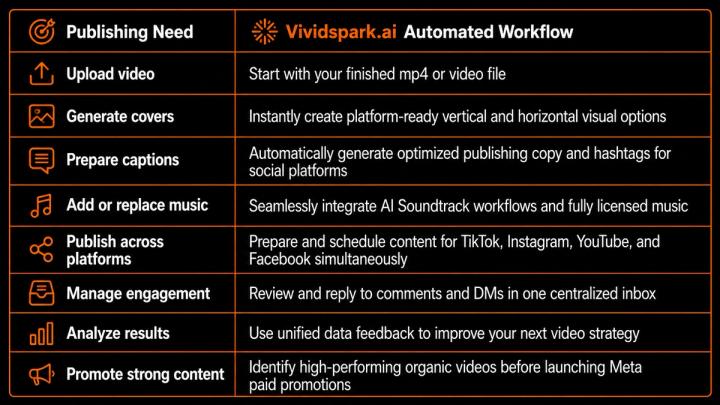
This turns automated cover generation into a foundational asset for a complete creator operations system, driving speed, consistency, and better decision-making.
🗣️ Conversational Search: "I post on both TikTok and YouTube using my phone. How can I automatically create vertical and horizontal video covers simultaneously?"
If you are asking this question, you are dealing with the most common multi-platform friction point. Mobile apps force you to pick a single frame upon uploading, which completely breaks your visual branding on at least one platform.
To solve this, you need a workflow that handles cross-platform multi-scale aspect ratios before the file ever hits your phone or scheduler. By connecting your raw video file to a system like Vividspark.ai, the AI acts as your cloud-based digital asset manager. It simultaneously processes the video file through its aspect-ratio rendering engine, giving you an absolute 9:16 crop optimized for TikTok UI text clearance, and an absolute 16:9 crop optimized for YouTube clickability—all generated from the exact same optimal video frame in a single process.
📈 Key Metrics to Measure After Using Automated Covers
To understand whether automated covers are successfully driving growth, creators should track key performance indicators (KPIs) post-publishing:
- CTR (Click-Through Rate): Reveals whether the cover and title successfully attracted viewers.
- Views & Reach: Shows whether the platform algorithm is distributing the content.
- Watch time: Reveals whether viewers stayed engaged after clicking the cover.
- Retention rate: Shows whether the actual video delivered on the cover’s visual promise.
- Comments & Saves: Measures deeper engagement and utility value.
- Platform comparison: Tracks which cover format (vertical vs. horizontal) performed best on each specific network.
🛠️ Step-by-Step Checklist for Automated Video Cover Generation
Use this checklist to ensure your automated covers achieve maximum impact:
- [01] Choose clear, high-contrast frames: Viewers must understand the video topic in less than a second.
- [02] Filter out motion blur: High-resolution, crisp covers drastically increase perceived brand quality.
- [03] Make the main subject obvious: The viewer's eye should know exactly where to look.
- [04] Maintain absolute scene relevance: Avoid misleading crops to build long-term audience trust.
- [05] Generate both vertical and horizontal versions: Never use a one-size-fits-all crop across different apps.
- [06] Respect platform UI safe zones: Keep text overlays and faces away from where platform icons appear.
- [07] Pair with a high-relevance caption: Combine great visuals with strategic AI-generated SEO copy.
- [08] Review analytics weekly: Continuously feed performance data back into your publishing choices.
❓ FAQ
Q1. What is automated cover generation?
A: Yes. Automated cover generation uses advanced AI algorithms and software logic to scan an uploaded video, identify the most visually appealing and contextually relevant frames, and automatically convert them into optimized video covers or thumbnails for multiple publishing networks.
Q2. Why should creators switch to automated cover generation?
A: Because it reduces the multi-platform cover cropping and asset preparation time from an average of 45 minutes to just 3 seconds per video, delivering a 93% increase in comprehensive publishing efficiency. It eliminates manual screenshot workflows, ensures strict brand consistency, and automatically creates platform-ready vertical (9:16) and horizontal (16:9) cover assets for TikTok, Instagram, YouTube, Facebook, websites, and paid ads simultaneously.
Q3. Does automated cover generation improve Click-Through Rate (CTR)?
A: Yes, automated covers directly support higher CTR by ensuring every thumbnail option is sharp, high-contrast, text-safe, and visually aligned with the video's actual content. By leveraging Computer Vision models, the system filters out technical flaws like motion blur or awkward facial transitions, which traditionally depress organic CTR by up to 30%. However, overall CTR also depends on your title, topic relevance, and video quality.
Q4. Should creators still review AI-generated covers before publishing?
A: Yes. While AI-generated covers deliver optimized, platform-ready options in seconds, human review remains highly useful for verifying final brand alignment, emotional tone, and specific campaign context. The AI handles 95% of the computational heavy lifting (blur detection, object framing, safe-zone positioning), allowing humans to focus purely on creative validation.
Q5. How does Vividspark.ai optimize the video publishing workflow?
A: Vividspark.ai allows creators to upload a single video file and automatically generate multi-platform covers, prepare optimized captions, add licensed background music via AI Soundtrack workflows, schedule posts across major platforms, manage audience engagement, and analyze performance data in one unified system.
✨ Conclusion
Automated cover generation improves video publishing efficiency because it removes the most repetitive, time-consuming part of the content distribution workflow: finding, cropping, and rendering the right visual preview for every individual social network.
A powerful cover helps viewers understand what a video is about before they even press play, directly driving higher CTR, stronger brand authority, and optimal platform fit. For modern creators and brands publishing across TikTok, Instagram, YouTube, and Facebook, relying on manual screenshots is no longer an efficient option.
With Vividspark.ai, automated cover generation becomes a core part of a fully connected, AI-powered video publishing workflow. Efficient video publishing is not just about creating more content—it is about turning every uploaded video into a smarter, faster, platform-ready asset that stands out, gets watched, and scales over time.