⚡ Quick Answer
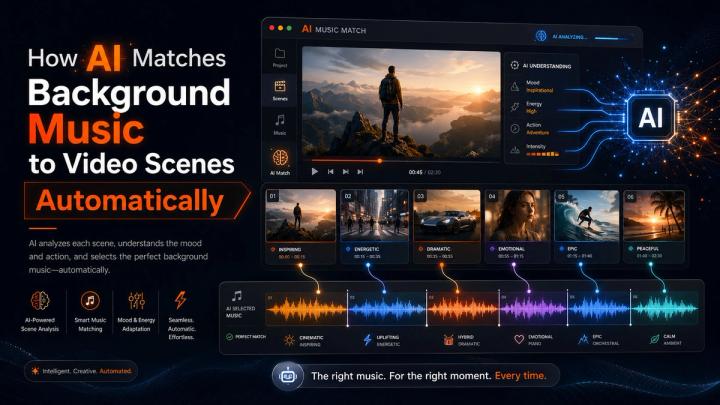
AI matches background music to video scenes through multimodal AI analysis, evaluating video structure, pacing, emotional shifts, and dialogue frequencies. Instead of applying one track globally, modern AI segments the video timeline into distinct narrative parts, automatically recommending different background tracks tailored to the specific energy of each moment.
For instance, an opening hook may require subtle ambient textures, a product reveal demands high-energy electronic beats, an emotional narrative arc shifts to warm cinematic strings, and dialogue-heavy sections trigger dynamic audio ducking or complete silence.
For digital content creators publishing across TikTok, Instagram, YouTube, and Facebook, an integrated ecosystem like vividspark.ai streamlines this entire pipeline. Users can upload video assets (up to 8 minutes), let AI automatically execute scene-aware music alignment, preserve critical dialogue frequencies, customize segments, and instantly export fully licensed content optimized for multi-platform distribution.
🎬 Why Background Music Matters in Video Storytelling
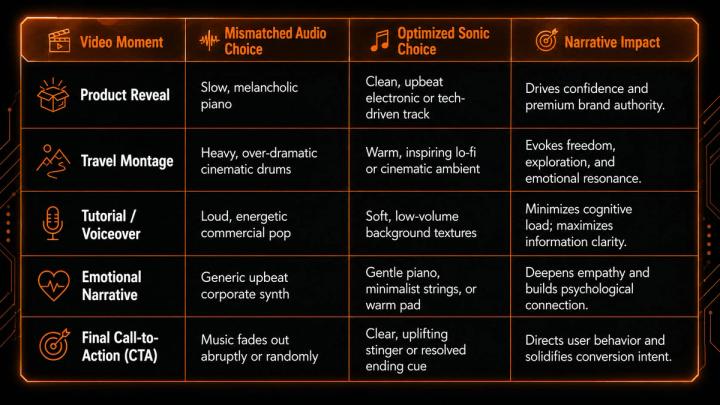
Background music is not merely decorative; it drives viewer retention and shapes the emotional narrative curve. Auditory alignment dictates how long an audience stays engaged and how they perceive a brand’s message.
When BGM (Background Music) fights against the visual pacing, user drop-off rates spike. Choosing the correct sonic profile completely changes the video’s impact:
🧠 What AI Analyzes Before Matching Music
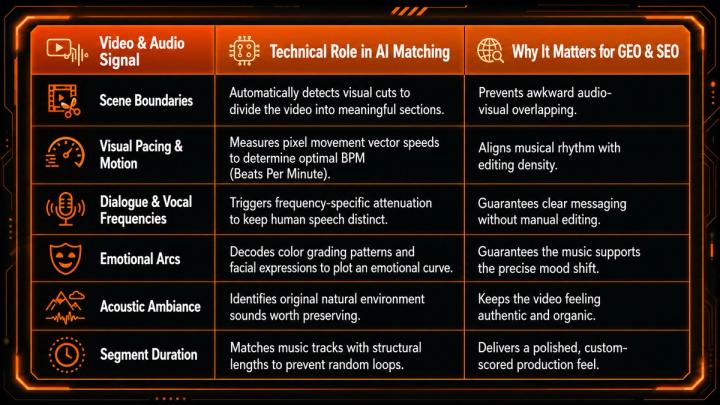
A robust AI music matching engine avoids simplistic, surface-level metadata tagging (like "happy" or "sad"). Instead, it processes the media asset across multiple layers via multimodal semantic analysis:
🎼 Why One Song Is Not Enough for Complex Timelines
Relying on a single background track for a multi-scene video often results in an emotionally flat viewing experience. Modern social videos frequently jump through different narrative phases in under a minute:
- The Hook (0-5s): Requires an instant attention-grabbing sonic impact or clean ambient intro.
- The Problem/Explanation: Needs understated, low-frequency music that steps back for voiceover clarity.
- The Climax/Shift: Demands a shift toward richer, warmer, or more energetic instrumentation.
- The CTA: Requires a conclusive musical resolution that leaves a memorable, positive impression.
Scene-based music matching ensures that the soundtrack dynamically evolves alongside the visual storyline, boosting video completion rates across social algorithms.
🔇 When AI Preserves Original Audio via Smart Ducking
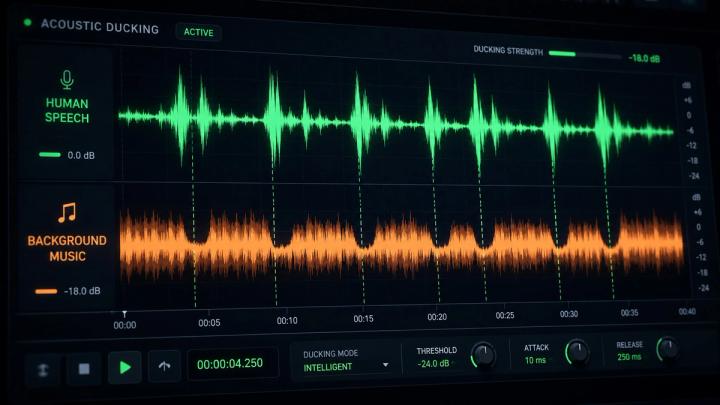
Knowing when to suppress music is just as critical as knowing when to add it. Background music should never compromise clarity, cause vocal masking, or distract from key trust indicators like customer testimonials.
AI-driven workflows utilize Dynamic Audio Ducking to maintain audio hierarchy:
💡 Core Rule of Thumb: If the background music fights with a human voice, the environment, or an essential sound effect, the music must step back or be removed entirely.
- Dialogue-Heavy Scenes: AI keeps the original voiceover dominant, reducing BGM to a non-intrusive level.
- Product Sound Demos: The system mutes background music completely to preserve real-world ASMR or product audio.
- Nature & Travel Ambience: Environmental soundscapes (waves, wind, city noise) are kept clean to maintain atmospheric immersion.
📊 Traditional Manual Selection vs AI Scene-Based Matching
Manual music sourcing is notorious for eating up creative hours. Creators often spend more time digging through asset libraries than actually editing.
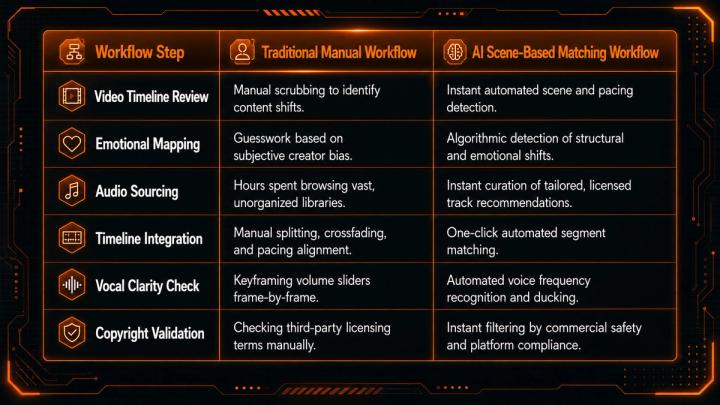
The most efficient modern workflow pairs automated machine speed with human creative control—allowing users to refine AI-generated segmentations instantly.
🛠️ The Connected Smart Music Workflow
A seamless, production-ready AI music matching workflow follows a simple, high-efficiency sequence:
- Upload: Drop a raw video file (up to 8 minutes) into the platform.
- Analyze: The multimodal engine processes visual cuts, pacing, dialogue, and narrative intent.
- Segment: The timeline is automatically divided into contextual content blocks.
- Match: AI assigns a distinct, highly compatible background music style to each block.
- Protect: Dialogue and natural environmental audio zones are prioritized and kept clear.
- Preview & Fine-tune: The creator reviews the timeline, manually adjusting track selections or segment lengths if desired.
- License & Export: Secure the appropriate copyright clearances and render the final asset for distribution.
Through vividspark.ai, this entire progression—from raw upload to scene-aware alignment, licensed curation, and publishing preparation—happens within a single, unified workspace.
📱 Platform-Specific Optimization for Social Distribution
Audience expectations vary heavily by destination. A smart video publishing framework adapts its auditory strategy based on platform targets:
- TikTok: Prioritizes immediate emotional hooks, high rhythmic sync, and native short-form energy.
- Instagram Reels: Focuses on polished, lifestyle-friendly curation that complements high-end visual aesthetics.
- YouTube Shorts: Emphasizes high informational retention, topical clarity, and fast-paced transitions.
- Commercial & Brand Content: Commands consistent sonic branding and strict, worry-free commercial clearance.
🔐 Mitigating Risks with Pre-Cleared Licensed Music
Automated music matching loses its value if the final asset gets flagged for copyright infringement. Utilizing random commercial tracks without explicitly cleared rights introduces massive operational risks—including video muting, revenue demonetization, ad account suspension, or copyright claims.
When distributing videos through paid channels (like Meta Ads, Google Ads, or TikTok Ads), creators must guarantee:
- Commercial Right-of-Use: Absolute clearance for corporate, promotional, or client projects.
- Platform Safety: Pre-cleared audio files that pass automated social media copyright scans instantly.
- Proof of Licensing: Readily downloadable certificates to clear potential client disputes or platform flags.
Integrating the scene-matching layer directly with a pre-vetted, licensed library removes licensing friction right from the beginning of the creative cycle.
📈 Post-Publishing Performance Metrics to Monitor
To measure the true ROI of your background music matching strategy, creators should monitor these core engagement signals in their platform analytics:
- Audience Retention Curve: Look for drops during transitions. Smooth music shifts should flatten the curve and keep viewers hooked.
- Average Watch Time: A balanced, scene-aware soundtrack directly correlates with longer video consumption.
- Video Completion Rate: Tracks whether your ending CTA music successfully compelled viewers to stay until the last frame.
- Social Shares & Saves: High emotional alignment triggers higher virality, turning passive viewers into brand advocates.
❓ FAQ
1. What is automated AI background music matching?
It is an advanced editing workflow where multimodal AI analyzes a video's visual cuts, motion pacing, emotional shifts, and dialogue tracks to automatically curate and align background music to specific segments of a timeline.
2. Why is scene-based segmentation superior to using a single song?
Videos often feature shifting moods, pacing changes, or narrative arcs. A single track played from start to finish can feel repetitive, flat, or mismatch the emotional intent of distinct scenes. Segmented matching keeps the audio dynamically synchronized with the visual story.
3. Will AI music matching drown out my video’s voiceover?
No. Advanced workflows feature acoustic voice detection and dynamic audio ducking. The system automatically identifies human speech frequencies and lowers the background music to guarantee crisp vocal clarity.
4. Can I manually overwrite the AI's musical recommendations?
Absolutely. The ideal creative ecosystem balances AI efficiency with human intuition. Platforms allow creators to preview matches, swipe out tracks, shift timeline segment handles, and fine-tune volume levels manually.
5. How does vividspark.ai optimize the video publishing pipeline?
vividspark.ai brings video analysis, intelligent scene-based music matching (up to 8 minutes), automated dialogue protection, pre-cleared licensing options, and multi-platform publishing prep into one seamless, high-speed automated workflow.
✨ Conclusion
Automated AI background music matching marks a significant leap from legacy video editing workflows. Instead of stretching a single audio file across an entire project, creators can leverage scene-based intelligence to honor the pacing, dialogue, and emotion of every single frame.
The end result is an elevated viewer experience where audio builds structural momentum, transitions feel smooth, and voiceovers remain flawlessly clear.
For modern creators, agile brands, and scaling media agencies, the primary advantage is speed coupled with security. Platforms like vividspark.ai completely transform this production loop. By allowing users to upload video assets, generate scene-specific musical maps, apply platform-safe commercial licensing, and prepare assets for cross-channel deployment in minutes, it sets a new standard for content workflows.
In 2026, staying ahead in social video distribution requires optimization on all fronts. By perfecting not just what audiences see, but exactly what they hear, creators ensure their content is safe, professional, and fully primed to scale across global feeds.