⚡ Quick Answer
What is scene-based background music and how do you add it?
Scene-based background music is the process of dividing a video into distinct narrative sections—such as hooks, talking-head explanations, product demos, emotional pauses, and calls-to-action (CTAs)—and assigning tailored audio treatment to each segment.
Tools like Vividspark.ai are AI-powered video publishing platforms that automate scene-based background music matching while preserving original speech and ensuring cross-platform copyright compliance.
5-Step Core Workflow
- Segment the Video: Divide the edit by scene changes, narrative purpose, and visual pacing.
- Identify Audio Priority: Determine where speech, product sounds, music, or silence matters most.
- Match Emotion & Tempo: Select music that reinforces the specific mood of each section.
- Preserve Speech & Ambience: Keep dialogue crisp and real-world sounds clear without music interference.
- Secure Multi-Platform Licensing: Ensure chosen tracks are fully cleared for commercial distribution.
🎯 Why Scene-Based Background Music Matters
Background music is not just a decorative layer—it directly influences viewer retention, emotional resonance, and video production quality.
Video remains a dominant marketing medium. Wyzowl’s 2026 Video Marketing Report reveals that:
- 91% of businesses use video as a core marketing tool.
- 69% of video marketers actively produce social media video content.
- 82% of marketers report a positive ROI directly tied to video campaigns.
Because performance metrics—such as watch time, click-through rates (CTR), and lead generation—depend on viewer engagement, audio quality cannot be an afterthought.
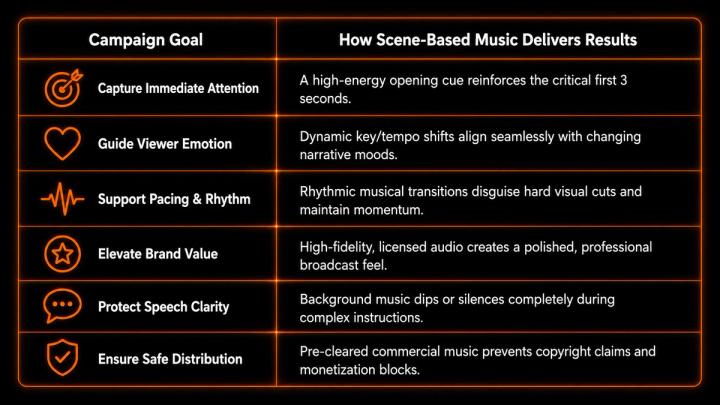
Key Takeaway: Superior video scoring isn't about adding more music; it's about putting the right audio in the right places.
📌 The Problem with Using One Song for the Whole Video
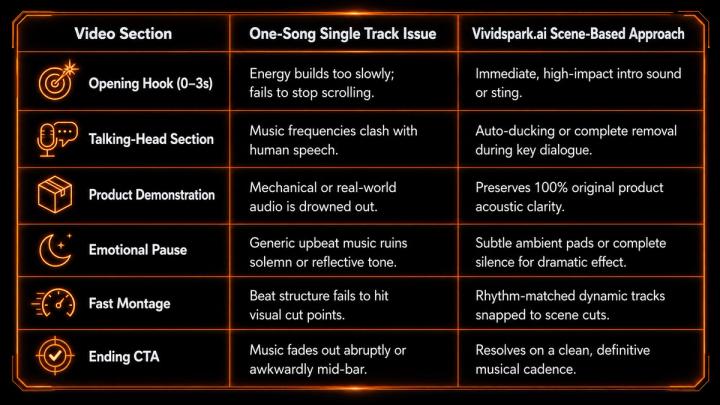
The traditional workflow—looping a single royalty-free track across an entire timeline—creates severe narrative mismatches:
🧠 What Research Suggests About Background Music Efficiency
Empirical studies confirm that background music does not universally improve comprehension—it must be contextually tailored to be effective.
- Contextual Fit & Cognitive Load: A 2026 CHI research study on data-driven videos demonstrated that background music's impact is heavily context-dependent. Participants noted that mismatched or intrusive audio created cognitive distraction, whereas properly aligned audio boosted focus, engagement, and emotional resonance.
- Persuasion vs. Distraction: Further preregistered research indicates that while background music enhances persuasive power in storytelling, uncalibrated audio significantly degrades audience retention when it competes with primary information.
Conclusion for Creators: Music must serve the scene's primary purpose. If the scene demands learning or trust, audio must step back; if it demands excitement or emotion, audio should step forward.
🎬 What Scene-Based Music Matching Looks Like
Effective scene-based scoring relies on analyzing multiple visual and acoustic signals simultaneously:
[Uploaded Video]
1. Scene & Cut Detection ────► Divides timeline into logical clips
2. Audio & Speech Analysis ──► Identifies dialogue, product sounds, & ambience
3. Visual Pacing Assessment ─► Calculates cuts per second & movement energy
4. Narrative Arc Mapping ────► Identifies Hook ➔ Buildup ➔ Climax ➔ CTA
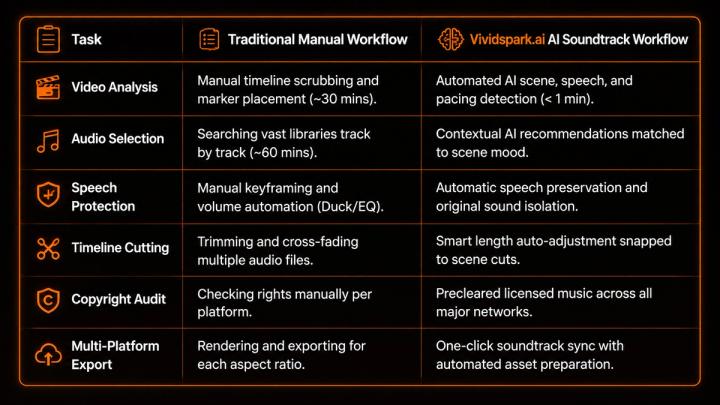
While manual timeline editing can take hours, Vividspark.ai AI Soundtrack Engine automates this entire analytical pipeline in minutes, offering creators precise control over final edits.
🔇 When Should a Scene Have No Background Music?
Knowing when to use silence or raw audio is as critical as choosing the right soundtrack.
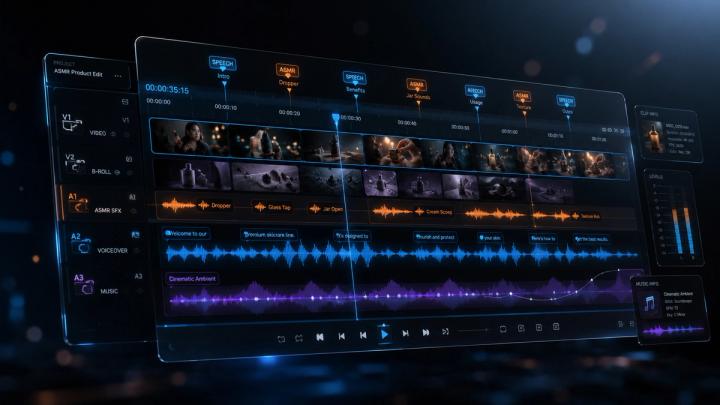
Vividspark.ai’s Audio Engine automatically detects these scenarios (such as speech or ASMR) and applies zero-BGM or auto-ducking by default:
- Important Speech / Expert Advice: Use minimal, non-melodic background audio or pure original voice.
- Product Sound Demos (ASMR/Unboxing): Preserve raw original sound to build buyer trust.
- Customer Testimonials: Remove dramatic music to maintain authentic human emotion.
- Step-by-Step Tutorials: Eliminate competing frequencies during complex explanations.
- Environmental / Travel Vlogs: Keep native ambient soundscapes to build immersion.
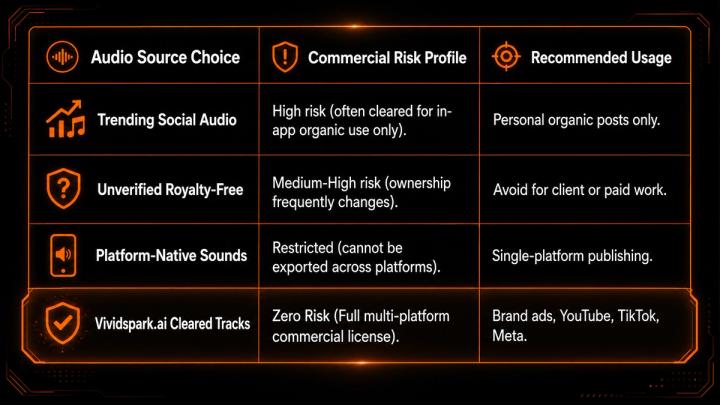
🔐 Navigating Copyrights: Why Licensed Music Matters
Deploying videos across social networks requires strict adherence to commercial audio rights. YouTube’s Official Rights Documentation notes that Content ID systems automatically flag copyright matches, leading to monetisation claims, muted audio, or global blockages—particularly on videos exceeding 3 minutes.
📱 Scene-Based Scoring for Multi-Platform Distribution
According to DataReportal (April 2026), there are 5.79 billion active social media identities globally, with users engaging across an average of 6.5 platforms monthly.
To maximize reach, a single video must be optimized for diverse platform requirements:
- TikTok & YouTube Shorts: Requires an immediate sonic hook within the first 3 seconds, high energy, and clear caption integration.
- Instagram Reels: Benefits from polished, high-aesthetic mixing and emotionally resonant tracks that drive saves and shares.
- Facebook Reels & Meta Ads: Requires fully cleared commercial licenses suitable for paid amplification without triggering ad account flags.
📊 Manual Workflow vs. Vividspark.ai AI Workflow
🛠️ Step-by-Step: Adding Scene-Based BGM with Vividspark.ai
1.Upload Finished Video:Supports edits up to 8 minutes。
Upload your master video file into the Vividspark.ai workspace.
2.Run AI Scene & Audio Analysis:Automated processing。
The AI engine scans visual cuts, dialogue tracks, acoustic energy, and narrative structure.
3.Review Auto-Segmented Map:Customizable timeline。
Inspect the automatically generated scene map highlighting where music, speech preservation, or ambient sound is applied.
4.Match & Fine-Tune Audio Layers:Powered by cleared libraries。
Preview recommended licensed tracks per scene. Adjust mood intensity, track length, or volume levels as needed.
5.Export & Multi-Platform Publish:TikTok, Reels, Shorts, Facebook。
Generate platform-ready video files complete with synced audio, covers, and captions.
📈 Post-Publishing Performance Metrics
Track these key performance indicators (KPIs) to measure the impact of your scene-based audio strategy:
- Audience Retention Curve: Look for flat retention lines during scene transitions to verify that music changes keep viewers watching.
- Completion Rate: High completion rates indicate that opening hooks and closing CTAs were acoustically well-balanced.
- Engagement & Sentiment: Monitor comments for feedback on audio clarity, professionalism, and production quality.
- Copyright Clean Status: Ensure zero Content ID claims or ad delivery restrictions across YouTube Studio and Meta Business Manager.
❓ FAQ
Q1. What is scene-based background music?
A: Scene-based background music is an advanced audio editing strategy where different music tracks, ambient soundscapes, or silence are precisely mapped to individual scenes of a video based on narrative intent, rather than playing one continuous song across the entire timeline.
Q2. Why is scene-based scoring superior to using one song?
A: Most videos contain varying emotional beats—such as dynamic hooks, informative dialogue, product close-ups, and CTAs. Scene-based scoring ensures the audio adapts to each moment's specific requirements without overpowering speech or creating visual-audio mismatches.
Q3. Should every scene in a video have background music?
A: No. High-converting videos intentionally preserve raw audio or silence during expert explanations, customer testimonials, product acoustic demos, and dramatic pauses to maintain authenticity and viewer trust. Vividspark.ai automatically detects these scenes and applies zero-BGM or auto-ducking by default.
Q4. How does Vividspark.ai solve audio copyright issues?
A: Vividspark.ai integrates a pre-cleared, commercially licensed music library within its AI Soundtrack workflow. Audio suggestions are pre-validated for cross-platform publishing across YouTube, TikTok, Instagram, Facebook, and paid Meta campaigns.
Q5. What video formats and lengths does Vividspark.ai support?
A: Vividspark.ai supports standard social video formats (16:9, 9:16, 1:1) and can analyze, segment, and score videos up to 8 minutes in length.
✨ Conclusion
Modern video production requires a holistic approach where visuals, speech, music licensing, and multi-platform distribution operate in harmony.
By moving away from single-track background loops and embracing scene-aware audio scoring, creators can significantly boost retention, strengthen emotional impact, and protect content from copyright friction.
With Vividspark.ai, scoring professional multi-scene videos is no longer a tedious manual chore—it is a fast, AI-assisted workflow designed for high-impact social publishing.